







Facebook is a leading social networking platform that connects people globally. It allows users to explore interests, connect with communities, and share their world in unique ways.
The app offers powerful features like Marketplace for shopping, Meta AI for instant answers, personalized Feed curation, and creative tools for content creation. These capabilities enable users to engage meaningfully while maintaining control over their social experience.
Whether you're looking to expand your professional network, find rare collectibles, or simply stay connected with friends, Facebook provides the tools to make it happen efficiently and creatively.
Facebook stands out with its comprehensive feature set designed for modern social interactions. The Marketplace function lets users discover unique items while Meta AI provides instant information access.
Content creation tools include advanced editing options for reels, AI-powered image generation, and story creation features. The platform also offers granular privacy controls, allowing users to customize their sharing preferences and connection levels.
Communication features are robust, supporting video/voice calls, private messaging, and group interactions. The personalized Feed algorithm ensures users see relevant content while providing options to refine their viewing experience.
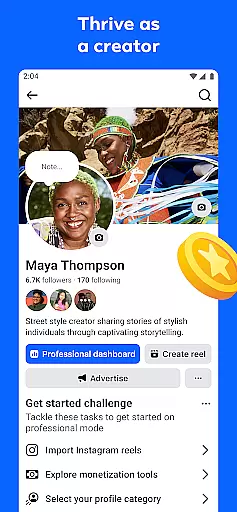
User profile customization is a crucial aspect of any social platform, allowing individuals to express their identity and preferences. Facebook offers extensive options for users to personalize their profiles, from choosing profile pictures and cover photos to detailed 'About' sections.
The platform ensures authenticity through its verification processes. Users can verify their accounts via phone numbers or email addresses, adding a layer of security and trustworthiness to their profiles. This verification helps prevent fake accounts and enhances the overall community experience.
By customizing their profiles, users can control how they present themselves to others. They can highlight their interests, showcase their achievements, and share their life stories. This personal touch makes interactions more meaningful and fosters genuine connections.
Moreover, Facebook's privacy settings allow users to manage who sees their information, giving them control over their digital footprint. This combination of customization and verification creates a safer and more engaging environment for all users.
Connection discovery is an essential feature that enables users to find and connect with others who share similar interests or backgrounds. On Facebook, this process is facilitated through various tools and algorithms designed to suggest relevant connections.
The platform analyzes user activity, such as groups joined, pages liked, and interactions made, to recommend potential friends and communities. These suggestions are based on mutual friends, shared interests, and common activities, ensuring that users are introduced to people who are likely to be relevant to them.
Facebook also provides search functionalities that allow users to look for specific individuals or groups. Whether reconnecting with old friends or finding new communities, these tools make it easier to expand one's network and engage with diverse perspectives.
Ultimately, connection discovery on Facebook enhances the social experience by helping users build meaningful relationships and participate in vibrant communities, enriching their online presence and real-world interactions.
User-friendly interface
Extensive features
Global connectivity
Privacy controls
Creative tools
Complex settings
Regional restrictions
Ad-heavy experience
Battery consumption
Learning curve

Swipe, Meet & Chat Real People
 3.80
3.80
Live video chat to connect with people around the world. Video chatting on Olive
4.40
Watch super live shows 24/7, chat & meet friends in Plamfy social networking app
4.70
Discover an open-minded dating experience when you download today
4.10
Chill and Chat with Tagged Live Video with millions of peeps
4.10
Random chat & meet online. Find your soulmate or someone special and have fun!
3.90
live inside your fandom
4.60
Live Chat & Match! Explore Real-Time Dating and Make Friends!
4.40
This version of Facebook uses less data and works in all network conditions.
4.60
Get notifications of FREE Stuff for Nextdoor, Letgo, offerup & TrashNothing
4.70
Social calendar for friends to make plans, group chat, share events & schedules
4.60
Dating & make friend to chat, meet, flirt, and make real connections!
4.60
A video app from OpenAI - AI video generation by the maker of ChatGPT
4.60
Unlimited calls & texts | WiFi voice line plus group txt | Call & text now
4.50
Meet Strangers Online, Live Video Chat & Make Random Video Calls on Joi!
4.30
Positive social
4.20
Honest dating app where real people find genuine love and real matches.
4.20
Meet local people, make friends & network: Join a community, group, host events
4.00
Meet online & chat with people! Talk, have fun, make connections in real time!
4.00


User Reviews