
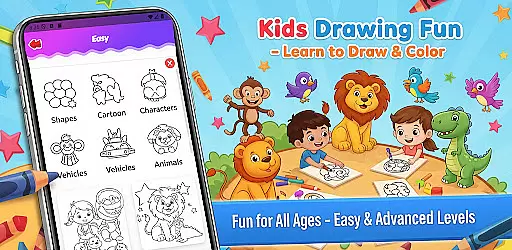
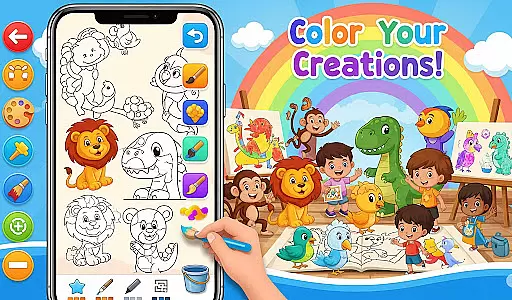
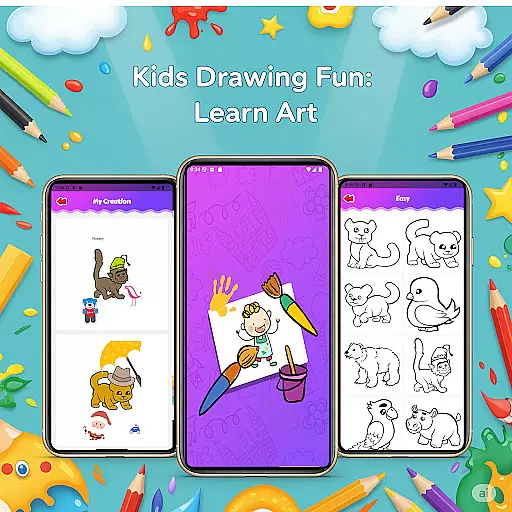
Fun Drawing & Color: Learn Art is an innovative educational app designed to make drawing and coloring both fun and instructional. This app caters to users of all skill levels, from beginners learning the basics to experienced artists seeking creative expression. With its ad-free interface and comprehensive features, it provides a seamless experience for artistic exploration.
The app offers step-by-step drawing guides that break down complex images into simple shapes, making it easy for users to follow along. It also includes a variety of creative tools such as vibrant coloring options, customizable brushes, text styles, and decorative stickers. These features ensure that every piece of art can be personalized and unique. Additionally, users can save their work in a personal gallery, allowing them to revisit and refine their creations anytime.
Whether you're using a smartphone or tablet, Fun Drawing & Color: Learn Art delivers a smooth performance across all Android devices. Its kid-friendly design and multiple skill-level activities make it ideal for both children and adults who want to develop their artistic abilities while enjoying a colorful and engaging experience.
Fun Drawing & Color: Learn Art stands out with its rich set of features tailored to enhance creativity and learning. One of the key highlights is the step-by-step drawing guide, which simplifies the process of creating various objects, animals, vehicles, and characters by breaking them into manageable steps. This feature is particularly beneficial for beginners who need structured guidance.
In addition to the drawing lessons, the app provides a wide array of customization tools. Users can experiment with different brush types, pencil colors, and magic brushes to bring their artwork to life. The color fill tool and extensive palette allow for effortless shading and coloring of large areas, while the option to add playful stickers and stylized text further enhances the creative possibilities. The inclusion of erase, undo, and redo functions ensures that mistakes can be easily corrected without frustration.
Another standout feature is the personal gallery where all drawings are automatically saved. This allows users to track their progress over time and revisit previous works for editing or inspiration. With compatibility across both phones and tablets, this app ensures a consistent and high-quality experience regardless of the device used.
In the realm of educational drawing apps, content authority and curriculum alignment are crucial for ensuring that learning is both accurate and structured. Fun Drawing & Color: Learn Art positions itself as not just a creative outlet but also an authoritative source for art education.
The app offers step-by-step drawing guides that teach users how to draw various subjects using simple shapes. This method aligns with foundational art curricula, which often start with basic forms before progressing to more complex compositions. By providing lessons on animals, vehicles, objects, food, and characters, the app covers a broad spectrum of themes that are typically explored in art education.
Moreover, the availability of multiple skill levels from beginner to advanced ensures that users can progress at their own pace, mirroring the structure of formal art courses. This tiered approach supports curriculum alignment by offering increasingly challenging activities that correspond to different stages of learning.
By integrating these features, Fun Drawing & Color: Learn Art doesn't just entertain; it educates, making it a valuable tool for those seeking to learn art in a structured and authoritative manner.
Gamification has become an integral part of modern educational tools, enhancing engagement and motivation through game-like elements. Fun Drawing & Color: Learn Art incorporates gamification seamlessly into its learning framework, creating an engaging environment for users to acquire new skills.
One of the key gamification features is the use of playful stickers and fun fonts, which serve as rewards for completing drawings. These decorative elements encourage creativity while providing a sense of accomplishment. Users can personalize their artwork with text styles and colorful stickers, transforming each piece into a unique creation that reflects their progress and achievements.
The app's interface includes various brush types and a full color palette, allowing users to experiment with different artistic techniques. This freedom to explore and create fosters a sense of ownership over one's learning journey, a core principle of effective gamification. Additionally, the ability to save and revisit artwork in a personal gallery creates a portfolio of progress, further reinforcing the learning experience through reflection and pride in one's work.
By blending educational content with engaging gamification elements, Fun Drawing & Color: Learn Art successfully integrates learning with play, making the process of acquiring new skills both enjoyable and effective.
User-friendly interface
Wide range of tools
Step-by-step tutorials
Saved artwork gallery
No ads or subscriptions
Limited advanced tools
Fewer social sharing options
Basic font styles
Lessons only in English
No cloud backup

This will quickly become your kids' favorite animals game!
 4.40
4.40
Perfect for Dino fans of all ages.Vivid illustrations.Fascinating_Facts.Narrated
4.4
Pretend play in Pepi City: become a doctor or a patient. Our city, your stories!
4.30
Play the fun healthy habits game for kids with Cocobi the little dinosaurs.
3.40
Clean the messy house & play with cute kitty in this fun cleaning game for kids!
3.70
Animal games! Adopt virtual pet dog, cat & rabbit to create your pet world!
4.10
A cube building game for small (and large) builders.
4.40
Play pretend & explore at the doctor's & school in Daniel Tiger's Neighborhood.
3.30
3D school bus driving game for kids!
4.50
Epic battles, interactive quests and exotic pets. Learn math with Prodigy today!
4.70
Preschool learning games: 123 numbers game for kids, abc learning for toddlers
4.70
Play educational games for preschool toddlers—plus more to discover ►AdsFree◄
4.60
Explore, create, and play with Hello Kitty and all her friends!
4.60
Fun educational games for kids that teach number tracing, counting with modes!
4.50
Creative beauty & fashion
4.50
Fun educational game: Learn, imagine, create, draw and color!
4.20
Play the fun princess party game for kids with Cocobi the little dinosaurs.
4.10
Baby Phone Game for Kids & Toddlers to Learn Sounds, Numbers, ABCs, Phone Calls
3.80
Help your child improve their number literacy with Numberblocks: Card Fun!
2.60


User Reviews