

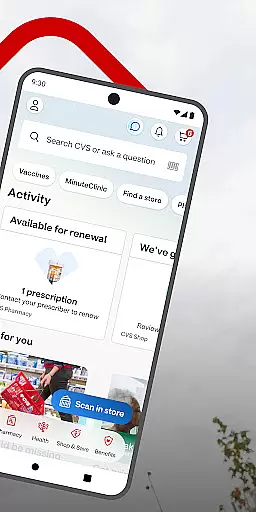
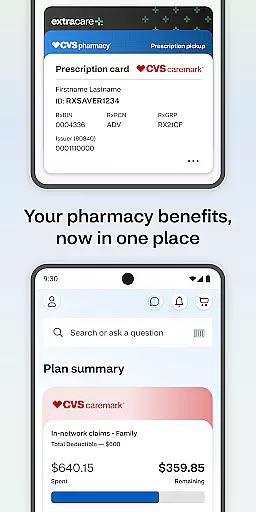
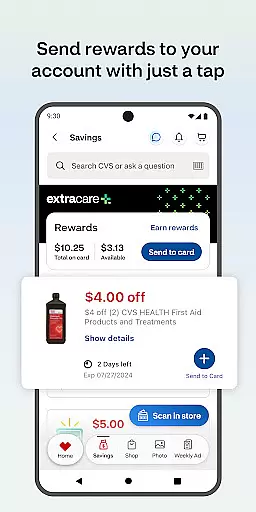
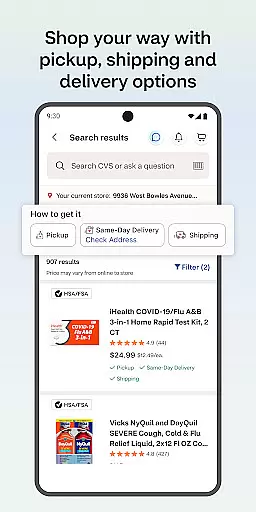
CVS Health is a comprehensive medical app designed to simplify healthcare and shopping experiences. The app serves as a one-stop solution for managing prescriptions, accessing exclusive deals, and scheduling health services. With features like ExtraCare® integration, users can save money while streamlining their shopping process.
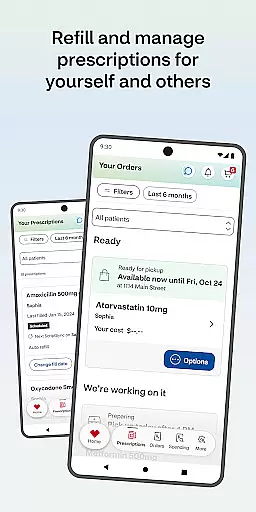
A key highlight of CVS Health is its ability to handle prescription management efficiently. Users can order refills, pay for medications, and even have them delivered. Additionally, the app provides important drug information and interactions, ensuring users are well-informed about their medications. This makes medication management safer and more convenient.
Beyond prescriptions, CVS Health offers easy access to healthcare services such as vaccine scheduling and virtual doctor consultations via video chat. These features ensure that users can conveniently manage not only their own health but also that of their families. The app's integration with local CVS Pharmacy® and MinuteClinic® locations further enhances accessibility to essential healthcare services.
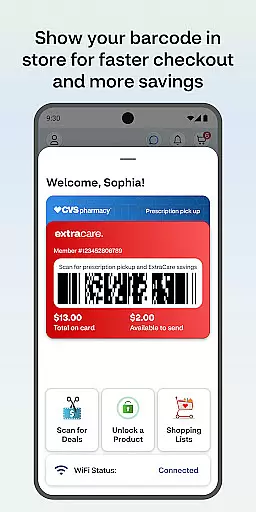
One of the standout features of CVS Health is its robust prescription management system. Users can scan barcodes for faster pharmacy pickups, pay directly through the app, and track their prescription history. The app also allows ordering refills and checking the status of current orders, making medication management seamless and efficient.
CVS Health goes beyond just prescriptions by offering various money-saving opportunities. By linking an ExtraCare® card, users gain access to exclusive app-only deals, coupons, and rewards. Real-time notifications ensure users never miss out on savings or important updates regarding their orders and prescriptions. Furthermore, the weekly ad feature helps users plan their shopping effectively.
The app also excels in providing accessible healthcare services. Users can schedule vaccines and medical care at nearby CVS Pharmacy® or MinuteClinic® locations. Virtual consultations via video chat offer round-the-clock access to healthcare providers. Additional functionalities include viewing wait times, finding nearby clinics, and checking insurance coverage, all contributing to a holistic healthcare management experience.
In the realm of digital health solutions, the credibility of medical content is paramount. The CVS Healthu00ae app ensures that all information provided is thoroughly vetted by healthcare professionals. This guarantees users access to reliable and accurate health data.
The app offers detailed drug interaction checks and medication information, which are crucial for patient safety. These features are developed in collaboration with pharmacists and medical experts, ensuring that users receive guidance that aligns with professional standards.
Furthermore, the ability to schedule vaccines and medical care through the app is backed by certified practitioners at CVS Pharmacyu00ae and MinuteClinicu00ae locations. This service connection provides assurance that the healthcare services promoted are credible and overseen by licensed professionals.
By integrating telehealth options like video consultations with healthcare providers available 24/7, the app extends its commitment to quality. Users can trust that these virtual consultations maintain the same level of expert review as in-person visits, safeguarding their health decisions.
Teleconsultations have become an essential aspect of modern healthcare, offering convenience without compromising on care quality. The CVS Healthu00ae app excels in providing high-quality teleconsultations, connecting users with healthcare providers through seamless video chats around the clock.
Each teleconsultation facilitated by the app adheres to rigorous medical standards. Healthcare providers available via the app are qualified professionals who deliver personalized advice and treatment plans, ensuring patients receive the same level of care they would expect from an in-person visit.
Moreover, the app's integration with local CVS Pharmacyu00ae and MinuteClinicu00ae services allows for a hybrid approach to healthcare. Users can transition smoothly from online consultations to in-person follow-ups or tests if needed, maintaining continuity of care.
With real-time updates and notifications about prescription statuses and health service availability, the app enhances the overall teleconsultation experience. This proactive communication ensures that users are always informed and engaged in their healthcare journey.
User-friendly interface
Comprehensive prescription management
Exclusive deals and savings
24/7 virtual healthcare access
Integrated local service options
Limited to CVS services
Background GPS usage
Requires constant updates
Occasional bugs reported
Android version restrictions

Adaptive-learning flashcards and quizzes for the Top 250 Drugs
 4.60
4.60
The NightOwl Companion app allows you to interact with the NightOwl sensor.
4.70
Donating blood and platelets is easier than ever with The American Red Cross.
4.80
An easy way to earn money donating plasma. Book a visit, sit back, and get paid.
3.80
Hearing aid app for Android solves your hearing problems.
4.00
Molina Members: My Molina. Manage your health anytime, anywhere!
4.30
A rapid reference for healthcare professionals caring for pediatric patients.
4.30
Donating plasma just got easier with the BioLife Plasma Services mobile app.
3.90
Online Doctors & Condition Management
4.40
Manage your healthcare through the FollowMyHealth® Universal Health Record.
4.80
Amplify surrounding sounds, conversations, TV or lectures for louder hearing.
4.70
Health Care at Your Fingertips
4.60
PPP provides quick offline access to over 350 field treatment protocols.
4.60
ASCCP Management Guidelines- There’s an app for that!
4.60
Control your hearing aids discreetly with the touch of a finger
4.30
Master AEMT with 1,400+ study items, TEIs, practice tests, and scoring.
4.10
Care Simplified by MyChart
3.40
The world's best selling 3D Human Anatomy app with groundbreaking 3D technology
2.00
A rapid reference for prehospital providers caring for pediatric patients.
4.1


User Reviews