
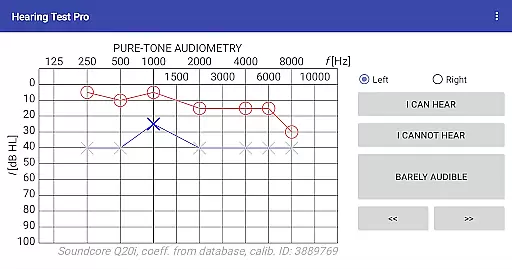
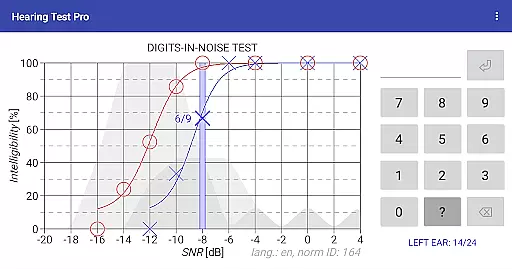
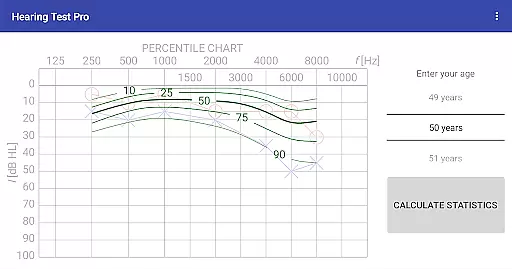
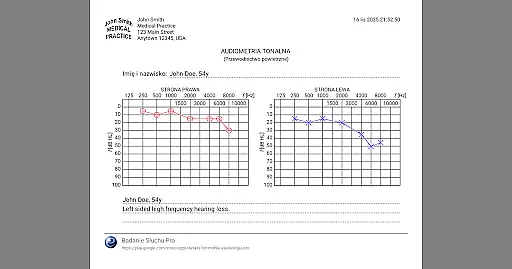
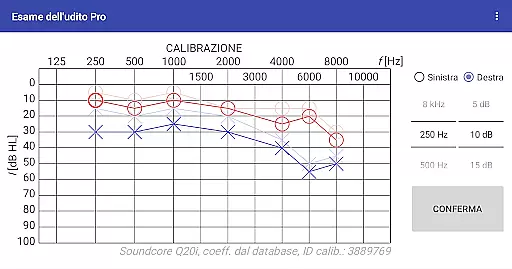
Hearing Test Pro is a comprehensive mobile solution designed for evaluating hearing capabilities through scientifically-backed methods. The app provides two primary testing options: pure-tone audiometry and the digits-in-noise test, both essential for assessing different aspects of auditory health. Pure-tone audiometry measures the quietest sounds detectable across various frequencies, offering insights into the degree of hearing loss. Meanwhile, the digits-in-noise test evaluates speech intelligibility by challenging users to recognize spoken numbers amidst background noise.
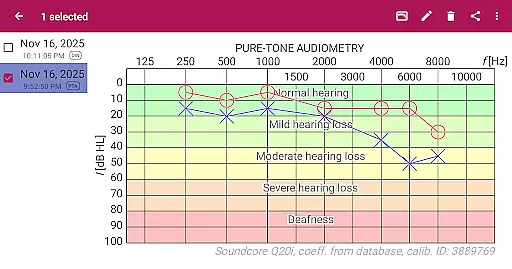
Designed with precision in mind, Hearing Test Pro includes advanced features such as high-frequency audiometry, classification of hearing loss, and comparison with age-related norms. These tools not only help identify potential hearing issues but also allow users to track their auditory health over time. Whether used by individuals monitoring their own hearing or professionals conducting assessments, this app delivers reliable results while maintaining ease of use.
The app's value extends beyond simple testing. With functionalities like result printing, note-taking, and calibration adjustments, it ensures accuracy and personalization. Additionally, the Pro version offers offline database access, cloud synchronization, and manual stimulus control, making it an indispensable tool for anyone serious about managing auditory health effectively.
Hearing Test Pro stands out due to its robust feature set tailored for thorough auditory evaluations. At its core, the app utilizes pure-tone audiometry, which determines the user's hearing threshold by identifying the faintest tones perceivable at different frequencies. This method is complemented by the digits-in-noise test, where users must discern spoken digits within noisy environments, providing a practical measure of speech intelligibility.
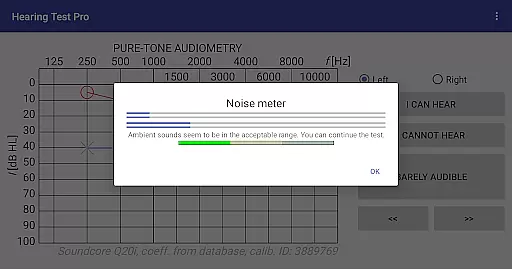
Beyond basic testing, the app incorporates several sophisticated tools. A built-in noise meter assesses ambient sound levels during tests, ensuring accurate readings. Device calibration allows customization based on specific headphone models or unique user conditions, enhancing reliability. Additional features include high-frequency audiometry for detecting subtle hearing changes, classification systems for categorizing hearing loss severity, and comparisons against normative data to contextualize individual results.
For professional users, the Pro version unlocks further capabilities. Local database storage enables offline access to test records without server connections, while synchronization services facilitate seamless data management across multiple devices. Manual stimulus control empowers clinicians to fine-tune test parameters dynamically, ensuring optimal assessment conditions tailored to each patient’s needs.
When it comes to medical applications, the credibility of content and expert review is paramount. Hearing Test Pro ensures that its offerings are firmly grounded in established audiological practices. The app provides two fundamental hearing assessments: pure-tone audiometry and the digits-in-noise test, both widely recognized in clinical settings for evaluating hearing acuity and speech intelligibility.
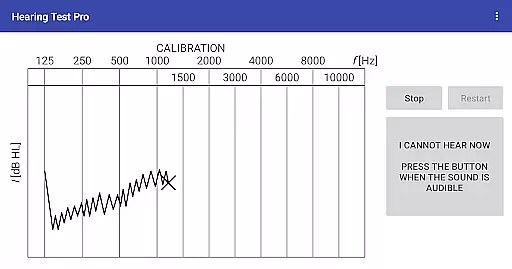
The pure-tone audiometry feature within Hearing Test Pro allows users to determine their hearing thresholds across various frequencies, a critical aspect of diagnosing and understanding hearing loss. By incorporating predefined calibration coefficients from a database, the app maintains accuracy akin to professional equipment. This attention to detail reassures users that the results they obtain are reliable and clinically relevant.
In addition to these core tests, the app offers high-frequency audiometry and classification of hearing loss, which further enhance its utility as a comprehensive tool for monitoring auditory health. With options like comparison with age-related norms and printing of test results, users can track their hearing status over time and share this information with healthcare providers. These features underscore the app's commitment to delivering credible and actionable medical insights.
While Hearing Test Pro does not offer teleconsultation services directly, it enhances the quality of remote consultations through precise diagnostic capabilities. The app equips users with detailed reports on their hearing abilities, generated through scientifically-backed testing methods such as pure-tone audiometry and the digits-in-noise test. These reports can be shared with audiologists or doctors during teleconsultations, ensuring that professionals have accurate data to make informed decisions about patient care.
The inclusion of advanced functionalities like device calibration and verification of calibration coefficients means that users can trust the measurements taken with the app. This reliability is crucial when discussing symptoms or treatment plans remotely, as it minimizes discrepancies caused by inaccurate self-assessment tools. Furthermore, the ability to adjust calibration based on clinical audiometer results adds another layer of precision to the diagnostic process.
For those utilizing telemedicine services, having access to a local database and cloud synchronization features in the Pro version ensures that historical data is readily available for review. This continuity supports ongoing management of auditory health, allowing clinicians to monitor changes over time effectively. Thus, while not a teleconsultation platform itself, Hearing Test Pro significantly contributes to the quality of virtual healthcare interactions by providing dependable diagnostic information.
Comprehensive hearing tests
Advanced calibration options
Offline database access
Cloud synchronization
Manual stimulus control
Premium features require payment
Complex setup for beginners
Limited free version functionality
Requires careful calibration
Background noise affects accuracy

Leafly is a weed app for finding dispensaries, cannabis strains, & more.
 4.70
4.70
A fantastic 3d reference that includes over 300 structures and a quiz function.
3.00
The Omada app enhances your program experience and helps you stay engaged.
4.50
Get your lab results on your smartphone with MyQuest.
4.40
Download OctaApp for easy access to your plasma donation info
4.40
The Client Portal app empowers you to manage care from one secure place
4.10
Anthem/Wellpoint and other health insurance plans
4.60
Continuous Glucose Monitoring
3.40
Get Rx fast at the pharmacy, schedule health care, and shop ExtraCare savings.
3.30
myVCA is your tailor-made guide to raising a healthy and happy pet.
4.90
Live vet support by text/video
4.80
Search by insurance, see real-time openings & verified reviews, get care fast.
4.80
Pelvic Floor Muscle Exercises
4.80
Behavioral Health Portal
4.70
The MDLIVE app makes connecting with a doctor fast, easy, and convenient.
4.60
The official DSM-5-TR® app
4.50
Good for You. Great for Life.
4.00
The world's best selling 3D Human Anatomy app with groundbreaking 3D technology
2.00
OKN Strips, OptoDrum, OKN
4.1


User Reviews