
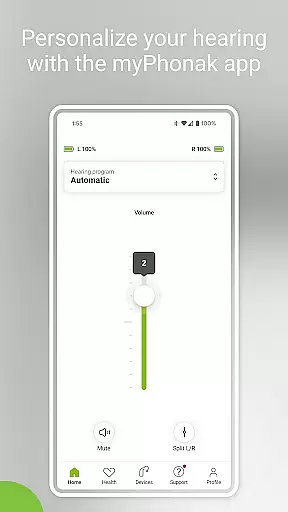
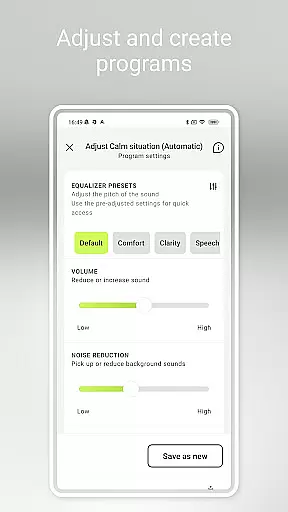
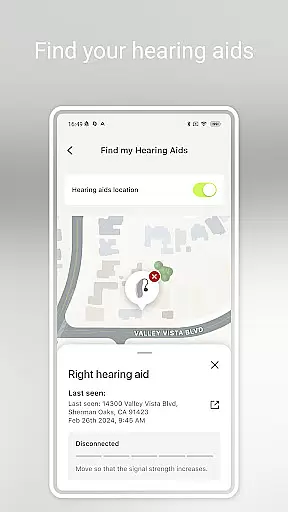
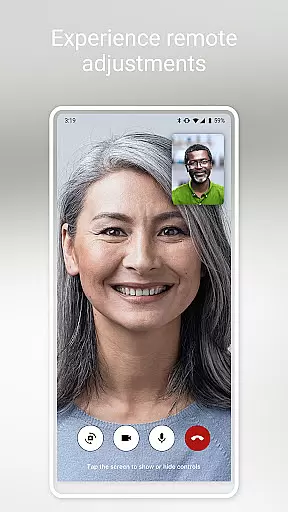
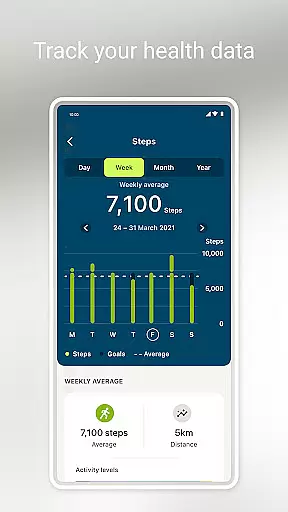
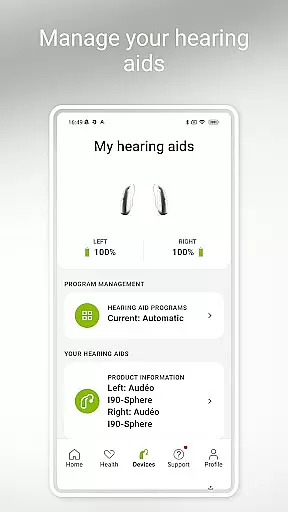
myPhonak is a comprehensive mobile application designed for users of Phonak hearing aids, offering an array of features to enhance the hearing experience. The app provides remote control functionalities, allowing users to adjust volume, noise reduction, microphone directionality, and equalizer settings with ease. It also supports remote appointments with hearing care professionals through live video calls for device adjustments. Additionally, myPhonak integrates health tracking features such as step counting, activity levels, heart rate monitoring, and more, tailored specifically for compatible devices.
This application bridges the gap between advanced hearing aid technology and daily user needs by providing personalized controls and health insights. Compatible with various Phonak hearing aids that have Bluetooth connectivity, myPhonak ensures a seamless connection between your hearing aids and smartphone. Whether you're managing day-to-day hearing preferences or tracking health metrics, myPhonak delivers a personalized and convenient solution to improve overall quality of life.
myPhonak boasts a variety of sophisticated features designed to provide users with complete control over their hearing aids and personal health data. One of its standout features is the Remote Control functionality, which allows users to modify hearing aid settings such as volume, noise reduction, and microphone directionality effortlessly. This feature caters to different listening environments, ensuring optimal sound quality at all times. Furthermore, the app includes an equalizer with presets like default, comfort, clarity, and softer, enabling quick sound adjustments, while sliders offer more granular control over bass, middle, and treble.
In addition to device management, myPhonak offers Remote Support, facilitating virtual appointments with hearing care professionals who can adjust hearing aids remotely. The Health section is another highlight, featuring step tracking, wearing time, activity levels, heart rate monitoring, and distance tracking, depending on the device's compatibility. Users can also configure Tap Control, set up cleaning reminders, and monitor battery levels and connection statuses. These features collectively ensure that users not only manage their hearing health effectively but also maintain an active lifestyle with real-time health insights.
In the realm of medical applications, content credibility is paramount. myPhonak stands out by offering features that are not only innovative but also grounded in expert-reviewed science. The app provides users with access to advanced hearing controls and personalization options for Phonak hearing aids, which have been developed under stringent medical standards.
Every functionality within myPhonak, from Remote Control to Health tracking features, is designed with the oversight of hearing care professionals. This ensures that users receive advice and adjustments that align with current medical knowledge and practices. For instance, the Remote Support feature allows users to consult with their hearing care professional via live video calls, ensuring personalized care and expert guidance.
The app's compatibility with various Phonak hearing aids further underscores its credibility. Each supported device has undergone rigorous testing and validation processes to meet medical-grade requirements. Users can trust that the health data tracked by myPhonak, such as steps and heart rate, are reliable and can be used in consultations with healthcare providers.
Teleconsultation has become an essential aspect of modern healthcare, and myPhonak excels in providing high-quality remote support. Through the Remote Support feature, users can engage in live video calls with their hearing care professionals, ensuring they receive timely and expert advice without the need for physical appointments.
This teleconsultation service is particularly beneficial for individuals who require frequent adjustments or consultations. By using myPhonak, users can discuss their hearing aid settings and get real-time adjustments, enhancing their overall hearing experience. The ability to connect with professionals remotely also means that users can maintain consistent communication with their healthcare providers, leading to better continuity of care.
Moreover, the integration of teleconsultation within myPhonak reflects a commitment to leveraging technology for improved healthcare accessibility. Users can be confident that the advice and adjustments received through the app are performed by qualified professionals, ensuring that their hearing health is managed effectively and efficiently.
User-friendly interface
Comprehensive hearing controls
Remote professional support
Health tracking integration
Wide device compatibility
Limited to Phonak devices
Advanced features need specific models
iOS version required is high
Health features are model-specific
Bluetooth connectivity essential

Leafly is a weed app for finding dispensaries, cannabis strains, & more.
 4.70
4.70
Patient Health Portal
4.20
Download the PulsePoint app and use your CPR skills to save a life!
4.60
A rapid reference for prehospital providers caring for pediatric patients.
4.0
The Better Pharmacy Experience
4.90
Log your symptoms in the MyZio app — the perfect companion to the Zio monitor!
4.60
Take on apraxia and aphasia with a powerful video-driven speech therapy app.
4.60
PPP provides quick offline access to over 350 field treatment protocols.
4.60
Manage your health care in one easy place
4.40
Want to make it easier to manage your health? We’re with you, wherever you are.
4.70
Save up to 80% on your pharmacy prescriptions & medications with free Rx coupons
4.70
Discover the source of pain with Muscle Trigger Point Anatomy.
4.70
Adaptive-learning flashcards and quizzes for the Top 250 Drugs
4.60
Blue Cross and Blue Shield of Texas member information
4.60
The MDLIVE app makes connecting with a doctor fast, easy, and convenient.
4.60
Enjoy 200%+ volume booster with bass booster, equalizer and headphone supported.
4.60
Identify pills, search different drugs, get drug information and much more!
4.50
Voice pitch monitor for speech therapy, LSVT, Parkinson's, singing & trans
4.30
A scientifically-proven method to help people with dementia or memory impairment
4.3


User Reviews