
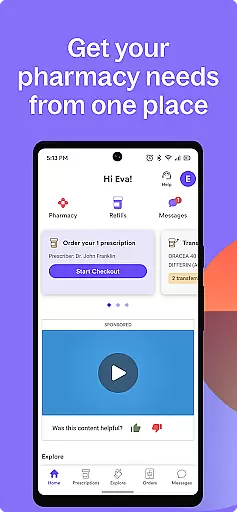
NimbleRx is a comprehensive prescription management app designed to simplify medication tracking and refilling. With its intuitive interface, users can effortlessly manage multiple prescriptions in one place, ensuring they never miss a dose. The app provides timely reminders for medication schedules and refill due dates, helping users maintain their health regimen.
One of NimbleRx's standout features is its flexible prescription delivery and pickup options. Users can choose to have medications delivered directly to their doorstep or schedule convenient pickups at their preferred pharmacy. This service eliminates the need to wait in long pharmacy lines. Additionally, the app prioritizes user privacy with advanced security measures, ensuring personal information and medication history are securely encrypted.
The app also helps users find the best prices for their medications, making healthcare more affordable. NimbleRx is suitable for individuals aged 12 and above, offering an accessible and user-friendly experience. By combining convenience, security, and cost-saving features, NimbleRx empowers users to take control of their health with peace of mind.
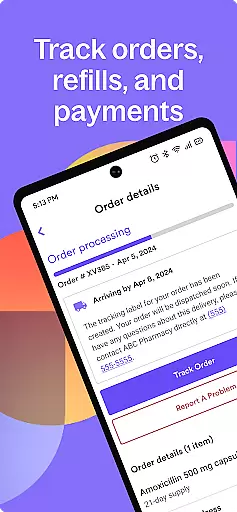
NimbleRx offers a robust set of features tailored to enhance prescription management. Its primary feature is the ability to manage all prescriptions through a single platform. Users can easily track their medications, view refill dates, and receive notifications when it's time to reorder. This ensures that users stay on top of their medication schedules without the hassle of manual tracking.
Another significant feature is the prescription delivery and pickup service. NimbleRx partners with local pharmacies to provide home delivery of medications, which is particularly beneficial for those with mobility issues or busy schedules. For users who prefer picking up their prescriptions, the app allows scheduling pickups at convenient times. These services save time and reduce stress associated with traditional pharmacy visits.
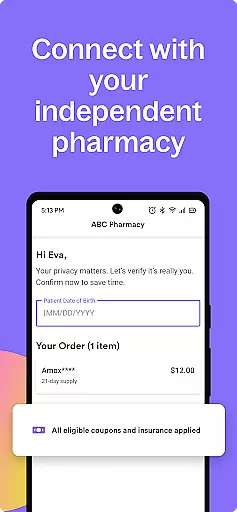
Security is a top priority for NimbleRx. The app employs state-of-the-art encryption to protect sensitive user data. Personal information and medication histories are stored securely, giving users peace of mind. Moreover, the app's user-friendly design makes navigation seamless, allowing users to access features like price comparison tools, which help them find the best deals on medications. Overall, NimbleRx combines functionality, convenience, and security to offer a superior prescription management experience.
In the realm of digital health solutions, the credibility of medical content is paramount. NimbleRx stands out by offering a reliable platform where users can access accurate and trustworthy information about their prescriptions. The app employs stringent verification processes to ensure that all medication details are sourced from reputable databases and cross-checked for accuracy.
Expert pharmacists and healthcare professionals regularly review and update the content within NimbleRx. This guarantees that users receive guidance and information that align with current medical standards and practices. Whether it's dosage instructions or potential drug interactions, you can trust that the advice provided has been vetted by experts in the field.
The value of this rigorous approach to content credibility is immense for users. It empowers them to make informed decisions regarding their health without second-guessing the reliability of the information. With NimbleRx, patients can adhere to their treatment plans confidently, knowing they have access to expert-reviewed content.
Teleconsultations have become an integral part of modern healthcare, providing convenience and accessibility. NimbleRx enhances this experience by ensuring high-quality teleconsultation services. Through partnerships with certified healthcare providers, the app delivers professional medical consultations directly to your device, maintaining the same level of care you would expect from an in-person visit.
The quality assurance process at NimbleRx includes regular training for participating doctors and specialists on effective virtual communication techniques. Additionally, user feedback mechanisms are in place to continuously improve service delivery. These efforts result in clear, concise, and compassionate consultations that address patient concerns thoroughly.
For users, this translates into peace of mind when seeking remote medical advice. Knowing that they are interacting with qualified professionals who understand their needs fosters confidence in managing their health remotely. With features like secure video calls and encrypted messaging, NimbleRx sets a benchmark for teleconsultation quality in the digital age.
User-friendly interface
Secure data encryption
Convenient delivery options
Customizable reminders
Best price finder
Limited international support
Premium features require subscription
Occasional delivery delays
Pharmacy network limitations
Interface may feel cluttered

A comprehensive medical disease app.
 5.00
5.00
An easy way to earn money donating plasma. Book a visit, sit back, and get paid.
3.80
Easy telehealth appointments + urgent care
4.70
Be more confident prescribing homeopathy at home for your family.
4.80
Crush your paramedic exam with NREMT-style tests, ECGs, and top-tier prep!
3.90
Remote, medical-grade heart care at your fingertips
4.70
Pelvic Floor Muscle Exercises
4.80
Continuous Glucose Monitoring
3.40
Tap & save. Coupons that fit in your pocket. Find low prices on prescriptions.
4.80
Access health information and communicate with your care team anytime, anywhere.
4.80
Pelvic Floor Muscle Exercises
4.80
Amplify surrounding sounds, conversations, TV or lectures for louder hearing.
4.70
Save up to 80% on your pharmacy prescriptions & medications with free Rx coupons
4.70
World's largest contact lens store
4.60
Download the PulsePoint app and use your CPR skills to save a life!
4.60
Radiographic Positioning Guide for Medical Imaging Professionals and Students
4.50
Download OctaApp for easy access to your plasma donation info
4.40
The Client Portal app empowers you to manage care from one secure place
4.10
Donating plasma just got easier with the BioLife Plasma Services mobile app.
3.90


User Reviews