
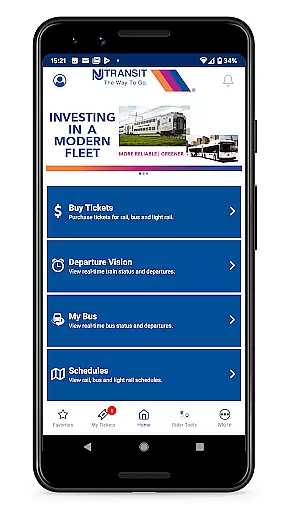
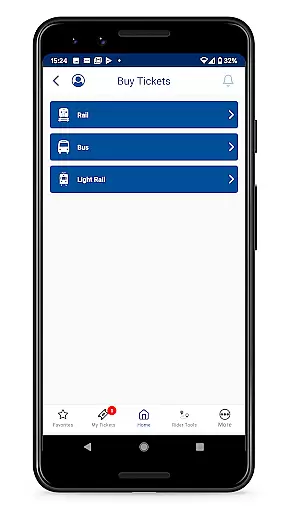
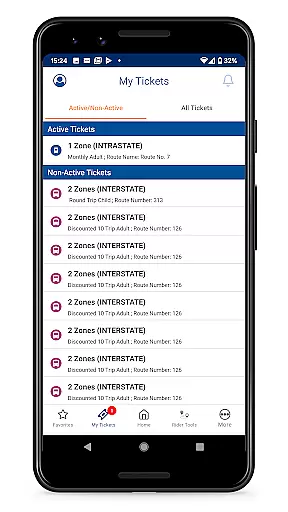

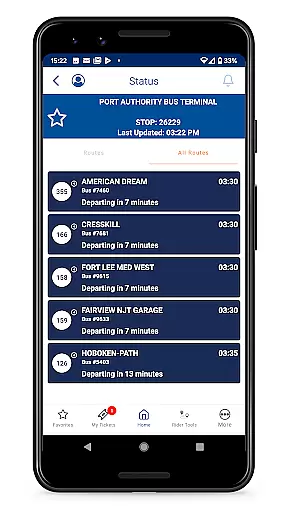
The NJ TRANSIT Mobile App is a comprehensive travel companion designed to simplify your journeys throughout New Jersey, including routes to New York and Philadelphia. This app provides essential transit information at your fingertips, allowing you to purchase and display tickets or passes securely on your mobile device. With features like MyTix® mobile ticketing, real-time arrival and departure updates for rail and bus services, and trip planning tools for various transit modes, the app ensures that navigating public transportation has never been easier.
Whether you're commuting daily or planning an occasional trip, the NJ TRANSIT Mobile App offers valuable tools such as push notifications for service alerts, detailed schedules, and live train statuses through DepartureVision®. These functionalities not only save time but also enhance your overall travel experience by keeping you informed and prepared for any transit scenario.
The NJ TRANSIT Mobile App boasts a variety of robust features tailored to meet the needs of modern commuters. One standout feature is MyTix®, which allows users to buy and display their transit passes or tickets directly on their smartphones, eliminating the need for paper tickets. Additionally, Rider Tools provide essential resources such as managing personalized transit alerts via push notifications, checking service advisories, and planning trips with ease.
Another key aspect is the real-time tracking system, which includes DepartureVision® for live train statuses and MyBus® for upcoming bus arrivals at your stop. The Trip Planner tool suggests optimal travel routes based on your destination, while Schedules offer quick station-to-station planning. These features collectively ensure that travelers have access to timely and accurate information, empowering them to make informed decisions about their journeys.
Map accuracy is a crucial feature for any navigation app, and the NJ TRANSIT Mobile App excels in this area. The app provides real-time rail and bus arrival and departure information, ensuring that users can rely on the data to make informed travel decisions. This level of precision helps commuters plan their journeys with confidence, knowing that the app's mapping data is both current and accurate.
The NJ TRANSIT Mobile App offers quick station-to-station schedules and real-time train statuses through its DepartureVisionu00ae feature. This ensures that travelers have access to up-to-the-minute information about their selected stations, which is essential for timely arrivals and departures. By delivering such detailed and reliable schedule information, the app significantly enhances the user's ability to navigate New Jersey, as well as to New York and Philadelphia, without unnecessary delays or confusion.
Furthermore, the MyBusu00ae feature allows users to view bus arrivals for their stops, adding another layer of accuracy to the commuting experience. This comprehensive approach to providing transportation information means that whether traveling by rail, bus, or light rail service, passengers can expect an integrated and precise mapping experience. With these tools at their disposal, users of the NJ TRANSIT Mobile App are equipped with the most accurate transit data available, allowing them to move efficiently and with peace of mind.
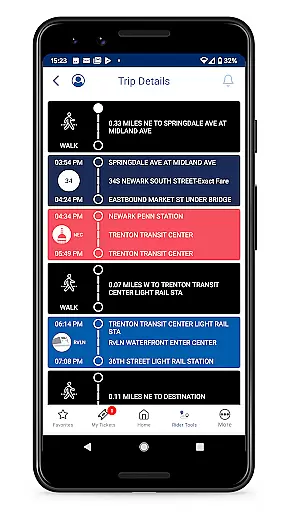
Route planning is an indispensable aspect of the NJ TRANSIT Mobile App, designed to streamline the travel experience for commuters. The app's Trip Planner feature delivers suggested travel options to reach your destination, taking into account various modes of transport including rail, bus, and light rail services. This empowers users to select the most efficient route based on real-time conditions, thus optimizing their travel time and convenience.
In addition to suggesting routes, the NJ TRANSIT Mobile App keeps users informed with service advisories that could affect their travel plans. Rider Tools within the app allow for managing My Transit Alerts, which provide push notifications about any disruptions or changes to NJ TRANSIT Rail, Bus & Light Rail services. This proactive communication ensures that passengers can adjust their route planning dynamically as situations evolve, avoiding potential inconveniences.
Moreover, the app facilitates comprehensive trip management through its scheduling features, enabling travelers to create detailed itineraries using station-to-station schedules. By integrating these tools with real-time data from DepartureVisionu00ae and MyBusu00ae, the NJ TRANSIT Mobile App not only plans routes but also adapts them according to live updates. As a result, users enjoy a responsive and adaptable route planning system that supports seamless travel throughout New Jersey and beyond.
User-friendly interface
Secure mobile ticketing
Real-time transit updates
Comprehensive trip planning
Customizable alerts
Limited to NJ TRANSIT
Occasional bugs
Requires internet
No offline mode
Push notification delays

America’s largest public fast charging network, with over 500 charging stations.
 4.50
4.50
Number locator, real connection map
4.10
Your real-time window to the world. Explore anywhere, anytime.
3.30
Navigate via GPS Maps of GPS Voice Navigation, driving directions to find routes
3.60
Get route map navigation with 3D satellite view, and live earth camera streaming
3.70
Live Satellite view app for find GPS navigation Direction and live location map
3.70
Route Planner is travel map to get turn by turn navigation & driving directions
3.90
Off-Roading Navigation App With Trails, Public Lands, & Private Property Info
3.30
Navigation, weather, offline maps & tools for smarter, safer travel planning.
4.00
This app is military GPS coordinate systems helper. (MGRS, UTM & DMS Maps)
4.80
Complete offline 1:50k South Island topo map including DOC Hunting Permit Areas
4.60
Track friends in real-time and explore worldwide live cameras.
4.60
Turn your Android device into a real off-road GPS using off-line topo maps!
4.40
Plan routes, share locations, and set custom alert zones
4.40
GPS phone tracker, family locator, secure location sharing app
4.20
Get directions, Maps, GPS navigation & GPS Maps using GPS App
4.10
Get route, find shortest path, near by places and weather update
3.90
Explore Live Earth Map with 3D World Map & locate cites, mountains real time.
3.80
Gas Station & Fuel Rewards Points
3.70


User Reviews