

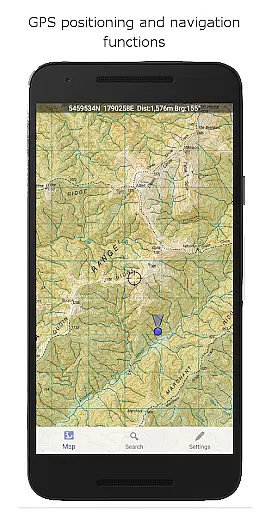
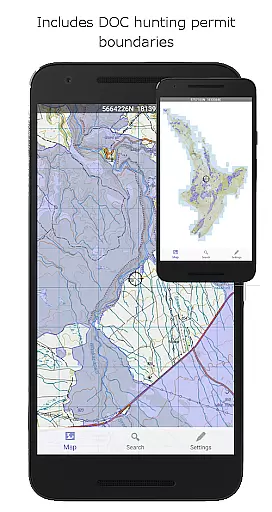
NZ Topo50 Offline - South is a comprehensive offline mapping application providing complete 1:50k topographic map coverage of New Zealand's South Island using the official LINZ NZTopo50 series maps. The app comes with all maps fully included upon installation, ensuring users have seamless access to detailed topographic information without requiring any additional downloads or internet connectivity.
This application is specifically designed for outdoor enthusiasts and professionals who require reliable navigation tools in areas with limited or no cellular network coverage. It includes essential GPS functionalities such as track logging, waypoint management, compass orientation, altitude and speed display, and route creation. Users can also import and export tracks and waypoints in standard KML or GPX formats, making it an ideal tool for activities like tramping, hunting, and search-and-rescue operations.
What sets this app apart is its use of New Zealand's national map grid system, which provides more accurate map projections compared to the commonly used WGS84 datum. This ensures precise positioning and parallel gridlines when viewing LINZ maps, delivering professional-grade mapping capabilities right on your mobile device.
The app offers an impressive array of features tailored for both casual users and professional navigators. One of its standout capabilities is the full offline functionality, allowing users to pan and zoom across the entire South Island without needing an internet connection. This feature is particularly valuable for backcountry navigation where cellular service may be unavailable.
In terms of navigation tools, NZ Topo50 Offline - South provides advanced functions including GPS positioning, track logging, user-defined waypoints, and orientation through an integrated compass interface. Additional displays show real-time altitude, speed, distance, and bearing to selected points on the map. The app also supports route creation and following, enabling users to plan and execute complex journeys with ease.
A unique aspect of this application is its inclusion of specialized overlays such as Department of Conservation (DOC) hunting boundaries and Te Araroa trail information. These overlays, combined with the app's adherence to New Zealand's national map grid system, ensure that users receive the most accurate and relevant geographic information available. The app's ability to maintain perfect grid alignment with LINZ maps demonstrates its commitment to precision and reliability in mapping technology.
Map accuracy is crucial for offline navigation applications like NZ Topo50 Offline - South. This app provides complete 1:50k offline topographic map coverage using the LINZ NZTopo50 series maps, ensuring that users have access to highly detailed and precise maps without needing an internet connection.
The app stands out by being built from the ground up to use the NZ national map grid, rather than the global average WGS84 datum. This choice ensures that the map projections are perfectly aligned with the local geography, offering parallel gridlines when LINZ maps are projected. Such precision is vital for backcountry navigation where accuracy can impact safety and route planning.
Users benefit from the inclusion of specific overlays such as DOC open permit hunting boundaries and Te Araroa tracks. These additional data layers enrich the mapping experience, providing valuable context for activities like hunting, tramping, or walking. The accuracy extends to named places and features, allowing users to search and zoom into their points of interest effortlessly.
Effective route planning is essential for outdoor enthusiasts relying on NZ Topo50 Offline - South. This app offers a suite of navigation functions including GPS positioning, track logging, user waypoints, and orientation features. These tools collectively enable users to plan and execute their routes with confidence, even in areas lacking cell phone coverage.
One standout feature is the ability to create and follow routes directly on the map. Users can plot their paths by setting waypoints and viewing distance and bearing information to those points. This functionality is particularly beneficial for activities such as tramping, biking, or hunting, where understanding your position relative to the planned route is critical.
Additionally, the app supports importing, exporting, and sharing tracks and waypoints in both kml and gpx formats. This interoperability allows users to leverage their route data across different platforms and devices, enhancing flexibility and convenience. Overall, these capabilities ensure that users can prepare meticulously for their adventures while enjoying seamless navigation throughout their journeys.
Full offline functionality
Precise NZ grid system
Advanced GPS tools
Specialized overlays included
Seamless map navigation
Large storage requirements
Limited to South Island
No automatic updates
Complex for beginners
High initial download size

Explore the world with Live Satellite View, 3D Maps, GPS Navigation & Earth Map.
 2.90
2.90
Easy, Moderate and difficult offroad adventures.
4.00
GPX Viewer PRO shows tracks, routes and waypoints from gpx and kml files.
4.60
Affordable rides and food delivery with incredible discounts in just one app.
4.50
Explore Live Earth Map with 3D World Map & locate cites, mountains real time.
3.80
Find routes fast with GPS Maps, GPS Navigation & driving directions.
4.10
Explore offline maps with radar, satellite view, and real-time alerts.
3.60
Ride or drive at YOUR price
4.70
Use GPS Maps and GPS Voice Navigation to find your way and get directions
4.10
Get there with the Waymo Driver — The World’s Most Experienced Driver™
4.90
Airport parking, with airport shuttle (TPS shuttle), reservations, and Spot Club
4.80
Find AI powered cameras, ALPRs, and other surveillance infrastructure near you
4.70
Find trails, organize your locations and navigate with offline maps.
4.60
Route schedules, maps, and real-time tracking of MTA buses in New York City.
4.20
Find radar, speed camera, flight tracker. Use hud, location tracker, speedometer
4.20
Navigate seamlessly with Real-Time Traffic, Offline Maps, and Voice Navigation.
4.10
Off-Roading Navigation App With Trails, Public Lands, & Private Property Info
3.30
Compass is an accurate compass and a great tool for any outdoor activities
4.4
All of NHSA's trail information at your fingertips for the 2025-2026 season
4.4


User Reviews