
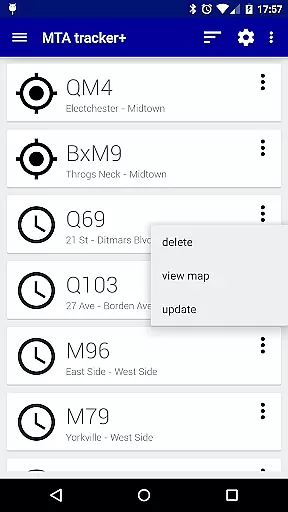
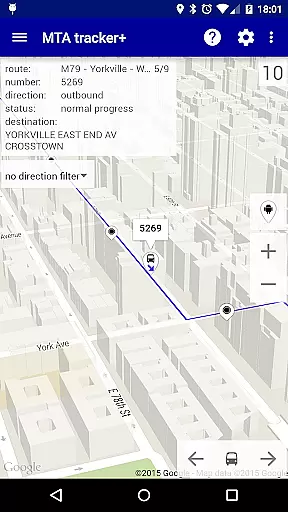
Transit Tracker+ - NYC is a comprehensive transportation app designed for commuters in New York City. This ad-free version offers advanced features beyond the basic Transit Tracker, including real-time vehicle tracking using MTA Bus Time data. The app allows users to view detailed route schedules, set custom alerts for approaching buses or trains, and explore nearby transit stops based on their location.
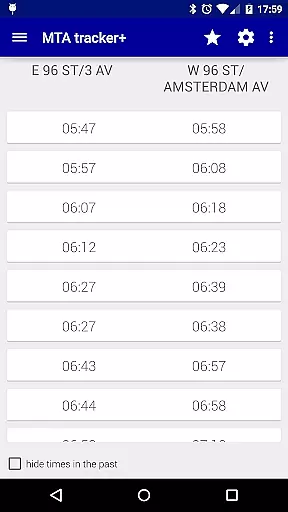
The application provides multiple viewing options for schedules, including map-based and origin/destination table formats. Users can benefit from additional functionalities such as dark/light theme selection, traffic data overlay on maps, and customizable update intervals for vehicle locations. These features make Transit Tracker+ particularly valuable for daily commuters who need reliable and up-to-date transit information.
While not officially affiliated with MTA, this app leverages publicly available APIs to deliver accurate transit data. It's an essential tool for navigating NYC's complex transportation network efficiently while avoiding unexpected delays or missed connections.
Transit Tracker+ stands out through its robust feature set tailored specifically for New York City commuters. The app's core functionality revolves around real-time vehicle tracking, allowing users to monitor specific routes, stops, or individual vehicles across supported MTA networks. This granular tracking capability extends to schedule planning, where users can view detailed timetables both as text-based tables and interactive map overlays.
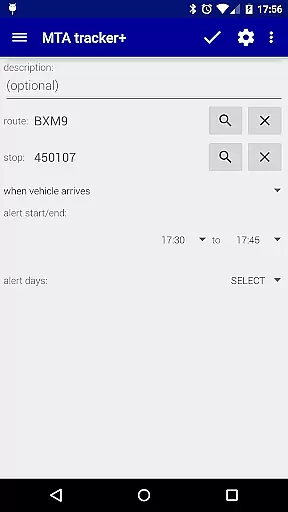
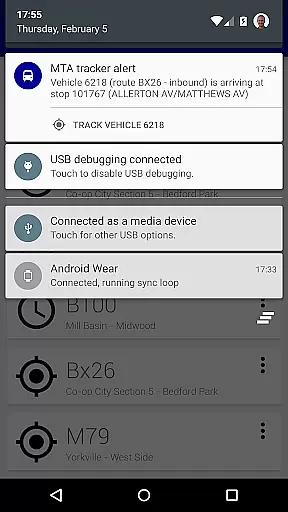
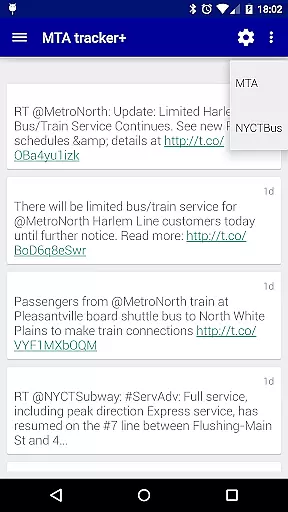
One of the app's most valuable features is its customizable alert system. Users can set proximity-based notifications for specific stops and routes, ensuring they never miss their bus or train. The application also incorporates location services to identify nearby transit stops, with optional filtering by route number. Additional enhancements include Twitter integration for MTA updates and extensive customization options for map displays and alert sounds.
These features collectively create a powerful tool that addresses common pain points in urban commuting. The combination of real-time tracking, comprehensive scheduling tools, and personalized alerts makes Transit Tracker+ an indispensable companion for navigating New York City's public transportation system effectively.
Map accuracy is a critical feature for any navigation app, and Transit Tracker+ - NYC excels in this area. The application uses real-time data provided by the MTA through public APIs to display the location of buses and trains on its map interface. This ensures that users have access to the most up-to-date information regarding their transit options.
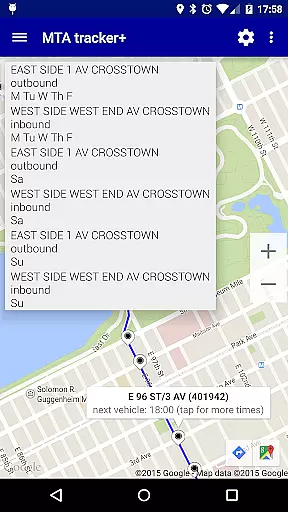
The app allows users to tap on stops displayed on the map to see scheduled arrival times for the next bus or train. This level of detail provides an accurate representation of the transit landscape, allowing commuters to plan their journeys with confidence. Additionally, the integration of satellite imagery and color-coded traffic data enhances the precision of the map, giving users a comprehensive view of their surroundings.
By focusing on accuracy, Transit Tracker+ - NYC delivers significant value to its users. Whether they are daily commuters or tourists, individuals can rely on the app to guide them through New York City's complex transportation network. The ability to make informed decisions based on accurate mapping not only saves time but also reduces the stress associated with navigating a bustling metropolis.
Route planning is a fundamental aspect of Transit Tracker+ - NYC, empowering users to navigate the city efficiently. The app offers multiple tools for effective route planning, including the ability to input specific route numbers, stop numbers, or vehicle numbers to receive detailed information about upcoming departures and arrivals. This functionality enables users to tailor their journey according to their unique needs and preferences.
In addition to live tracking, Transit Tracker+ - NYC includes the option to download route schedules. Users can view these schedules as origin/destination tables or on a map, tapping on stops to see all scheduled times. This feature is particularly useful for planning trips in advance, ensuring that users are well-informed about service frequency and timing.
Another advantage of the app's route planning capabilities is the inclusion of alerts. Users can set notifications for when a vehicle is approaching or arriving at a particular stop, streamlining their travel experience. By combining real-time updates with customizable alerts, Transit Tracker+ - NYC equips users with the tools necessary to optimize their commutes and enjoy a seamless transit experience.
Real-time vehicle tracking
Customizable alert system
Comprehensive route schedules
User-friendly interface design
Extensive customization options
Limited route coverage
No official MTA support
Premium price point
Occasional data delays
Complex setup required

Turn your Android device into a real off-road GPS using off-line topo maps!
 4.40
4.40
Fully offline 1:50k New Zealand topographical map North Island
4.5
Find shortest way and save energy . Distance and area calculator.
4.70
CamSam PLUS - The speed and red light camera warning system!
4.40
Route tracker, Speedometer, Odometer, Fuel, HUD mode, save route as .GPX
4.40
Track accurate speed & distance with GPS Speedometer. Check speed limit & time.
4.50
NJ TRANSIT information and ticketing at your fingertips
3.70
Track friends in real-time and explore worldwide live cameras.
4.60
GPS phone tracker, family locator, secure location sharing app
4.20
Order a cab online. An affordable taxi ride and driver in no time. What a bolt!
4.80
GPX Viewer PRO shows tracks, routes and waypoints from gpx and kml files.
4.60
Complete offline 1:50k South Island topo map including DOC Hunting Permit Areas
4.60
Find radar, speed camera, flight tracker. Use hud, location tracker, speedometer
4.20
Get directions, Maps, GPS navigation & GPS Maps using GPS App
4.10
GPS Navigation: Get map directions and find the shortest routes to avoid delays!
4.00
Get route map navigation with 3D satellite view, and live earth camera streaming
3.70
Live Satellite view app for find GPS navigation Direction and live location map
3.70
OpenCPN is a full featured ChartPlotter and Navigator for Android.
3.60
All of NHSA's trail information at your fingertips for the 2025-2026 season
4.0


User Reviews