


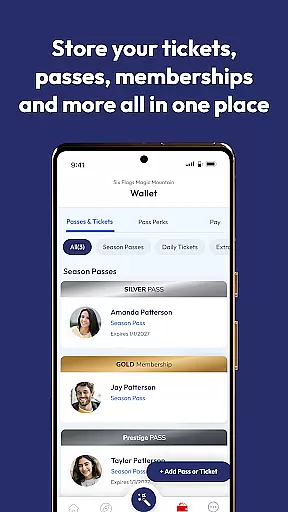

Six Flags is a comprehensive travel app designed to enhance your experience at any of the 41 Six Flags amusement and water parks. The app consolidates all park information into one place, providing unparalleled access to tickets, passes, memberships, and exclusive personalized offers. With features like interactive maps, ride wait times, show schedules, and food ordering, it ensures you navigate the parks like a pro while enjoying convenience and efficiency.
One of the standout functionalities is the ability to create an account for seamless management of all your park-related purchases. This feature not only simplifies access but also enhances your park visit with personalized offers and easy retrieval of important items such as photos taken with a photo pass. Whether you're planning your visit or already in the park, Six Flags mobile app provides tools that make every step of your journey smooth and enjoyable.
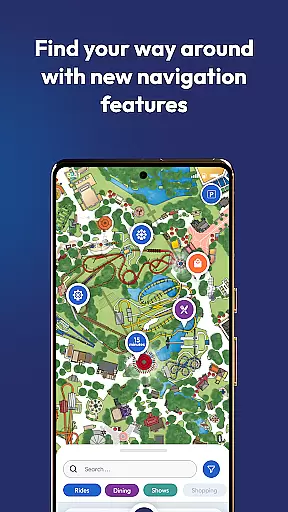
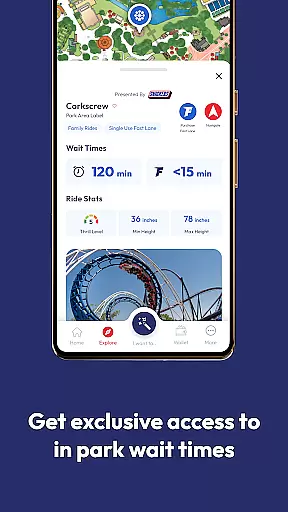
The Six Flags app boasts a variety of features tailored to improve your park experience. A key highlight is the interactive map which allows users to navigate the parks effortlessly. You can check ride wait times, locate shows, and find your way around the park with ease. Additionally, the app supports food ordering from your phone, ensuring you spend more time enjoying the park and less time waiting in lines.
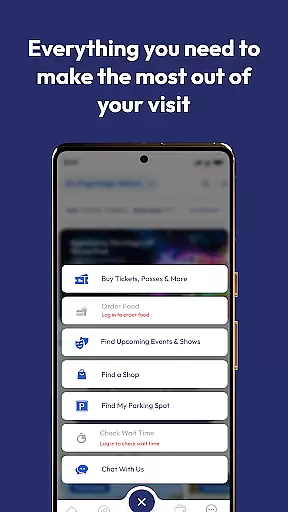
Another significant feature is the ability to buy tickets, passes, memberships, and even single-use Fast Lane passes directly through the app. Users can also mark their parking spots, access Pass Perks, and enjoy augmented reality games available at select parks. These features collectively ensure that visitors have a convenient, fun-filled experience, making the most out of their visit to any Six Flags park.
Booking authenticity is a crucial aspect of the Six Flags mobile app, ensuring that all transactions and reservations made through the platform are legitimate and secure. The app allows users to buy tickets, passes, memberships, and even order food directly from their mobile devices.
The integration of a user account system adds an extra layer of security and convenience. When users create an account, any purchases made with the same email address will automatically appear in the app. This seamless synchronization not only enhances booking authenticity but also simplifies access to various services within the Six Flags parks.
By providing a reliable booking system, Six Flags ensures that visitors can focus on enjoying their experience without worrying about the legitimacy of their purchases. This feature significantly boosts user confidence, making the entire visit more enjoyable and stress-free.
Price transparency is another key feature of the Six Flags mobile app, empowering users with clear information about the costs associated with park visits. The app provides multiple purchasing options, including tickets, passes, and memberships, each clearly outlined with associated prices and benefits.
In addition to straightforward pricing, the app offers personalized deals based on user preferences and past purchases. This tailored approach ensures that visitors receive the best possible value for their money, enhancing overall satisfaction.
Moreover, the app includes features like Pass Perks and the option to purchase Single Use Fast Lane for select rides, further contributing to price transparency. These features allow users to make informed decisions about additional expenditures during their visit, ensuring a transparent and hassle-free experience.
User-friendly interface
Comprehensive park info
Personalized offers
Interactive map
Food ordering capability
Limited AR game availability
Occasional bugs reported
Membership required for full access
In-park Fast Lane purchase only
Heavy reliance on network connectivity

Navigate your world faster and easier with voice navigation & street view map
 4.20
4.20
The #1 Parent App in Brevard County
4.3
Navigation on hikes is no longer a problem. Download the map, put notes and go!
4.60
Take JetBlue everywhere you go! Book, manage and check in for your trips & more.
4.60
Maps, Wait Times, Park Hours
4.40
NEW! Vacation with Ease.
4.60
Travel light with our easy-to-use mobile app, the perfect flying companion.
4.40
Find the perfect vacation rental. Search from over 2 million properties.
4.80
Rent the perfect car for wherever you’re going
4.90
Plan where to stand and shave minutes off your trip!
4.80
Find your perfect somewhere with last minute hotel & travel deals!
4.80
Manage your travel on Delta with access to boarding passes, flight info & more.
4.80
Book your whole trip in one app.
4.80
Save on gas and convenience with the earnify™ App
4.70
Get all MTA services, Subway, Bus, LIRR, Metro-North and More all in one place.
4.60
The mobile panorama panel. Works offline - worldwide!
4.40
Maps Speedometer shows your current speed in any app
3.60
Find the best prices, pay for the cheapest gas, and save on every fill up
3.30
Every Diners, Drive-in & Dives location in one place! Your guide to Flavortown!
3.00


User Reviews