
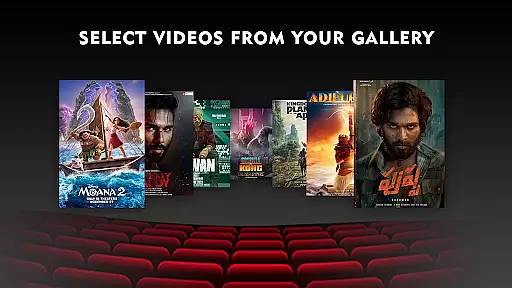
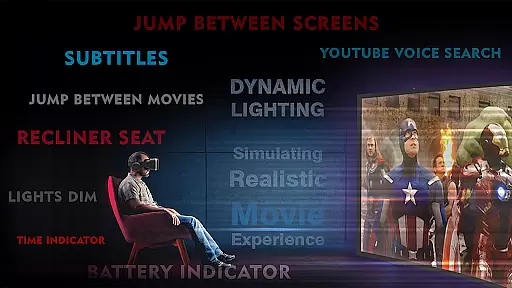
VR Player Plus - Movie Theatre is a premium virtual reality movie player designed to deliver an immersive cinematic experience. This app transforms your VR headset into a personal IMAX theater, allowing you to watch videos, movies, and shows with stunning clarity and spatial surround sound.
The app stands out with its unique seat selection feature, letting users choose their preferred viewing angle and screen size. Compatible with various VR headsets including Google Cardboard, Irusu VR, and Shinecon VR, it supports multiple video formats including 4K and 2K resolutions. The intuitive controls and optimized interface make it easy to navigate and manage media files.
Whether you're watching WhatsApp videos or professional cinema releases, VR Player Plus brings the authentic theater experience to your living room. The combination of advanced video rendering algorithms and 3D spatial audio creates an unparalleled level of immersion that traditional mobile players can't match.
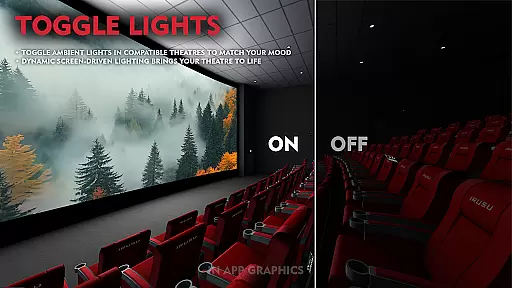
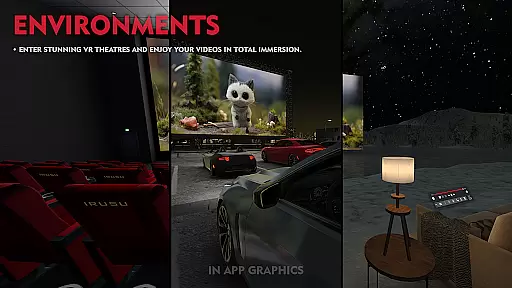
VR Player Plus offers an impressive array of features that enhance the virtual reality movie-watching experience. Users can select from various theater environments, ranging from serene lake views to classic cinema settings, creating a personalized atmosphere for each viewing session.
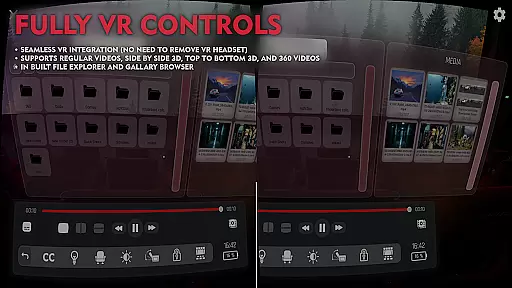
The app supports multiple VR video formats including regular, side-by-side, and top-bottom configurations. Its advanced video rendering technology ensures smooth playback of high-resolution videos up to 4K quality. The innovative seat selection function allows viewers to adjust their virtual position and screen size, while the seat recliner feature provides optimal comfort.
Additional notable features include a built-in file browser for easy media management, precise video seek bar for quick navigation, and spatial audio technology that delivers breathtaking 3D surround sound. These comprehensive features make VR Player Plus a complete solution for immersive home entertainment, setting new standards in the VR movie player category.
In the realm of virtual reality entertainment, content diversity is key to maintaining user engagement. VR Player Plus - Movie Theatre offers an extensive range of environments and theatre settings, from a serene lake view to the classic ambiance of a traditional cinema. This selection allows users to tailor their viewing experience according to their mood or preference, ensuring that each movie session feels unique and personalized.
Moreover, the app supports various video formats including regular, side by side, and top-bottom VR videos, catering to different types of content available in the market. With compatibility across multiple VR headsets like Google Cardboard, Irusu VR headsets, VR box, and Shinecon VR, it ensures that users have access to a wide array of VR experiences without being limited by hardware constraints.
The inclusion of advanced features such as 4K and 2K video support, automatic aspect ratio adjustment, and spatial audio technology with 3D surround sound further enriches the diversity of content that can be enjoyed. These elements work together to provide a fresh and immersive experience every time the user engages with the application.
User engagement duration and retention are critical metrics for any entertainment platform, and VR Player Plus - Movie Theatre excels in these areas through its innovative features. The app's seat selection feature allows viewers to choose their preferred angle and screen size, enhancing comfort and encouraging longer viewing sessions. By offering this level of customization, users are more likely to spend extended periods within the virtual environment, thus increasing overall engagement time.
Additionally, the introduction of a video seek bar provides easy navigation through movies, making it convenient for users to pause, resume, or revisit favorite scenes without frustration. Such seamless interaction not only improves the user experience but also contributes to higher retention rates as individuals find it easier to manage their viewing habits.
Furthermore, the promise of future updates and total control enhancements indicates a commitment to ongoing improvement, which incentivizes continued use. As new features roll out, they will undoubtedly add value to the existing service, prompting users to return frequently and maintain their interest over time.
Immersive IMAX experience
Wide format compatibility
Intuitive user interface
Advanced seat selection
Spatial audio technology
Requires compatible headset
High-end device recommended
Limited free features
Occasional performance issues
Subscription fees apply

Pathfinder 2e initiative tracker with bestiary, HP, reaction, conditions, etc
 4.80
4.80
Open-source, fast, simple and powerful IPTV app
4.90
Practice and master your ESP and intuition with five mode trainer.
4.20
SpiritWave is paranormal ITC application.
5.00
Direct access to the most complete Guitar Tab Archive in Spanish: LaCuerda.net
4.60
Underrated short-drama gems that hit hard and keep your heart hooked.
4.50
Chat with AI characters! Anime, games, roleplay & more.
4.50
Explore the unknown!
3.00
Earn Real Rewards Playing Fun Mobile Games & Easy Cash Out - PayPal & Gift Cards
4.40
Time tracking, lap counting and much more for Carrera® Digital 132/124
4.80
Stream Live TV, News & Documentaries. Watch Full Seasons with PBS Passport.
4.80
5 funny and lovely ponies waiting for you to style them!
4.80
Live TV, sports & holiday movies — stream on phone, tablet & TV
4.60
Your Avatar, Endless Fun
4.60
Stream Online TV - Watch Live IPTV Playlist & Channel with Built-In Player
4.50
Create and play realistic-looking mock Emergency Alert System messages.
4.30
Watch whatever you want, whenever you want, wherever you want.
3.30
Stream live TV shows, sports, news, movies & more - all without cable.
3.00
Neon Christmas Tree Animated: Festive Wear OS watch face with fitness info
4.4


User Reviews