
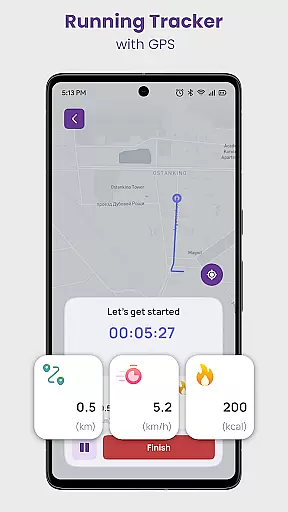
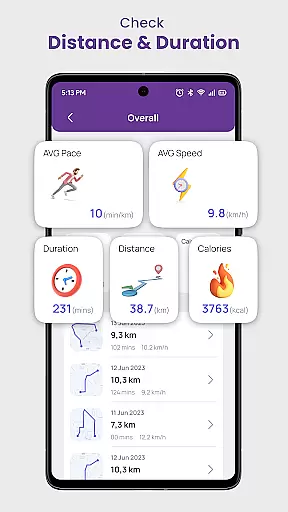
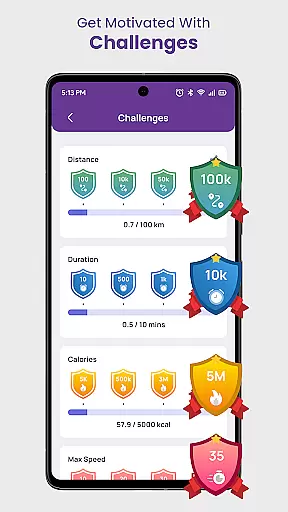
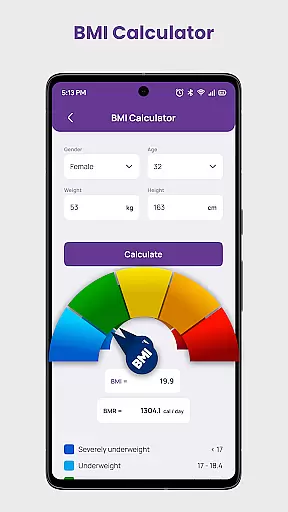
Daily Running Tracker with GPS is a comprehensive fitness application designed to enhance your running experience. This app serves as a personal running companion, utilizing GPS technology to track your route, distance, and pace in real-time. Whether you are a beginner or an experienced runner, the app provides detailed statistics on your performance, empowering you to set and achieve personal goals.
One of the standout features of this app is its ability to calculate calories burned during each session, giving you insights into your overall fitness progress. With built-in tools like a Body Mass Index calculator and various training plans tailored to different objectives, Daily Running Tracker ensures that users have all the resources they need to maintain a healthy lifestyle. The app also fosters a sense of community by offering challenges and virtual races, keeping users motivated and engaged.
Daily Running Tracker with GPS offers a rich set of features that cater to runners of all levels. The app's GPS-powered tracking system accurately monitors your route, distance, and pace, providing real-time feedback on your performance. This feature is complemented by detailed statistics that help you understand your progress over time, allowing you to set new personal records.
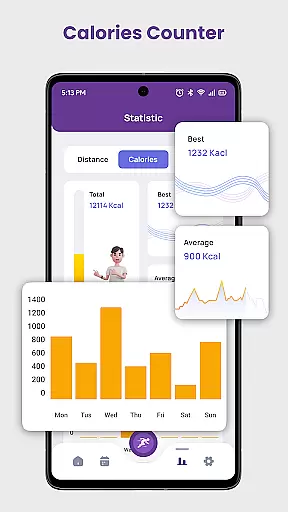
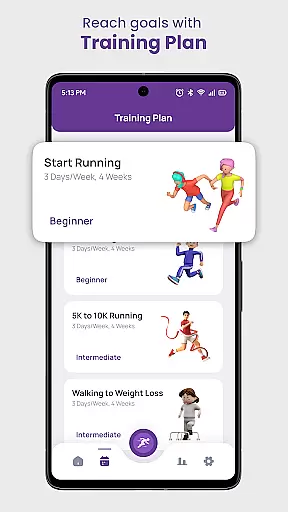
In addition to tracking, the app includes a calorie counter that calculates the calories burned during each jogging session. Users can also access structured training plans designed for various goals, such as preparing for a 5K or 10K race. These plans are crafted by fitness experts to ensure steady progress while minimizing the risk of injury. Furthermore, the app incorporates motivational elements like challenges and virtual races, encouraging friendly competition within its community.
The inclusion of a Body Mass Index calculator adds another layer of health monitoring, helping users maintain a balanced perspective on their fitness journey. With features like offline tracking and record-keeping of key metrics such as longest distance and max speed, Daily Running Tracker with GPS stands out as a versatile tool for anyone committed to improving their running performance.
Personalized planning in the Daily Running Tracker with GPS app is a standout feature that caters to individual fitness goals and progression. This functionality allows users to receive tailored training plans based on their specific objectives, whether it's weight loss, endurance building, or preparing for competitive events.
The app employs advanced algorithms that consider various factors such as current fitness level, past performance data, and target goals to create a bespoke plan for each user. By analyzing this information, the app suggests optimal running routes, ideal pace settings, and appropriate rest intervals, ensuring a balanced approach to fitness improvement.
Users benefit from this personalized strategy by experiencing more effective workouts that adapt over time as they progress. The adaptive nature of these plans means that as runners become fitter and more skilled, the recommendations evolve to continually challenge them without risking burnout or injury.
This personalized planning tool not only enhances motivation but also maximizes the efficiency of each workout session, leading to better overall results and a more engaging fitness journey.
Progress visualization within the Daily Running Tracker with GPS app provides users with an intuitive way to track their fitness journey through detailed statistics and graphical representations. This feature captures key metrics such as distance covered, calories burned, and personal records, presenting them in easy-to-understand charts and graphs.
By offering visual feedback on performance trends over time, the app empowers users to recognize patterns, set new goals, and celebrate milestones. Whether it's noticing an increase in average speed or observing cumulative mileage over weeks, these insights foster a deeper understanding of oneu2019s running habits and improvements.
Moreover, the app highlights achievements and breakthroughs, such as longest distance run or fastest pace achieved, motivating users to push their limits further. These visual cues serve as powerful reminders of progress made and encourage continued dedication to personal health and fitness objectives.
Ultimately, progress visualization transforms raw data into actionable insights, enhancing user engagement and commitment to an active lifestyle while making every step count towards achieving long-term fitness aspirations.
User-friendly interface
Accurate GPS tracking
Comprehensive training plans
Motivational challenges
Health-focused BMI calculator
Limited social features
No advanced analytics
Premium subscription required
Occasional GPS inaccuracies
High battery consumption

Easy access to health benefits
 4.70
4.70
Your Health Has Met Its App (℠)
3.90
Histamine intolerance, low FODMAP diet and irritable bowel syndrome (IBS)
4.00
Pupillary distance PD with camera quick and easy, checking glasses frames on you
3.70
Monitor, analyze, track, and convert blood sugar & help you control diabetes.
4.10
The most accurate heart rate app to monitor and track your heart rate & pulse.
4.40
This is an application that serves as a companion app for smart watch.
4.20
GloryFit is a companion app for the smart bracelet.
3.60
beat yesterday.
4.00
Meditation app, head space app provides calm music to help you meditate & sleep
5.00
App to stop smoking slowly or now with a motivational badges and helpful tips
4.80
Walk. Earn: Get rewarded for every step! Walk, move, and earn real rewards.
4.70
Personal Measurements - Track your gains!
4.50
Period Tracker, the easiest way to track your periods!
4.50
For Absolute Novices to Strength Training. Simple. Effective.
4.40
Download MadMuscles to start your positive body transformation!
4.30
Your Health Assistant
3.90
HRV4Training helps you optimize goals and improve performance. No sensors needed
3.30
Transform your body and soul with DBFFitness, with a 40-day fitness journey.
4.1


User Reviews