
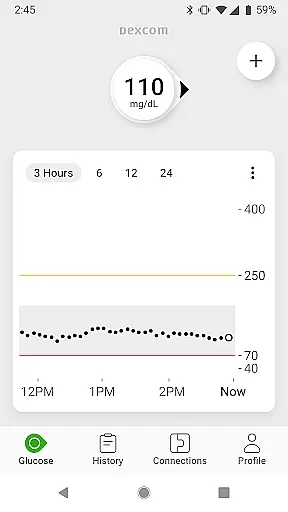
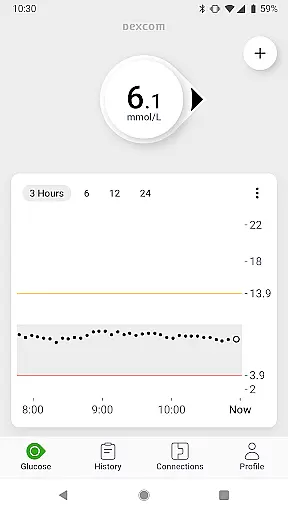
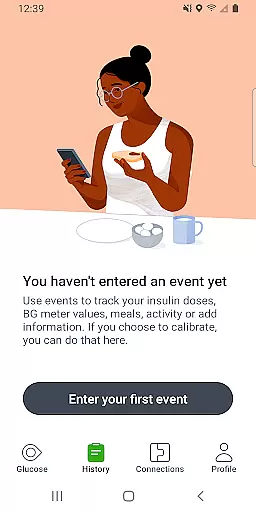
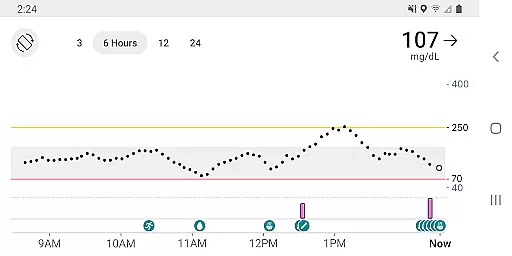
The Dexcom G7 app is a vital tool for diabetes management, providing real-time glucose monitoring without the need for fingersticks. Its core function is to display continuous glucose readings and trends from the Dexcom G7 CGM System directly on compatible Android devices.
Key features include customizable alerts for high or low glucose levels, remote monitoring capabilities, and integration with third-party health apps. These functions empower users to manage their condition more effectively while staying connected with healthcare providers and loved ones.
An important use case is during physical activities, where users can monitor their glucose levels in real time through the Quick Glance feature on their device's lock screen. This functionality provides peace of mind and helps maintain optimal glucose control throughout various daily activities.
The Dexcom G7 app offers an impressive array of features that enhance diabetes management. The system's standout capability is its ability to provide accurate glucose readings every five minutes through a discreet wearable sensor.
Advanced functionalities include customizable alerts that notify users of potential glucose level issues before they become critical. The app also enables data sharing with up to 10 followers through the Dexcom Follow app, facilitating support networks. Additionally, the integrated Clarity Clinic feature allows seamless data sharing with healthcare professionals.
Other notable features include estimated fasting glucose logging, digital health app integrations, and the ability to view health metrics alongside glucose trends. These comprehensive tools work together to create a robust diabetes management ecosystem that adapts to users' evolving needs.
The Dexcom G7 Continuous Glucose Monitoring (CGM) System offers personalized planning for diabetes management. This system provides real-time glucose data every 5 minutes, allowing users to make informed decisions about their treatment plans.
With customizable alerts, the Dexcom G7 warns users of high or low glucose levels, enabling them to take timely action. The integration with third-party health apps and lifestyle devices further enhances personalized planning by providing a holistic view of health and activity data.
Users can log their estimated fasting glucose in the Dexcom G7 app, which helps in identifying trends in glucose levels. This feature supports personalized planning by allowing users and their healthcare teams to adjust treatment strategies based on observed patterns.
Progress visualization is a key feature of the Dexcom G7 CGM System. Users can view their glucose data on the lock screen of their smart device through the Quick Glance feature, offering immediate insights into their current glucose status.
Dexcom Clarity summary insights are integrated into the G7 app, presenting both real-time and retrospective glucose insights. This visualization helps users understand their glucose trends over time and make necessary adjustments to their diabetes management plan.
The trend graph in the G7 app displays health and activity data from connected apps and devices, providing a comprehensive view of the user's overall health progress. This visualization empowers users to maintain better control over their diabetes with clear, actionable insights.
Real-time glucose monitoring
Customizable alerts system
Remote follower access
Integrated healthcare tools
Comprehensive data tracking
Limited device compatibility
Requires internet connection
Potential calibration issues
Subscription fees apply
Learning curve for new users

Period Tracker, the easiest way to track your periods!
 4.50
4.50
Meditation app, head space app provides calm music to help you meditate & sleep
5.00
Beauty Care, Makeup & Skin Care Scanner | Pregnancy App For A Mom | Healthy Baby
5.00
Using Recognise™ has been shown to reduce pain, and improve performance.
4.3
Pupillary distance PD with camera quick and easy, checking glasses frames on you
3.70
Step Counter, track steps when you walk or run
4.70
Track heart rate & HRV in 30s! Get live health insights and anomaly alerts
4.40
Fast Body building & Weight Loss. Home Workouts with Daily Coach, No Equipment.
4.30
Lazy home workouts with your virtual fitness coach for weight loss.
4.30
App to stop smoking slowly or now with a motivational badges and helpful tips
4.80
Get lasting results with Chair Yoga, Wall Pilates, and Walking workouts!
4.60
Point, scan, and unlock truth in every bite.
4.50
Monitor, analyze, track, and convert blood sugar & help you control diabetes.
4.10
Make sense of your health data.
3.80
Live Heart Rate Pro - Real Time Heart & Workout Data For Wear OS & Bluetooth BLE
3.20
The Sleep Miracle Sound Machine: Soothes baby to sleep with a gentle "Shhh"
3.00
The Wear OS BeechBand app is designed to alleviate anxiety and other conditions
4.0
Using Recognise™ has been shown to reduce pain and improve performance.
4.1
Optimization for TRT & Enhanced Athletes
4.3


User Reviews