
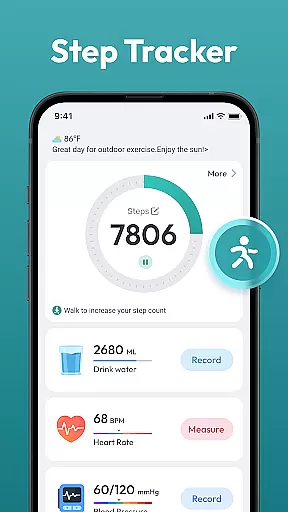
Step Counter - Pedometer App is a comprehensive health and fitness tool designed to help users track their daily physical activities. This app automatically counts steps, measures walking or running distance, and supports setting personal goals like achieving 10,000 steps per day. Suitable for all ages, it requires no additional wearable devices, making it an accessible solution for anyone looking to monitor their fitness progress.
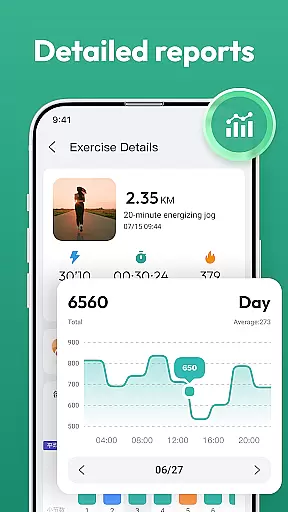
The app provides detailed activity tracking through daily, weekly, and monthly charts. It also offers training courses and plans tailored to individual needs. With a user-friendly interface, Step Counter ensures that users can easily navigate and utilize its features to maintain an active lifestyle and achieve their health objectives.
Step Counter - Pedometer App boasts a variety of features that enhance the user's ability to monitor and improve their physical activity. One standout feature is automatic step counting, which works seamlessly with most Android devices without requiring any external wearables. The app tracks not only steps but also calculates the distance covered during walks or runs, providing a holistic view of the user's daily movement.
In addition to basic step tracking, the app includes detailed analytics presented through daily, weekly, and monthly charts. These visual representations allow users to identify trends in their activity levels over time. Furthermore, personalized training programs and plans are available to guide users toward their fitness goals. The intuitive design ensures that even those new to fitness apps can quickly adapt and make the most out of this powerful tool.
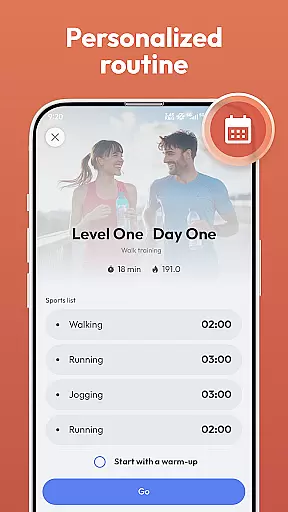
Personalized planning in a health and fitness app refers to the ability to create tailored workout and activity plans based on individual goals, capabilities, and progress. This feature is crucial for maintaining user motivation and ensuring that fitness objectives are met effectively.
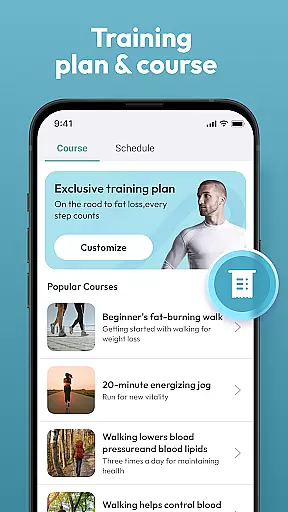
Step Counter - Pedometer App offers personalized planning through its training courses and plans. Users can select a program that aligns with their fitness aspirations, such as losing weight or staying active. The app's automatic step counting and distance tracking provide essential data to help users understand their current activity levels.
By using this app, individuals can set realistic daily goals, like reaching 10,000 steps, and monitor their achievements over time. The availability of daily, weekly, and monthly charts allows users to visualize their progress and make necessary adjustments to their plans.
This personalized approach not only enhances user engagement but also promotes healthier lifestyle choices by offering structured guidance and feedback, which is vital for long-term adherence to fitness routines.
Progress visualization is a key component of any fitness application, providing users with graphical representations of their achievements and milestones. This feature helps maintain motivation by allowing users to see how far they've come and what they have yet to accomplish.
In Step Counter - Pedometer App, progress visualization is achieved through comprehensive charts that display daily, weekly, and monthly activity data. These visual tools enable users to track trends in their walking or running habits, offering insights into their overall fitness journey.
The app automatically records various health data points without the need for additional wearable devices. By simply carrying their phone, users can access detailed visual feedback on their step counts and distances covered.
Such visualization aids in setting and achieving personal fitness goals, making the path to better health more transparent and attainable. It empowers users to take control of their wellness journey with clear, actionable data.
User-friendly interface
No wearables needed
Automatic step tracking
Detailed activity charts
Personalized training plans
Limited to Android
No iOS support
Requires constant phone carry
Battery consumption concern
Occasional data inaccuracies

Create powerful subliminal audio with custom affirmations and background music.
 4.00
4.00
Power-lifting, weightlifting and Wendler 531 app to track your workout program.
4.90
sobriety counter app to help and motivate people to stop drinking alcohol.
4.90
Histamine intolerance, low FODMAP diet and irritable bowel syndrome (IBS)
4.00
A brain game that moves you
4.70
Protect your healthy sleep
4.80
Load the bar with this barbell & plate calculator. It's leg day, not brain day!
4.70
Your portable blood pressure tracker. Record, monitor, and analyze BP anytime.
4.30
This is an application that serves as a companion app for smart watch.
4.20
Weight loss app: home workout for women to lose weight & burn calories.
4.80
Easy to use step counter, calorie counter helps lose weight, count steps offline
4.80
Measure your Pupil Distance for Eyeglasses and VR headsets in 3 quick steps.
4.70
Drink water reminder app. Track water intake. Smart simple hydration tracker.
4.70
Personal Measurements - Track your gains!
4.50
FODMAP, Gluten, Allergy, Vegan
4.50
Raccoon AI Calorie Counter. Intermittent Fasting & Timer. Macro, Carb, Protein
4.50
Pack of 66 calming lullabies for smooth fall asleep and relaxation
4.10
The Sleep Miracle Sound Machine: Soothes baby to sleep with a gentle "Shhh"
3.00
The Wear OS BeechBand app is designed to alleviate anxiety and other conditions
4.5


User Reviews