
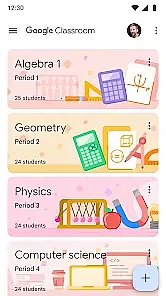
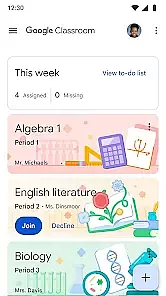
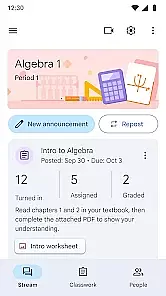
Google Classroom is an educational app designed to help teachers and students streamline the learning process. It allows educators to create, distribute, and grade assignments in a paperless environment. The app integrates seamlessly with Google Workspace tools like Docs, Sheets, and Drive, making it easy to share resources and collaborate. Teachers can organize classes, send announcements, and communicate with students directly through the platform.
This app is particularly useful for managing remote or hybrid learning environments. Students can access class materials, submit assignments, and receive feedback all in one place. With its simple interface and powerful features, Google Classroom enhances classroom organization and promotes better communication between teachers and students.
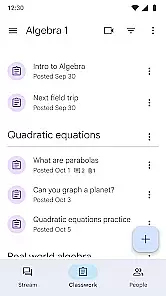
Google Classroom offers a range of features that cater to both teaching and learning needs. One key feature is the ability to create and manage assignments digitally. Teachers can attach files from Google Drive, set deadlines, and track student progress without any paperwork. The app also supports real-time collaboration on documents, allowing multiple students to work together efficiently.
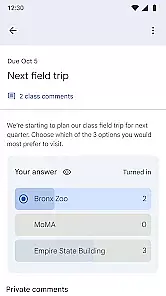
Another standout feature is the communication tools available within the app. Teachers can post announcements and reminders for upcoming deadlines, ensuring that students stay informed. Additionally, the comment section under each assignment enables direct interaction between teachers and students, facilitating quick clarifications and support. These features make Google Classroom a comprehensive solution for modern education.
In the realm of educational applications, content authority and curriculum alignment are paramount. Google Classroom ensures that all educational materials are meticulously vetted by experts in the field, guaranteeing a high standard of quality and accuracy.
The app's content is regularly updated to align with current educational standards and curricula worldwide. This ensures that both educators and students have access to relevant and up-to-date information that supports their learning objectives.
By integrating seamlessly with other educational tools and platforms, Google Classroom provides a comprehensive learning experience that bridges gaps between different educational systems and practices.
Users benefit from a structured learning path that mirrors official educational guidelines, enhancing the overall effectiveness of teaching and learning activities within the app.
Gamification in learning transforms the educational experience into an engaging and interactive journey. Google Classroom incorporates gamified elements such as badges, leaderboards, and rewards to motivate students and encourage active participation.
This approach not only makes learning more enjoyable but also helps in reinforcing positive behaviors and achievements. By setting clear goals and providing instant feedback, students can track their progress and stay motivated throughout their educational journey.
The platform cleverly balances educational content with gamified features, ensuring that the primary focus remains on learning outcomes while still offering the benefits of a gamified environment.
Ultimately, this integration fosters a dynamic learning ecosystem where students are more engaged, leading to improved performance and a deeper understanding of the subject matter.
User-friendly interface
Seamless integration with Google services
Efficient assignment management
Real-time collaboration capabilities
Enhanced communication tools
Limited offline functionality
Dependent on Google ecosystem
Basic grading system
No advanced analytics
Occasional syncing issues

This will quickly become your kids' favorite animals game!
 4.40
4.40
Spark your little ones’ imagination!
3.80
Join Duggee and the Squirrels as they practice their counting!
4.3
Fun educational games for kids that teach number tracing, counting with modes!
4.50
Toddler Learning Games, Learn: Colors, Shapes, Puzzles, ABC ... ►NoAds!◄
4.50
Glow Doodle! Baby Coloring & Drawing games for toddlers: Color and Learn! NoAds!
4.40
Kids math games, abc games for kids 4-5 years old. Kindergarten learning games
4.50
Build your own BRIO railway!
4.30
Safe, fun, ad-free games for kids! For babies, toddlers, & kids age 2-6
3.60
Tons of kids safety games, cartoons, and stories are included in one kids app!
4.70
Epic battles, interactive quests and exotic pets. Learn math with Prodigy today!
4.70
Pretend play in Pepi City: become a doctor or a patient. Our city, your stories!
4.30
Fun educational game: Learn, imagine, create, draw and color!
4.20
A fan of cute games? Try animal games & take care of fluffy virtual pets!
4.20
Create, design & explore Mia’s avatar game world! Dress up a dreamhouse you love
3.80
Create, Style, Repeat!
3.70
Play the fun healthy habits game for kids with Cocobi the little dinosaurs.
3.40
Explore the world of reading and writing with Booker!
4.0
Draw shapes, mix colors, and dodge traps to defeat foes in the vibrant Art Zone!
4.3


User Reviews