
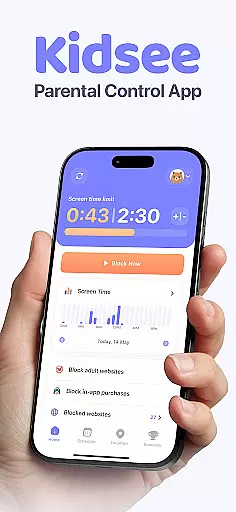
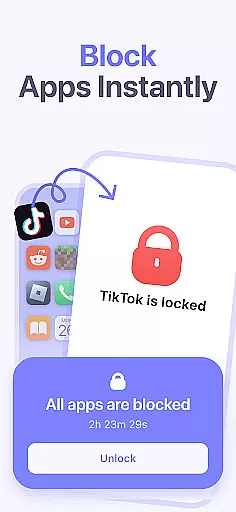
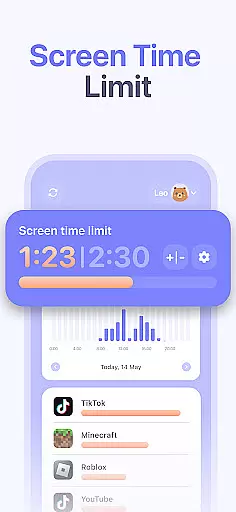
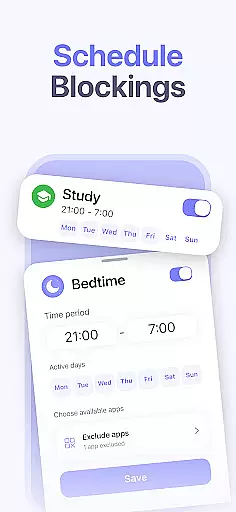
Kidsee Parental Control is a comprehensive family safety solution designed to help parents manage their children's digital habits while ensuring their safety. The app offers flexible screen time controls, allowing parents to remotely lock apps, set daily usage limits, and create custom schedules for different times of the week.
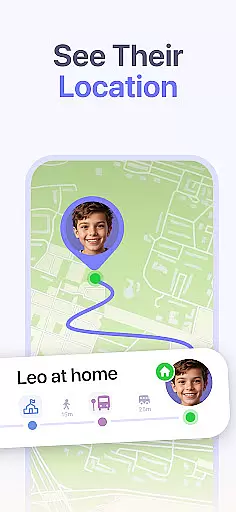
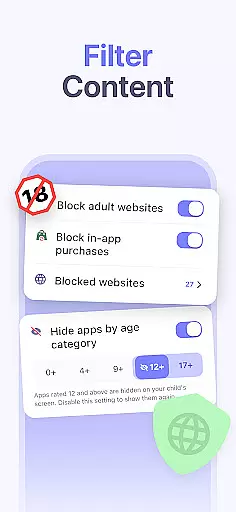
In addition to screen time management, Kidsee provides real-time GPS tracking and location history, giving parents peace of mind about their child's whereabouts. It also supports blocking inappropriate content and in-app purchases, making it an all-in-one tool for promoting digital wellbeing and protecting children online.
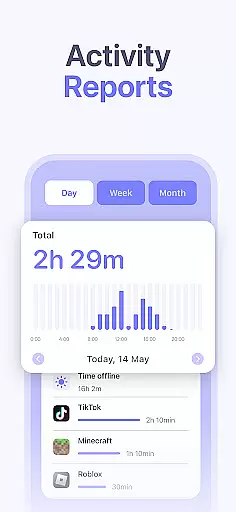
The app's features are extensive and cater specifically to the needs of modern families. Kidsee allows parents to instantly block distracting apps on their child's device while excluding educational ones from restrictions. Parents can track app usage patterns by hour and day, helping them make informed decisions about screen time allowances.
For safety, Kidsee includes a GPS tracker that shows real-time location and battery levels of the child’s phone, ensuring continuous connection. The app also enables monitoring of multiple children from one account, supporting up to 10 devices. This makes it easy for parents to manage various devices across different platforms, including Android and iOS.
When it comes to parenting apps, the credibility of the content and validation by experts is crucial. Kidsee Parental Control App ensures that all features are designed with the guidance of child psychologists and digital safety experts. This guarantees that the app not only helps in managing screen time but also promotes healthy digital habits among children.
The app provides tools for setting flexible screen time limits, blocking inappropriate content, and monitoring location, which are all endorsed by professionals in child development. These features are crafted to support parents in nurturing a safe and balanced digital environment for their kids.
Parents can trust Kidsee to deliver accurate information and reliable functionality, as it is backed by research and expert opinions. The app's ability to block adult content and manage app usage is continuously refined based on the latest findings in online safety and child psychology.
By choosing Kidsee, parents are equipped with a tool that has been rigorously assessed for its effectiveness in supporting family safety and digital wellbeing. This validation gives users peace of mind, knowing they have a credible ally in managing their children's digital lives.
Growth tracking in parenting apps refers to the ability to monitor and analyze a child's digital habits over time. Kidsee excels in this area by providing precise data on app usage, screen time, and location history. This allows parents to understand their child's digital behavior patterns and make informed decisions.
The app offers detailed reports on a child's activity, broken down by hour and day. Parents can see which apps are used most frequently and at what times, enabling them to set appropriate limits and schedules. This level of detail ensures that growth tracking is not just about collecting data but providing actionable insights.
Kidsee's accuracy in tracking is supported by its use of advanced technology, including the AccessibilityService API and GPS features. These tools ensure that the data collected is reliable and up-to-date, giving parents a true picture of their child's digital footprint.
With Kidsee, parents can be confident in the accuracy of the growth tracking features, allowing them to guide their children effectively in their digital journey. This precision in data collection and analysis is what sets Kidsee apart as a trusted partner in digital parenting.
Comprehensive parental controls
Real-time GPS tracking
Supports multiple devices
Flexible scheduling options
Blocks inappropriate content
Requires constant internet
Premium version needed
Limited without permissions
Complex setup process
Accessibility service required

Comprehensive Parental Control & Child Safety — Hear & Protect Your Child World
 4.30
4.30
Cherish every beat - capture your baby's heart sounds with our app
4.30
Family GPS locator app — child location tracker. GPS kids tracker, family safety
4.70
A Coloring for the Whole Family! Discover the Joy of Family Love Through Colors!
3.60
Fun Ideas for Parents
4.70
Kids story books for children. Baby reading books with audio for pre-k toddlers
4.70
Pregnancy+ App has helped 80m moms track their pregnancy with info & support!
4.80
All-In-One Pregnancy Tracker, Your Baby's Milestones, Growth Stages & Parenting.
4.90
Parental control: child monitoring app, screen time control, GPS child tracker
4.40
All-In-One Pregnancy Tracker, Your Baby's Milestones, Growth Stages & Parenting
4.70
GPS phone tracker: find kids on map. Location tracking and parental control.
4.50
With BabyCam you can monitor your baby using your mobile phone, tablet, PC or TV
4.40
All-in-one pregnancy app, contraction timer, kick counter & due date calculator
4.40
Real-time family location with consent, check-ins & SOS—private by default.
4.40
Join over 1MM parents & professionals who've used OFW to navigate co-parenting
4.40
Keep Your Family Safe with Pollog Family Assistants
4.10
Affirmations | Stories | Bible
4.10
Discover fun videos, kids songs, bedtime stories and games
3.60
Play activities, milestones, expert-led classes, baby tracker, and more!
3.00


User Reviews