

PayByPhone is a leading mobile parking payment solution that simplifies the parking experience for millions of drivers worldwide. Trusted by over 95 million users, this app allows you to pay for parking directly from your phone with ease and security. Available in 10 languages and used across more than 1,300 locations globally, including cities and private operators in the UK, North America, France, Germany, and Switzerland.
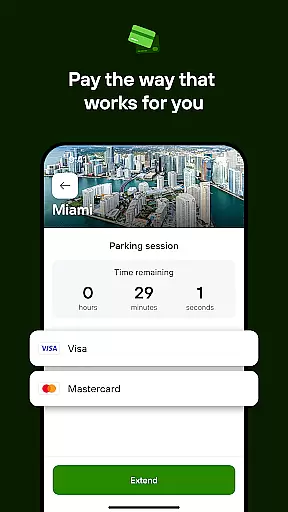
The app's core functionality includes entering or scanning a location code, selecting the desired parking duration, and paying through your preferred method such as credit/debit card, Google Pay, Apple Pay, or PayPal. It also offers smart features like remote session management, SMS notifications, and vehicle pinning, making it an essential tool for modern drivers who value convenience and efficiency.
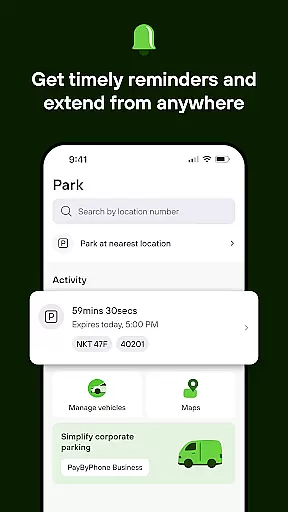
PayByPhone stands out with its comprehensive set of features designed to enhance user convenience. One key feature is the ability to start and extend parking sessions remotely, allowing users to manage their parking without needing to return to their vehicle. The Today View widget provides a quick overview of active parking sessions, ensuring users are always informed about their current status.
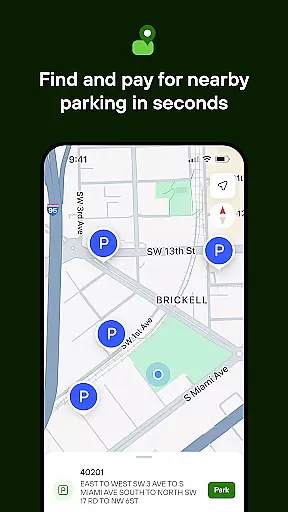
Additionally, the app integrates with Maps and Nearby services to help users locate available parking spots easily. Users can also receive SMS or push notifications before their parking session expires, helping them avoid fines. Other notable features include reviewing parking history, pinning parking locations for easy vehicle retrieval, and receiving emailed receipts for expense tracking. These functionalities collectively ensure a seamless and stress-free parking experience.
When it comes to managing parking sessions through the PayByPhone app, having access to detailed vehicle information is crucial. This feature allows users to input and save specifics about their vehicles, such as license plate numbers and car models, ensuring that parking sessions are accurately attributed and managed. By maintaining a comprehensive profile for each vehicle, users can swiftly initiate parking sessions without the need to re-enter details each time.
The PayByPhone app leverages this data to streamline the parking experience. For example, when starting a new parking session, users can simply select a saved vehicle from their list, reducing the potential for errors and saving valuable time. Additionally, in locations where vehicle information must be displayed, having this data readily available within the app ensures compliance with local regulations and avoids unnecessary fines.
For users who own multiple vehicles, the ability to manage detailed vehicle information within PayByPhone offers unparalleled convenience. It eliminates the hassle of remembering specific details for each car and reduces the risk of entering incorrect information during the rush. Ultimately, this feature enhances the overall user experience by providing a seamless and efficient way to handle parking payments across different vehicles.
Price transparency is a cornerstone of the PayByPhone app's value proposition, ensuring users have clear insights into parking costs before committing to a payment. The app provides detailed breakdowns of parking fees, including any additional charges or discounts applicable, allowing drivers to make informed decisions. This level of openness not only builds trust but also empowers users to manage their expenses effectively.
Through the PayByPhone app, users can view pricing structures for various parking locations in real-time. Whether they're parking in a bustling city center or a quiet suburban area, drivers can access accurate cost estimates tailored to the duration of their intended stay. Furthermore, the app supports multiple payment methods, including credit/debit cards, Google Pay, Apple Pay, and PayPal, making it easy for users to choose their preferred option without hidden fees.
This commitment to price transparency extends beyond mere cost display. PayByPhone also sends notifications alerting users when their parking sessions are about to expire, giving them the opportunity to extend their time if needed without incurring unexpected penalties. Such proactive measures ensure that users remain fully aware of their spending and can adjust their parking arrangements accordingly, enhancing both satisfaction and financial control.
User-friendly interface
Wide global availability
Multiple payment options
Remote session management
Comprehensive notification system
Limited to parking services
Requires internet connection
Occasional service fees
Not all features available everywhere
Dependent on location support

On the CarShield app, you can view contracts, make payments, & request roadside.
 4.40
4.40
OBD1 ECMs application. Data log or tune directly from your phone or tablet!
4.60
Attention! This is the theme for the Car Launcher app
4.5
Theme for Car Launcher
4.4
Practice the drills within MotoJitsu Master Riding Program Volume 1 & 2!
4.80
Digital Car Key/Launcher, Screen Mirror, Android Dashboard, Remote Wireless Link
4.40
Control maps, media and messaging, with the Google Assistant while you drive
4.10
The ExtraMile App allows you to pay for fuel from the comfort of your car!
4.70
Available in select states.
4.00
Take Control of Your Car
4.80
View your car’s service records and find out when maintenance is due.
4.70
CVT diagnostics with ELM327 for Nissan-based vehicles
4.40
Instant diesel savings. No credit checks or fees. Nationwide growing network.
4.40
Automotive Electrical Wiring Diagrams
4.40
Autotrader is your online solution for buying and selling new and used cars.
4.40
Taximeter; the professional's choice
4.30
Get your personalized financing options and shop for used cars today!
4.20
OBD diagnostics, Live Data, DPF regeneration for BMW
4.00
Theme for Car Launcher
4.0


User Reviews