
Videous lite is a streamlined video management and editing application tailored for users seeking efficient video processing. It offers an intuitive interface with practical features, making it suitable for both personal entertainment and professional creation.
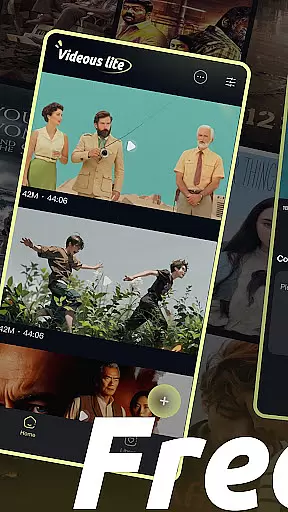
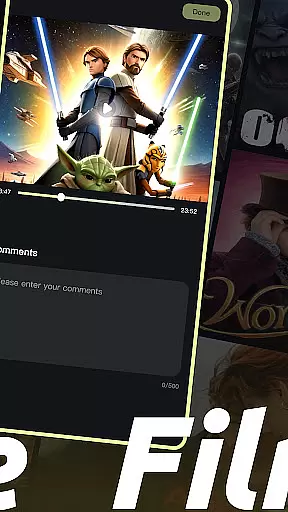
Upon opening the app, users are greeted with a clear layout of their video library on the home page. Videos are arranged chronologically, each marked with length and size for easy management. The settings button allows customization, while the more button aids in administration by enabling comment viewing and video deletion.
This app is ideal for users who need quick video uploads, intuitive editing, and organized video management to enhance their creative projects.
Videous lite stands out with its user-friendly video upload feature, allowing users to quickly add local videos to their library. This ease of use extends to expanding one's video collection effortlessly.
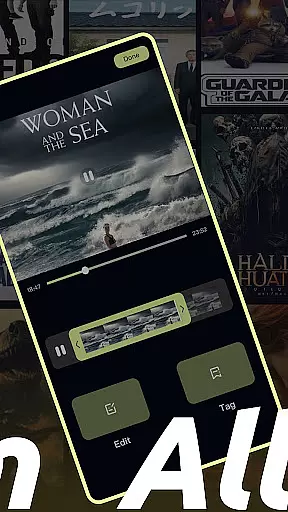
The editing functionality is designed for precision and simplicity. Users can drag the progress bar to edit videos accurately, swiftly creating the perfect clip. Additionally, tag customization helps in efficiently categorizing and retrieving videos.
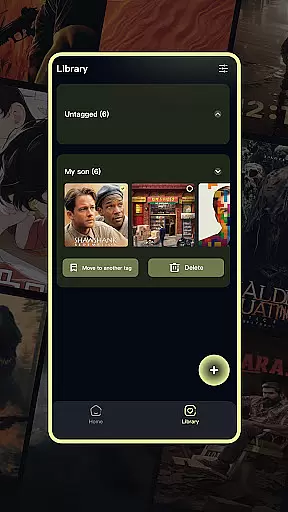
Video management is another strong suit, with the Library Page displaying all video tags. Clicking on a tag reveals related videos, and the page supports selection, moving, and deletion of videos, ensuring a tidy and organized video library.
In the realm of digital content, having a diverse and frequently updated library is crucial for user engagement. Videous lite offers an extensive array of video management and editing features that cater to both personal entertainment and professional creation needs. Its intuitive interface allows users to easily upload, edit, and manage their video libraries with practical functions such as chronological organization, length and size markers, and customizable tags.
The application's home page presents a clear layout of the user's video collection, ensuring quick access and efficient management. With just one click on the + button, users can swiftly expand their repository by uploading local videos. This seamless integration not only simplifies the process but also encourages creativity through experimentation with new content.
Moreover, Videous lite stands out in its commitment to keeping content fresh. The app provides tools for tagging, selecting, moving, and deleting videos which help maintain an organized library. By offering these dynamic capabilities within an accessible platform, it ensures that users are consistently motivated to create and curate novel material while enjoying a streamlined editing experience.
User engagement duration and retention are pivotal metrics for any entertainment application aiming to captivate its audience over time. Videous lite excels in this area by providing an immersive environment where users can effortlessly dive into video editing projects. Its straightforward controls allow even beginners to drag progress bars or customize tags without feeling overwhelmed, thus extending their interaction periods naturally.
By integrating essential settings adjustments at fingertips via top-right corner buttons alongside administrative options like viewing comments or deleting videos from the top-left menu, Videous lite enhances usability significantly. Such thoughtful design elements contribute directly towards longer session times as they remove friction points commonly encountered during complex workflows.
Furthermore, Videous lite fosters loyalty among its community through continuous improvements based on feedback loops established within the app itself. Users feel valued knowing their input shapes future updates, thereby increasing attachment levels towards the platform. As a result, not only does initial interest convert into sustained usage patterns but also promotes word-of-mouth advocacy further bolstering overall retention rates.
User-friendly interface
Efficient video processing
Intuitive video editing
Comprehensive video management
Quick video uploads
Limited advanced features
Basic video effects
Occasional performance lags
Restricted format support
Minimal customer support

Exclusive creator communities
 4.70
4.70
Exclusive Short Drama Video! All in HD. Bringe trending reels & enjoy drama time
3.80
Stream Online TV - Watch Live IPTV Playlist & Channel with Built-In Player
4.50
Browser for Chromecast to stream webvideos, online movies, IPTV & HD livestreams
4.40
Atomus is a 10-finger multi-touch interactive visualizer.
4.30
Real ghost box scanner with echo, reverb, EMF, & multi-stream channels.
3.80
Realistic Baby Simulator App
4.00
Binaural Brainwave Doses for Every Imaginable Mood
3.60
Pop Drama is a premier app crafted for short drama lovers
4.60
Original short dramas with diverse genres for a rich viewing experience!
4.80
Fun brain twisting challenge with trending Whirlpool Filter.
4.70
Hand-drawn, cartoon OC creator - original character creator
4.70
Stream Movies & TV Series: Original Shows, Family Movies & New Releases Weekly
4.60
Fetch money rewards all just for playing games. Cash out for gift cards in app.
4.50
Play games. Earn real rewards. Cash out in 3hours via PayPal or gift cards.
4.40
Catch the latest episodes of The Voice or live stream NFL games with The NBC App
4.20
Explore the unknown!
3.00
Stream over 80 hours of exclusive mashups and remixes by DJ Rehab.
4.1
See the frequencies! Watch the magic!
4.3


User Reviews