

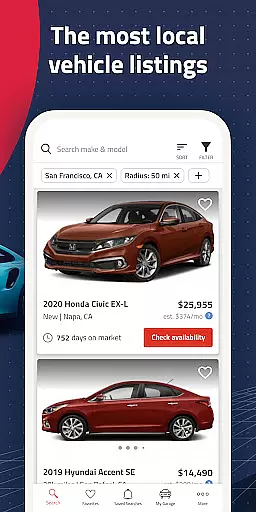


Autolist is a premier automotive marketplace app designed to simplify the car-buying process. With access to millions of used car listings from thousands of sources, it aggregates the largest selection of local cars, trucks, and SUVs in one place. Whether you're searching for a specific make and model or just browsing options, Autolist provides comprehensive filters to refine your search by price, year, color, and features.
The app's standout feature is its Listimate value tool, which offers complete price history and estimated values for each vehicle, empowering buyers to negotiate fair prices. Additionally, users can directly contact dealers or private sellers through call, text, or email to check availability, request quotes, or schedule test drives. Autolist also ensures you stay updated with real-time notifications on price drops and new inventory matching your criteria.
Perfect for anyone in the market for a used car, Autolist combines an extensive inventory with powerful tools to ensure a seamless and informed buying experience.
Autolist stands out with its robust set of features tailored to enhance the car-buying journey. The app boasts an extensive inventory sourced from thousands of listings nationwide, ensuring users have access to the widest selection of vehicles. Its advanced filtering system allows users to narrow down choices by various criteria such as price range, vehicle year, exterior and interior colors, and installed features, making it easy to find exactly what you need.
A key highlight is the Listimate value tool, which provides detailed price histories and estimated values for every car listed. This feature helps users understand market trends and make informed decisions when negotiating prices. Furthermore, Autolist facilitates direct communication with sellers through integrated call, text, and email options, streamlining the process of checking availability and securing deals.
For those who want to stay ahead in their search, Autolist offers real-time alerts on saved searches and favorite vehicles, notifying users of price changes and newly available inventory that matches their preferences.
When searching for a used car, having access to comprehensive vehicle details is crucial. Autolist provides extensive information on each listing, including make, model, year, mileage, and installed features. This level of detail allows buyers to make informed decisions without needing to visit multiple dealerships.
The app aggregates data from thousands of sources across the web, ensuring that users have the most up-to-date and accurate vehicle specifications available. Whether you're looking for a specific trim level or particular features like sunroofs or navigation systems, Autolist's detailed listings help you find exactly what you need.
Users benefit from this wealth of information by being able to compare vehicles more effectively. With all relevant details presented clearly within the app, shoppers can evaluate different options side-by-side based on their preferences and budget constraints.
This commitment to providing thorough vehicle information not only saves time but also increases buyer confidence. Knowing exactly what a car offers before contacting sellers streamlines the entire purchasing process, making it easier than ever to find your ideal vehicle.
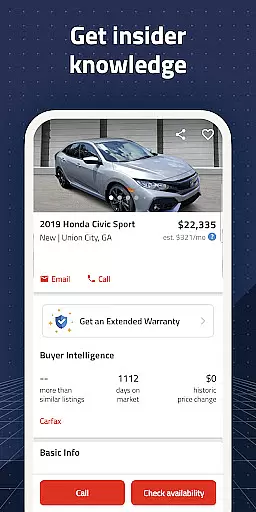
One of the biggest challenges in buying a used car is understanding its true market value. Autolist addresses this issue through its robust price transparency features. Each vehicle listing includes complete pricing history, showing how long the car has been listed and any price changes over time.
The app's proprietary Listimate value estimation tool provides users with an estimated fair market price for each vehicle. This feature analyzes historical sales data and current market trends to give buyers valuable insights into whether a particular car is priced fairly.
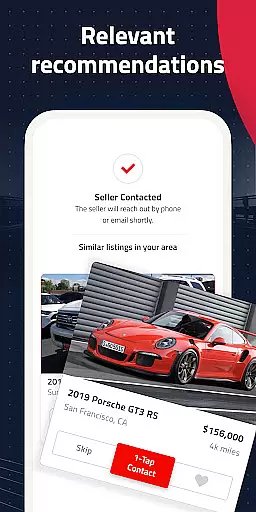
Additionally, Autolist enables direct communication with sellers through call, text, or email functions within the app. This facilitates straightforward price negotiations and quote requests, empowering buyers with the information they need to secure the best deal possible.
By combining historical pricing data with real-time market analysis, Autolist ensures that users have all the necessary information to make confident purchasing decisions. This transparency helps prevent overpaying and contributes to a more equitable used car marketplace.
User-friendly interface
Extensive vehicle listings
Powerful filtering options
Comprehensive price history
Direct seller communication
Limited new car options
Occasional listing inaccuracies
Ads can be intrusive
Requires constant updates
Some features are premium-only

Take Control of Your Car
 4.80
4.80
OBDII - ELM327 Terminal tool for 96-00 Volvos
4.50
* This app needs an adapter cable and a certain OBD2 adapter to work *
4.20
The Texaco App allows you to pay for fuel from the comfort of your car!
4.80
myAudi offers users services and Audi connect services for Audi drivers
4.10
Oil change service & coupons for car maintenance at Valvoline Instant Oil Change
4.70
Find Your Local Store or Shop Online for the Car, Truck, or SUV Parts You Need
4.70
Easy connect & control your cars from afar. Remote Lock & unlock car and carplay
4.60
A smarter way to park and reserve your spot ahead of time.
4.40
Play what you want through Android Auto
4.90
Practice the drills within MotoJitsu Master Riding Program Volume 1 & 2!
4.80
Car Values, Research and More
4.80
1M+ high-quality auto parts at your fingertips. Fitment guaranteed.
4.70
DMV practice test 2025: Driver License permit test & written test for all states
4.70
Listings of Tesla's with FSD - Included package
4.60
Secure mobile payments & fuel savings at Phillips 66®, Conoco® and 76® stations
4.40
Taximeter; the professional's choice
4.30
Wonder how much horsepower and torque your car/truck makes? Look no further.
3.40
DIY Vehicle Wheel Alignment
4.0


User Reviews