
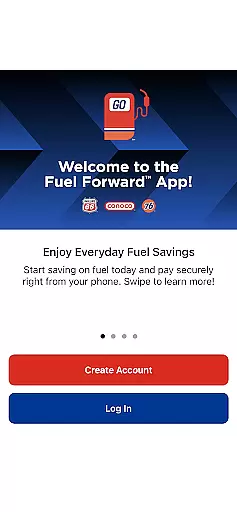
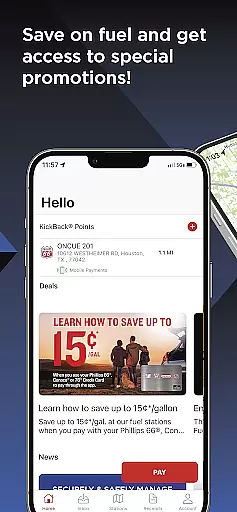
Fuel Forward™ is a mobile payment solution designed specifically for Phillips 66®, Conoco®, and 76® gas stations across the United States. This app allows users to pay for fuel directly from their mobile devices, eliminating the need for physical wallets or cards. With its secure payment system, users can easily add their preferred payment methods, including credit cards, PayPal, and other digital wallets, making transactions seamless and efficient.
In addition to its core payment functionality, Fuel Forward™ offers features such as real-time station location services, fuel price comparisons, and access to exclusive promotions. Users can also earn and track loyalty points through the KickBack® program at participating locations. Whether you're looking to save time at the pump or find the best fuel prices nearby, this app provides an all-in-one solution for managing your fueling needs while maximizing savings.
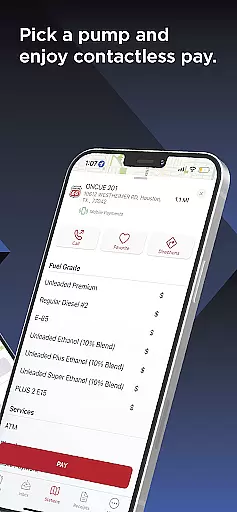
The Fuel Forward™ app stands out with its comprehensive set of features tailored to enhance convenience and savings for drivers. One of its key functionalities is the ability to make secure payments directly from your phone. By simply entering the pump number and authorizing the transaction within the app, users can complete their fuel purchases without ever needing to swipe a card. The app supports a wide range of payment options, including major credit cards, PayPal, Venmo, Google Pay, Samsung Pay, and even direct bank account linking.
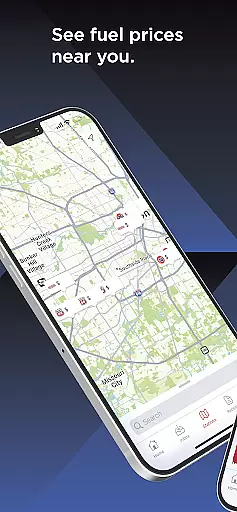
Beyond payments, the app includes tools like GPS-enabled station locators that provide directions to nearby Phillips 66®, Conoco®, and 76® stations. It also displays detailed information about each station’s amenities and current fuel prices. For those enrolled in the KickBack® loyalty program, the app tracks earned points and rewards, helping users maximize their benefits. These robust features ensure that every trip to the gas station is both convenient and cost-effective.
In the realm of Auto & Vehicles, having access to detailed vehicle information is paramount for making informed decisions. The Fuel Forwardu2122 App steps up to this need by providing users with comprehensive details about Phillips 66u00ae, Conocou00ae, and 76u00ae stations nationwide. This includes not only locations but also specific amenities available at each station.
The app goes beyond just basic location services by enabling users to discover fuel prices near them. This feature ensures that drivers can plan their refueling stops based on both convenience and cost-efficiency, optimizing their travel budget without sacrificing quality or reliability.
Moreover, the app's ability to display station amenities adds another layer of utility. Whether you're looking for a quick snack, restroom facilities, or car wash services, the app provides all necessary information at your fingertips. This empowers users to choose stations that best fit their needs while on the road.
By integrating these detailed insights into an easy-to-use mobile application, Fuel Forwardu2122 enhances the overall driving experience. It allows users to make well-informed choices regarding where they stop for fuel and services, ultimately contributing to a smoother journey.
Price transparency in the automotive sector is crucial for consumers who seek to manage their expenses effectively. The Fuel Forwardu2122 App addresses this by offering clear visibility into fuel prices at various Phillips 66u00ae, Conocou00ae, and 76u00ae stations across the nation. This empowers users to select the most economical options without compromising on service quality.
Beyond merely displaying prices, the app incorporates special promotions and savings opportunities directly within its interface. Users can easily identify discounts and loyalty rewards, such as those offered through the KickBacku00ae program, ensuring they maximize their financial benefits every time they refuel.
Additionally, the app supports a wide array of payment methods including credit cards, digital wallets like PayPal and Google Pay, and even direct bank account links. By presenting all accepted payment methods upfront, it eliminates any guesswork related to transaction fees or compatibility issues, further enhancing price transparency.
This commitment to openness extends to the transaction history feature, which allows users to view past purchases and receipts. Such functionality not only aids in personal finance management but also builds trust between consumers and service providers by maintaining clear records of all interactions.
User-friendly interface
Wide range of payment options
Secure transactions
Real-time fuel pricing
Loyalty rewards integration
Limited to specific gas stations
No cashback option
Requires stable internet
Occasional bugs reported
Geographic restrictions apply

Ferrari inspired analog & digital watch face with quick access and premium style
 4.5
4.5
A full featured, real-time transit locator system
4.30
Discover new and used cars in Syria easily! Browse ads and connect with sellers.
3.70
Oil change service & coupons for car maintenance at Valvoline Instant Oil Change
4.70
Simplify your drive
3.90
Automotive Electrical Wiring Diagrams
4.40
Mobile Phone Parking - So easy to park
3.70
1M+ high-quality auto parts at your fingertips. Fitment guaranteed.
4.70
O'Reilly Pro will streamline your parts lookup and ordering process!
3.20
Marathon ARCO Rewards members earn rewards & apply the rewards for fuel savings!
4.80
Lexus app currently supports 2010 or newer vehicles (2018 or newer for Hawaii).
4.80
Trip computer+car diagnostic tool with widest variety of features and dashboard!
4.70
Easy connect & control your cars from afar. Remote Lock & unlock car and carplay
4.60
Your Path to Driving Licensing Success Begins Here! Develop your driving skills.
4.40
OBD2 car scanner and diagnostics: read Check Engine, DTC, economy....
4.30
OBD diagnostics, Live Data, DPF regeneration for BMW
4.00
By enthusiasts, for enthusiasts
4.00
Available in select states.
4.00
Theme for Car Launcher
4.4


User Reviews