
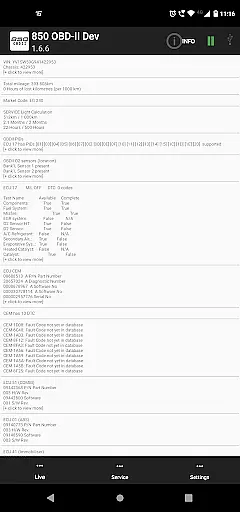
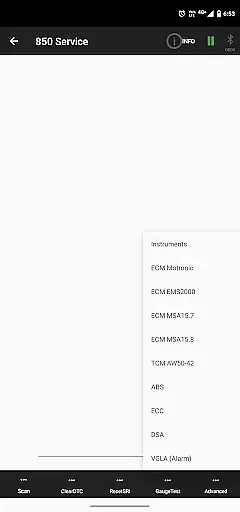
850 OBD-II is a specialized diagnostic tool designed for Volvo vehicles from 1996-2000, with support for P1 and P2 platforms. This app works in conjunction with an ELM327 Bluetooth/WiFi/USB dongle to provide advanced vehicle diagnostics and programming capabilities beyond standard OBD-II functions. It allows users to directly read individual modules, aiding in accurate problem diagnosis.
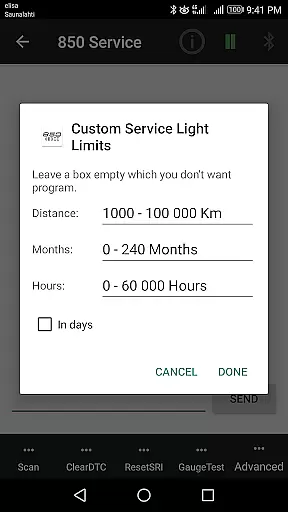
The application's key strength lies in its ability to reset service lights, read and clear fault codes, display real-time sensor data, and retrieve detailed system information such as ECU part numbers and configurations. With advanced commands for specific systems like Motronic M4.4 and MSA15.7, it offers functionality previously only available through dealerships. Whether you're diagnosing ABS systems or programming remote settings, this app provides comprehensive coverage for various Volvo models.
This app is particularly valuable for Volvo enthusiasts and mechanics who require detailed diagnostic information. By supporting a wide range of modules including CDM, ABS, TCM, ECM, and more, it empowers users to perform tasks that would otherwise necessitate a visit to the dealership. The app represents a cost-effective solution for maintaining and troubleshooting late 90s to early 2000s Volvo vehicles.
850 OBD-II distinguishes itself through its extensive feature set tailored specifically for Volvo vehicles. The app supports both basic OBD-II functions and advanced module-specific diagnostics across multiple Volvo platforms. Users can access live sensor data from various systems including ABS, SRS, instrument panels, and automatic gearboxes, providing real-time monitoring capabilities crucial for accurate diagnosis.
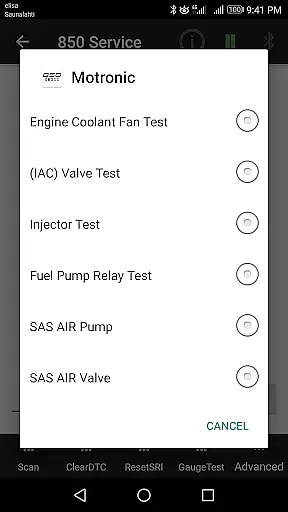
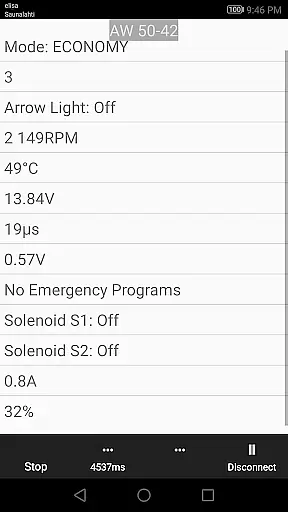
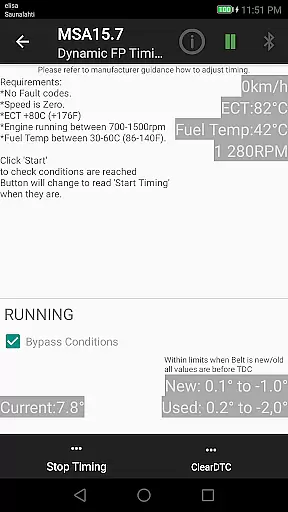
A significant advantage of this application is its advanced command functionality. It enables users to perform injector testing on Motronic M4.4 systems, dynamic timing adjustments for TDi fuel pumps using MSA15.7 protocols, and even complete VGLA remote programming without dealership intervention. The app also translates Volvo-specific DTC codes for numerous systems, including MSA15.7, AW 50-42 transmissions, and various ECUs, offering unparalleled diagnostic depth.
Additional notable features include component activation tests, customizable parameter adjustments through advanced commands, and terminal functionality for sending custom ELM327 commands. The app maintains compatibility with different CAN bus protocols while providing detailed system information and configuration data. These capabilities make it an indispensable tool for professional mechanics and dedicated Volvo owners seeking comprehensive diagnostic solutions.
Accessing detailed vehicle information is crucial for effective diagnostics and maintenance. The 850 OBD-II app excels in this area by providing comprehensive data about individual modules within supported Volvo models. This includes reading part numbers of ECUs, configurations, and real-time sensor data from systems like ABS, SRS, and the instrument panel.
The app goes beyond standard OBD-II capabilities by enabling users to access specific parameters and fault codes unique to Volvo's systems. For instance, it can read and clear DTCs from advanced modules such as Motronic M4.4, MSA15.7, and even specialized systems like ROPS and CAB. This level of detail helps both professional mechanics and DIY enthusiasts pinpoint issues more accurately.
Users benefit from the ability to view live scrolling values from various vehicle systems, including engine management, transmission, and climate control units. The app also provides valuable information about system configurations and component statuses, making it easier to understand the vehicle's current state and historical data.
This detailed information empowers users to make informed decisions about maintenance and repairs. Whether you're diagnosing a specific issue or performing routine checks, having access to such comprehensive vehicle data ensures more accurate assessments and potentially saves on repair costs.
While primarily a diagnostic tool, the 850 OBD-II app offers excellent value through its transparent pricing model and feature set. Unlike many automotive diagnostic tools that require expensive subscriptions or hardware, this app works with widely available ELM327 adapters, making professional-grade diagnostics accessible to all Volvo owners.
The app clearly states its hardware requirements, specifically the need for an ELM327 adapter version 1.4b or greater. This straightforward approach helps users understand exactly what they need to get started, avoiding unexpected costs or compatibility issues. The developer also provides helpful notifications when using suboptimal hardware, ensuring users get the best possible experience.
All core features, including Service Light reset, Fault Code reading, and Live data monitoring, are included without additional charges. Advanced functions like Injector testing and VGLA Remote Programming demonstrate the app's commitment to delivering maximum value without hidden fees.
This transparent approach extends to the app's limitations and potential risks, which are clearly documented. Users appreciate knowing exactly what they're getting, from the app's capabilities to its support limitations, making it easier to decide if it meets their needs.
User-friendly interface
Comprehensive diagnostic tools
Real-time data monitoring
Advanced programming options
Wide vehicle compatibility
Requires ELM327 adapter
Limited to supported models
Complex for beginners
Occasional bugs reported
No iOS version available

The Smarter Way Forward
 3.30
3.30
Ferrari inspired analog & digital watch face with quick access and premium style
4.0
CVT diagnostics with ELM327 for Nissan-based vehicles
4.40
Autolist - The Largest Selection of Local Used Cars and Trucks
4.50
The ExtraMile App allows you to pay for fuel from the comfort of your car!
4.70
Secure mobile payments & fuel savings at Phillips 66®, Conoco® and 76® stations
4.40
MySubaru: Download. Connect. Love.
4.70
Find Your Local Store or Shop Online for the Car, Truck, or SUV Parts You Need
4.70
Easy connect & control your cars from afar. Remote Lock & unlock car and carplay
4.60
Lexus app currently supports 2010 or newer vehicles (2018 or newer for Hawaii).
4.80
Quick and easy car diagnostics to get you the right fix.
4.70
A smarter way to park and reserve your spot ahead of time.
4.40
Ultimate OBD2 Car Scanner: Diagnostics, Service and Modification Tool
4.30
Your car is talking. Start listening.
4.30
myAudi offers users services and Audi connect services for Audi drivers
4.10
OBD diagnostics, Live Data, DPF regeneration for BMW
4.00
BlueDriver® is a Premium Diagnostic OBD2 Scan Tool. www.BlueDriver.com
3.90
AlfaOBD software for Fiat Group cars native diagnostic
3.70
Theme for Car Launcher
4.1


User Reviews