
70mai App is a dedicated mobile application designed to work seamlessly with 70mai Smart Dash Cams. The app allows users to connect their smartphones to the dash cam via Wi-Fi, enabling real-time image previews directly on their devices. This feature eliminates the need for physical access to the dash cam while driving or parked.
In addition to live previews, the app provides access to historical footage stored on the dash cam. Users can download important videos and images to their smartphones without using a SIM card. The app also supports firmware updates, allowing users to check for new versions, download update packages, and push them to the dash cam for installation. This ensures that the device remains up-to-date with the latest features and security enhancements.
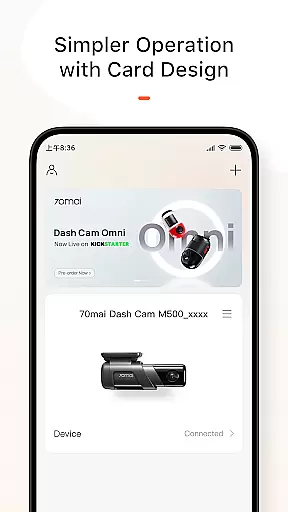
The app's intuitive interface makes it easy for drivers to manage their dash cam settings, view critical recordings, and maintain optimal performance. Whether you're looking to monitor your vehicle's surroundings or ensure your dash cam is running the latest software, 70mai App offers a comprehensive solution for all your dash cam management needs.
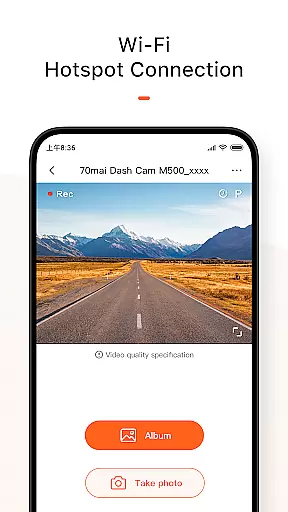
One of the standout features of 70mai App is its ability to provide real-time image previews from the connected dash cam. By establishing a direct Wi-Fi connection between the smartphone and the dash cam, users can view live footage without any delay. This functionality is particularly useful when adjusting the camera's position or checking its field of view.
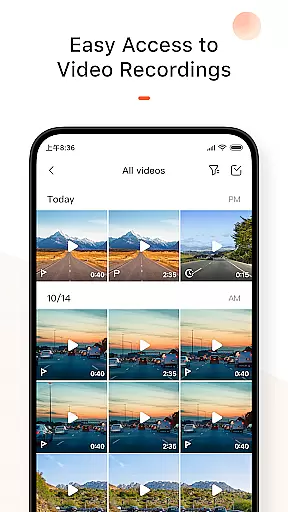
Beyond live previews, the app excels in managing recorded content. Users can browse through historical footage captured by the dash cam and download specific files to their smartphones. This process is straightforward and does not require a SIM card, making it convenient for users who want to save important moments without incurring data charges.
Another key feature is the built-in firmware update system. The app regularly checks for available updates and notifies users when a new version is ready. Users can download the update package directly through the app and push it to the dash cam for installation. This streamlined update process ensures that the device remains current with minimal user intervention, enhancing both functionality and security.
The 70mai App provides users with comprehensive access to detailed vehicle information captured by the 70mai Smart Dash Cam. This includes real-time image previews directly on your mobile device after connecting via Wi-Fi.
By utilizing the app, drivers can review historical footage and download crucial videos or images to their smartphones without using a SIM card. This feature ensures that all important events are documented and easily accessible for future reference.
In addition to video management, the app allows users to check for firmware updates for their dash cam. By downloading and pushing the update package through the app, users can keep their device up-to-date with the latest features and improvements.
While the 70mai App itself is free to use, it offers significant value by ensuring price transparency in managing your dash cam's functionality. Users can access all core features without hidden costs, including real-time previews and video downloads.
The app enables users to manage their dash camu2019s performance efficiently, eliminating the need for additional expenses related to data usage or third-party services. All updates and downloads occur directly through the app at no extra charge.
Furthermore, the ability to perform firmware updates via the app ensures that users are not required to pay for external support or services. This straightforward approach enhances user experience while maintaining full cost visibility.
User-friendly interface
Real-time camera preview
Free video downloads
Regular firmware updates
Seamless Wi-Fi connectivity
Limited to 70mai devices
Wi-Fi range constraints
No cloud backup option
Occasional connection issues
Firmware update dependency

OBD2 car scanner and diagnostics: read Check Engine, DTC, economy....
 4.30
4.30
* This app needs an adapter cable and a certain OBD2 adapter to work *
4.20
Digital Car Key/Launcher, Screen Mirror, Android Dashboard, Remote Wireless Link
4.40
The ExtraMile App allows you to pay for fuel from the comfort of your car!
4.70
Mobile Phone Parking - So easy to park
3.70
1M+ high-quality auto parts at your fingertips. Fitment guaranteed.
4.70
MySubaru: Download. Connect. Love.
4.70
Find Fast EV Chargers | Charge Your Vehicle at 1,100+ Fast Car Charging Stations
4.60
7-Day Returns on All Cars
4.80
Shop, finance, or sell today.
4.80
DMV practice test 2025: Driver License permit test & written test for all states
4.70
Buy and sell your boat
4.70
Instantly redesign your car with AI. From sporty to futuristic, try it all.
4.50
Autotrader is your online solution for buying and selling new and used cars.
4.40
Realtime Charts is a plugin for the Torque Pro App (OBD 2 & Car)
4.20
Car Sounds Engine Sounds app welcomes Auto Lovers to feel Car Simulator Sound
4.20
Available in select states.
4.00
Easily notify car owners in urgent situations, safe, fast, multilingual.
4.1
Ferrari inspired analog & digital watch face with quick access and premium style
4.4


User Reviews