
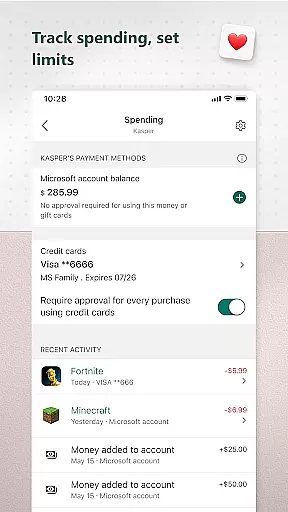
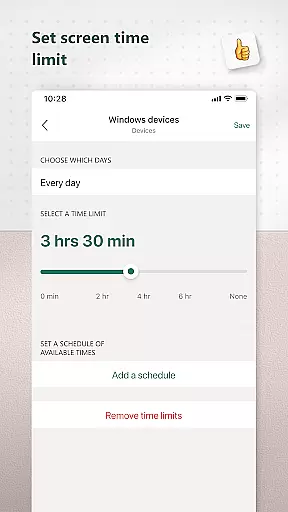
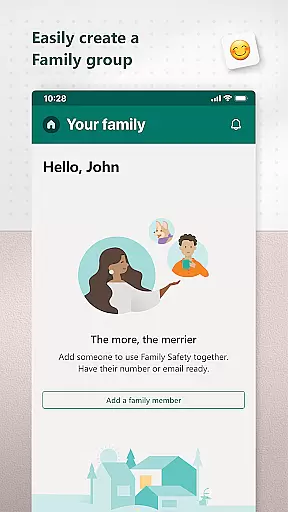
Microsoft Family Safety is a comprehensive parenting app designed to help families develop healthy digital habits while ensuring children's safety online. The app allows parents to set up parental controls, manage screen time, and filter inappropriate content across multiple devices including Android, Xbox, and Windows.
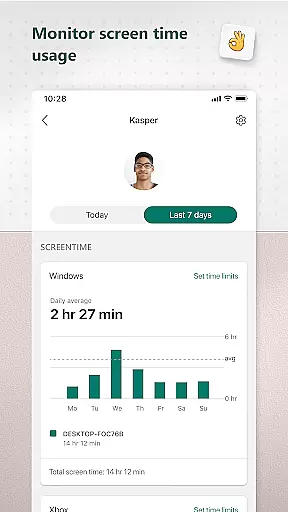
One of the standout features is its activity reporting system, which provides weekly summaries of children's screen time and app usage. This helps parents stay informed about their kids' digital activities and initiate meaningful conversations about online behavior. Additionally, the app offers web filtering for kid-friendly browsing on Microsoft Edge and enables blocking of inappropriate apps and games.
The app is equally beneficial for children as it ensures they access age-appropriate content while maintaining a level of independence. With privacy being a priority, Microsoft emphasizes data protection and gives users control over how their information is collected and used.
Microsoft Family Safety offers a robust set of features tailored to support both parents and children in navigating the digital world safely. One key feature is the detailed activity reporting that tracks screen time and app usage, providing parents with actionable insights through weekly email summaries.
Screen time management is another core functionality, allowing parents to set specific limits for apps, games, and overall device usage on Xbox, Windows, and Android. Parents can also receive notifications when their child requests additional screen time, enabling real-time adjustments.
Content filtering ensures children only access appropriate material by enabling kid-friendly browsing on Microsoft Edge and restricting access to inappropriate apps and games. Privacy controls are stringent, giving users meaningful choices about data collection and usage, reinforcing trust and security within the app.
When it comes to parenting apps, content credibility is paramount. Microsoft Family Safety ensures that all information and guidance provided are backed by child development experts and digital safety professionals. The app's features are designed based on extensive research into online safety and child psychology.
The parental controls offered by the app are not arbitrary restrictions but are developed with careful consideration of age-appropriate content and activities. This means parents can trust that the limits they set are in line with recommended guidelines for healthy digital habits. Furthermore, the activity reports generated by the app provide accurate insights into children's screen time and online usage.
Microsoft takes pride in its commitment to user privacy and data protection. Unlike some other services, Microsoft does not sell or share location data with third parties such as insurance companies or data brokers. This ensures that families using the Family Safety app maintain control over their personal information while benefiting from expert-validated tools to manage their digital lives.
Tracking a child's growth in terms of digital habits is essential for modern parenting. Microsoft Family Safety offers precise tracking mechanisms that allow parents to monitor their children's screen time across multiple devices including Android, Xbox, and Windows platforms. This cross-device compatibility ensures comprehensive coverage of a childu2019s digital activities.
The app provides detailed activity logs which include specifics like app usage duration and frequency of website visits. These logs help parents understand where and how their children spend their time online. Additionally, weekly email summaries offer an overview of the child's digital footprint, enabling parents to have informed discussions about online behavior.
Accuracy in growth tracking also extends to timely notifications when a child requests additional screen time. This feature allows parents to make informed decisions regarding extending or limiting access based on real-time requests. Such precision in tracking supports the development of balanced digital habits among children while giving them a sense of autonomy within safe boundaries.
User-friendly interface
Multi-device compatibility
Comprehensive activity reports
Effective screen time management
Strong privacy protections
Limited third-party app control
Requires child's consent for some features
No iOS support
Premium features may require subscription
Occasional syncing issues

AI Motion Video Maker & Ideas
 4.3
4.3
All-In-One Pregnancy Tracker, Your Baby's Milestones, Growth Stages & Parenting
4.70
Discover fun videos, kids songs, bedtime stories and games
3.60
All-in-one pregnancy app, contraction timer, kick counter & due date calculator
4.40
3D Baby size, Fruit comparisons, Smart Checklist, Trending Names & Training.
4.90
Watching baby, helping parents
4.10
Screen Time, App and Web Block & Monitoring, Location Tracker
3.60
Track baby’s development & growth week by week with BabyCenter’s pregnancy app!
4.90
FamilyAlbum helps you share, save, and remember your child's special moments.
4.80
A simple way to track your baby’s breastfeeding, diaper changes, sleep patterns.
4.90
All-In-One Pregnancy Tracker, Your Baby's Milestones, Growth Stages & Parenting.
4.90
Pinardin - Smart Parental Control, Online Safety & GPS Tracking!
4.80
Fun Ideas for Parents
4.70
Block apps, set screen time limits, and customize usage schedules
4.50
Reliable phone tracker by number & locate phone app. Protect your family.
4.50
Comprehensive Parental Control & Child Safety — Hear & Protect Your Child World
4.30
Fake call application designed for parents and adults to discipline their children through the children's police.
4.20
Magic chalkboard coloring and drawing!
4.20
Findnumber: Real-time location tracker for ultimate family security
4.20


User Reviews