
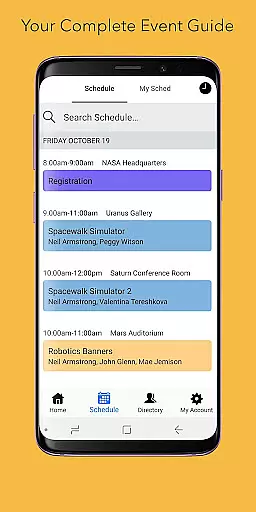
Sched is a leading platform for session registration and attendance management, designed to streamline the organization of complex multitrack events. This app consolidates all event details into one accessible location, offering users an efficient way to manage their events.
With features like a full schedule view, personalized experiences, comprehensive directories, and offline caching, Sched ensures that users can easily access key event information without needing a physical guide. Whether you're organizing a conference or attending one, Sched enhances your experience by providing essential tools right at your fingertips.
The app's vision is to transform how events are experienced, making them more interactive and less cumbersome. By integrating technology with event management, Sched aims to create a seamless experience for both organizers and attendees, ultimately improving engagement and satisfaction.
Sched offers a robust set of features tailored for managing and enhancing event experiences. One of its standout capabilities is the full schedule view, which allows users to conveniently browse the entire event schedule directly from their mobile device, eliminating the need for paper guides.
Personalization is another key feature, enabling attendees to log in and view their customized schedules on-the-go. Users can make real-time changes and sign up for public events by creating attendee accounts, instantly saving favorite sessions to their personal schedules.
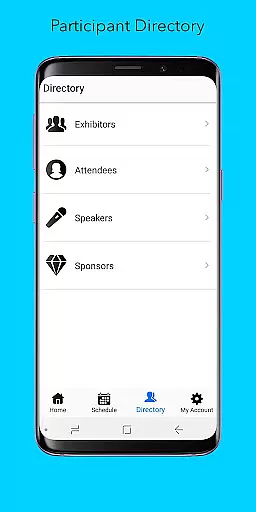
Additionally, Sched provides a comprehensive directory of speakers and exhibitors, complete with detailed professional profiles. The offline caching functionality ensures that users always have access to their schedules, even without an internet connection. These features collectively enhance user engagement and provide a reliable, flexible solution for event management.
Task creation and detail customization are essential features for event management platforms like Sched. This functionality allows event organizers to create, modify, and manage various sessions and activities within their events with precision.
Sched offers an intuitive interface where users can easily input session details such as time, location, speaker information, and descriptions. The platform supports complex multitrack events, enabling the simultaneous scheduling of multiple sessions, which is crucial for large-scale or multifaceted events.
For attendees, detailed session information enhances their event experience by allowing them to plan their participation effectively. They can choose sessions that best fit their interests and schedules, thus maximizing their event engagement and satisfaction.
The ability to customize task details ensures that all event-related information is accurate and up-to-date, providing a seamless experience for both organizers and participants. This feature ultimately leads to more successful and well-attended events, benefiting everyone involved.
Reminder settings in event apps like Sched play a vital role in ensuring attendees do not miss important sessions. This feature allows users to set up personalized alerts for upcoming events or sessions they plan to attend.
Sched provides flexible reminder options, enabling users to configure notifications based on their preferences. Whether it's a push notification, email alert, or in-app reminder, users can choose the most convenient method to stay informed about their scheduled activities.
For busy professionals or attendees juggling multiple sessions, timely reminders help manage their time efficiently. By receiving alerts before a session starts, users can transition smoothly between events, enhancing their overall event experience.
This functionality not only boosts attendee engagement but also increases session attendance rates, which is beneficial for both event organizers and participants. With reliable reminder settings, Sched ensures users remain well-informed and punctual throughout their event journey.
User-friendly interface
Comprehensive event management
Offline access to schedules
Real-time updates and changes
Detailed speaker profiles
Limited free features
Requires account creation
Occasional sync issues
Premium subscription costs
Complexity for small events

The calendar app in this 2026 year see all dates.
 4.20
4.20
Purchase line-skip passes, drinks, cover, and more at bars and clubs
3.50
Watch live football matches and streaming events on our Arabic TV app!
3.50
The Official App
3.70
Fast Scans. Happy Fans. For Every Hometown!
4.60
Meet people over dinner
4.40
Design Invitations & Cards for Any Occasion
4.80
Buy tickets for any event!
3.90
Save money on concert, sport, and theater tickets, and discover upcoming events.
4.80
Invitation card maker for birthday party & Wedding. Digital greeting card editor
4.90
Text message invitations for birthday party, wedding, graduation, baby shower +
4.60
Everything you need for the Best Thursday Ever.
4.40
Manage all your events, leads, ticketing, payments and check-ins.
4.30
Microsoft Build is an annual developer conference hosted by Microsoft
4.20
Introducing the official Magic: The Gathering app for mobile.
4.20
TV Garden - World Live TV : Play & cast your videos seamlessly!
3.20
Create Birthday Cards in Birthday Invitation Maker and Birthday Card Creator App
3.00
An App for Bhutanese
4.0
The Official App
4.5


User Reviews