

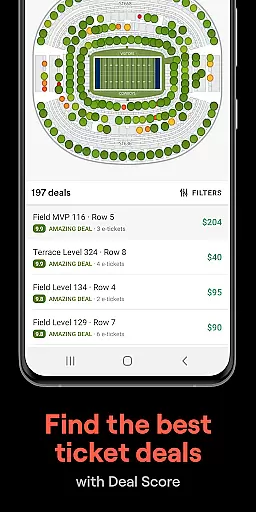
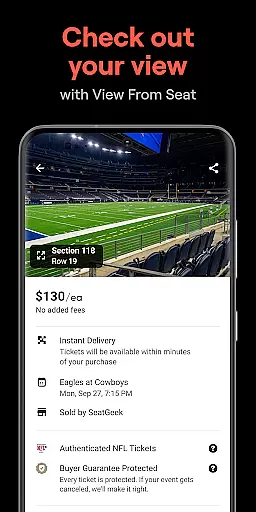
SeatGeek is a premier ticketing platform that provides users with access to tickets for thousands of live events, including sports games (NFL, NBA, NHL, MLB, MLS), concerts, festivals, and theater performances. The app's standout feature is its interactive seating charts, which allow users to explore the best deals using panoramic photographs from every section, ensuring they know exactly what their view will be before purchasing. SeatGeek also offers a unique Deal Score system, which color-codes each deal based on value, helping users avoid overpaying.
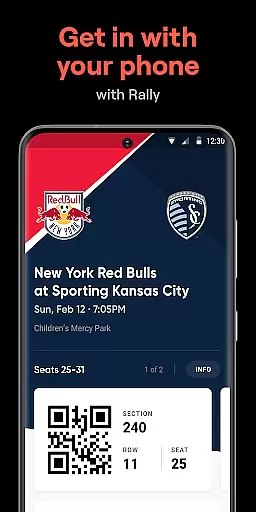
In addition to buying tickets, users can resell their own tickets directly through the app. With just one tap, users can list their tickets on SeatGeek’s marketplace, where the app even recommends optimal pricing to ensure quick sales. Another key feature is mobile ticketing, allowing users to gain entry to venues by simply showing their e-ticket in the app, eliminating the need for printing. Whether you're looking to attend a local sporting event or a major concert, SeatGeek streamlines the entire process while offering flexible payment options like Google Pay and Credit Card.
SeatGeek stands out due to its innovative features designed to enhance the ticket-buying experience. One of its most notable tools is the interactive seating chart, which not only maps out the best deals but also provides panoramic views from various sections, giving users confidence in their purchase decisions. This ensures that buyers know exactly what they are getting before committing to a ticket. Additionally, the app's Deal Score feature uses advanced algorithms to evaluate and rank deals, providing users with clear guidance on whether they are getting a good value.
Another significant advantage is the ability to send tickets instantly to friends' phones, either for free or for a fee, making group outings more convenient than ever. For those who can't attend an event, SeatGeek makes it easy to resell tickets with its intuitive one-tap listing process. The app also recommends competitive prices to help sellers move their tickets quickly. Furthermore, the Daily Tap feature adds an element of fun by giving users the chance to win free tickets to nearby events, enhancing engagement and encouraging regular use of the app.
Creating and customizing event tasks is a crucial feature for any event management app. SeatGeek allows users to effortlessly browse and select tickets for thousands of events, ranging from sports to concerts. The app's interactive seating charts provide detailed views of available seats, enabling users to choose the best possible location based on their preferences.
The level of detail customization in SeatGeek is impressive. Users can explore panoramic photographs from every section, ensuring they know exactly what the view from their seat will look like. This feature significantly enhances the ticket purchasing experience by providing transparency and helping users make informed decisions. Additionally, the Deal Score feature color-codes each deal, guiding users towards the best value options.
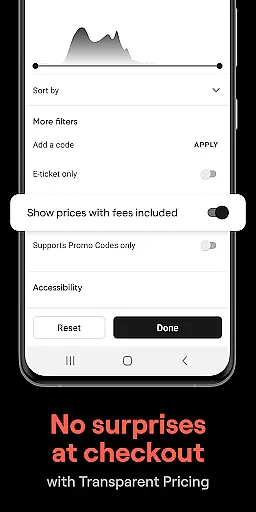
SeatGeek also offers various filters such as team, artist, venue, genre, or sport, allowing users to discover nearby events that match their interests. This customization ensures that users can tailor their event search precisely to their liking, making the entire process more efficient and enjoyable. With these capabilities, SeatGeek empowers users to create personalized event experiences with ease.
Setting reminders for upcoming events is essential for ensuring you never miss an important occasion. SeatGeek provides robust reminder functionalities that keep users informed about their purchased events. Once tickets are bought, users can rely on the app to send timely notifications regarding event details, dates, and times, ensuring they stay well-prepared.
In addition to standard reminders, SeatGeek's mobile ticketing system eliminates the need for physical printouts. Users can simply show their e-tickets in the app at the venue entrance, streamlining the entry process. Furthermore, if users have extra tickets, they can easily send them to friends directly through the app, either for free or for a fee, enhancing convenience and flexibility.
For those who cannot attend an event, SeatGeek facilitates seamless reselling within its marketplace. By recommending optimal pricing, the app helps users quickly sell their tickets. These reminder and management features collectively ensure that users remain engaged and informed throughout their event journey, maximizing both convenience and satisfaction.
User-friendly interface
Interactive seating charts
Deal Score value rating
Mobile ticket access
Flexible payment options
Limited international support
Occasional high fees
Event availability varies
Requires account creation
Some features US-only

An App for Bhutanese
 4.3
4.3
Microsoft Build is an annual developer conference hosted by Microsoft
4.20
Create invitation cards for birthdays, weddings, Christmas and more.
4.80
Instant photo sharing for every occasion
3.80
Text message invitations for birthday party, wedding, graduation, baby shower +
4.60
Events, Meetings, Photo Shoots
4.50
RAISE-365 makes fundraising easy and fun!
3.20
Design Invitations & Cards for Any Occasion
4.80
Freebie Games for Epic Games, Steam, Amazon, Rockstar etc.
4.40
Invitation card maker for birthday party & Wedding. Digital greeting card editor
4.90
Birthday Greetings provides Birthday Card, Frames, Gifs & Father's day Wishes
4.80
Save money on concert, sport, and theater tickets, and discover upcoming events.
4.80
The Ultimate Tournament Hub
4.70
Meet people over dinner
4.40
The calendar app in this 2026 year see all dates.
4.20
Track birthdays, habits & goals. Unlimited countdowns and count-ups
4.20
No invest, Easy way to earn USDT through crypto cloud mining
3.80
The Official App
4.2
Browse events, find transportation, keep up with the latest news from your team
4.5


User Reviews