
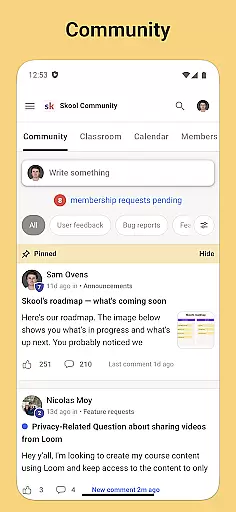
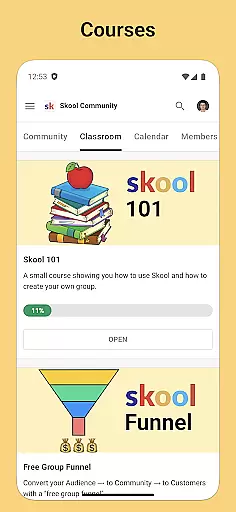
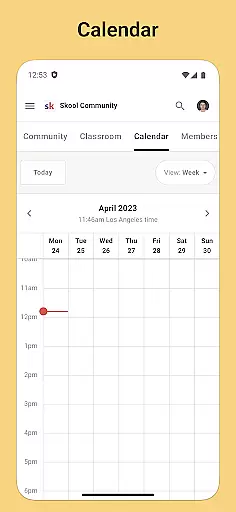
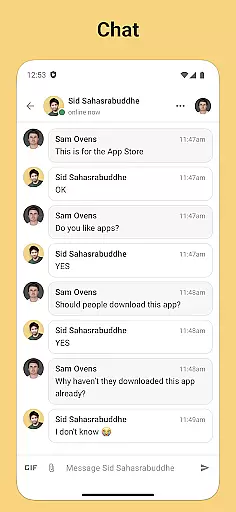
Skool is a dynamic social platform designed to keep users engaged with their online communities through an accessible mobile experience. The app serves as a hub for community interaction, offering features like group discussions, event planning, and direct messaging. With Skool, staying connected and informed within your digital communities has never been easier or more efficient.
The app's core functionality revolves around its Community, Courses, Calendar, and Chat features. These tools collectively enable users to participate in meaningful discussions, learn from diverse content, stay updated on upcoming events, and communicate privately with other members. Whether you're looking to expand your network or deepen existing connections, Skool provides the necessary infrastructure to support vibrant community life.
For individuals who are part of multiple online groups or organizations, Skool offers a centralized solution for managing interactions and information flow. By receiving real-time push notifications, users can promptly respond to discussions, never miss an important update, or overlook a community gathering again. This makes Skool particularly valuable for active community members seeking seamless integration into their daily routines.
Skool stands out in the Social category by providing comprehensive tools that cater to various aspects of community engagement. Its discussion platform allows users to create posts and comment threads, fostering interactive dialogue among members. This feature not only encourages open communication but also helps build stronger relationships within communities.
In addition to facilitating conversations, Skool incorporates educational elements through its Courses feature. Users can access video and text-based lessons, making learning flexible and personalized. The inclusion of a Calendar further enhances organizational capabilities, ensuring users remain aware of community events and activities. These combined functionalities make Skool a versatile tool for both socializing and personal development.
Another notable aspect of Skool is its Chat function, which enables direct messaging between users. This private communication channel adds a layer of intimacy and immediacy to interactions, complementing the public nature of group discussions. Overall, Skool's innovative blend of social networking, education, and organization tools positions it as a leading choice for modern community management.
User profile customization is a crucial aspect of any social platform, allowing users to express their individuality and establish their digital identity. Skool offers a comprehensive profile customization feature that enables users to personalize their profiles with relevant information, profile pictures, and preferences.
The app ensures authenticity verification through its robust system that checks the credibility of user information. This helps maintain a trustworthy community where users can confidently interact with verified members.
By providing these features, Skool enhances user engagement and fosters genuine connections within its communities. Users benefit from a reliable environment where they can showcase their true selves and connect with like-minded individuals.
Overall, Skool's focus on profile customization and authenticity verification contributes significantly to creating a vibrant and authentic social experience for its users.
Connection discovery is an essential feature in social apps, enabling users to find and connect with others who share similar interests or goals. Skool excels in this area by offering intuitive tools that help users discover new connections within their communities.
The app leverages advanced algorithms to recommend potential connections based on user activity, interests, and community involvement. This ensures that users are presented with relevant suggestions that enhance their social experience.
With Skool's connection discovery feature, users can expand their networks, engage in meaningful discussions, and participate in collaborative learning opportunities. The app's intelligent recommendation system facilitates serendipitous encounters and fosters a sense of belonging among community members.
Ultimately, Skool's commitment to facilitating connection discovery empowers users to build valuable relationships and enrich their social interactions within the platform.
User-friendly interface
Comprehensive community tools
Real-time notifications
Versatile learning options
Private messaging system
Limited customization options
Occasional notification delays
Requires constant internet
Learning curve for new users
Some features may need subscription

Watch 24/7 live stream, and make real friends nearby
 4.30
4.30
Video call, live video chat & talk to strangers. Meet people on Omega!
3.60
Date single & make friend
4.60
Social App Used By Millions
4.40
Get notifications of FREE Stuff for Nextdoor, Letgo, offerup & TrashNothing
4.70
Resonate & Date with New Match
3.70
Watch 24/7 great live stream, or go live to boost your social followers!
4.50
This version of Facebook uses less data and works in all network conditions.
4.60
A video app from OpenAI - AI video generation by the maker of ChatGPT
4.60
Watch super live shows 24/7, chat & meet friends in Plamfy social networking app
4.70
Live pics from your friends - Only the photos you want to see
4.60
Global short video platform: epic effects, trending videos & vibrant community!
4.40
Online group games like Mafia, Word War, Scattergories, Ludo, Uno, and many more
4.30
Honest dating app where real people find genuine love and real matches.
4.20
The world's leading social networking app for gay, bi, trans, and queer people.
4.10
Create your personal AI chatbot: talk, roleplay, and connect with characters!
4.10
Connect and share ideas
4.10
The video chat to meet people in the blink of an eye!
3.90
Message and video call your family and friends!
2.60


User Reviews