
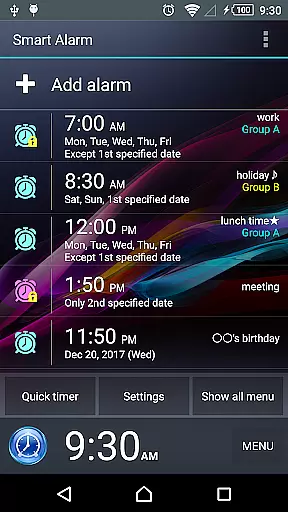
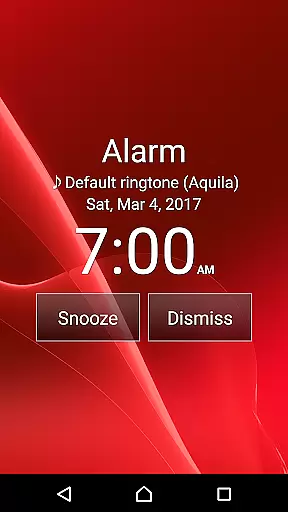
Smart Alarm is a premium alarm clock application designed for users seeking a reliable and feature-rich solution to manage their daily wake-up routines. This app offers advanced functionalities beyond basic alarm settings, including snooze features, gradual alarm sound increase, and customizable buttons to prevent accidental stops.
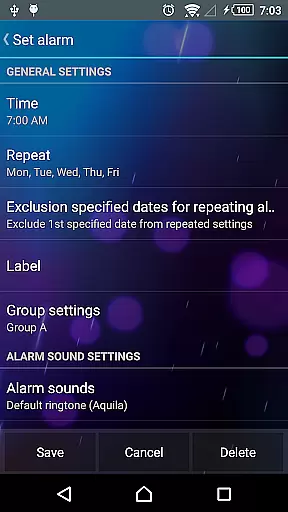
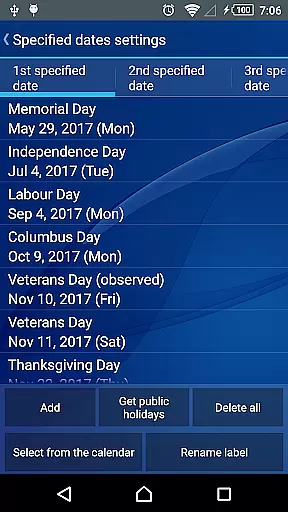
The application stands out with its ability to repeat alarms on specific days of the week while excluding public holidays, making it ideal for users with structured weekly schedules. Additionally, it provides options to use music from an SD card as the alarm tone and includes two-stage vibration settings for a gentler wake-up experience.
With its user-friendly interface and customizable options, Smart Alarm ensures users can tailor their alarm experience to individual preferences, enhancing both functionality and comfort.
Smart Alarm boasts an array of innovative features that cater to diverse user needs. One notable function is the ability to set alarms that adapt to the user's weekly routine, even accounting for public holidays in the United States. This ensures users are only alerted on relevant days, avoiding unnecessary disruptions.
The app also allows users to select music stored on their SD card as the alarm sound, providing personalized wake-up tones. Its unique gradual alarm sound increase and two-stage vibration strength help users wake up more naturally, reducing the shock of sudden loud noises.
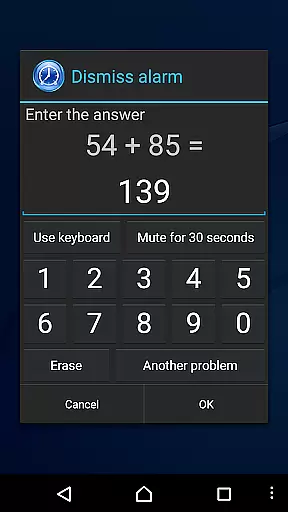
Additional standout features include customizable button sizes to prevent accidental alarm stops, math problem-solving or number entry requirements to stop the alarm, and key customization for side, back, and menu buttons. These thoughtful additions enhance usability and ensure a tailored alarm experience.
Smart Alarm offers comprehensive lifestyle functionality that caters to a wide range of user needs. The app includes essential alarm features such as snooze, weekly repeat settings, and holiday exclusions, ensuring it fits seamlessly into daily routines.
One standout feature is the ability to customize various aspects of the alarm experience. Users can set music from their SD card as the alarm sound, adjust button sizes to prevent accidental stops, and even solve math problems to turn off the alarm. These options provide flexibility and personalization for different user preferences.
The application also integrates with device settings, allowing users to control alarm behavior during silent mode and when headphones are connected. This level of customization ensures the alarm works in various situations and environments.
Furthermore, Smart Alarm addresses practical concerns by offering transparency settings that display the device's wallpaper as the app background. This approach creates a more visually appealing interface while maintaining all necessary alarm functions.
The content and features presented in Smart Alarm have been carefully designed and verified to ensure reliability. The developers emphasize the importance of testing the free version before purchasing, demonstrating their commitment to quality assurance.
Each function has been implemented with practical considerations in mind. For instance, the gradual volume increase feature and two-stage vibration settings help prevent startling wake-up experiences. These thoughtful additions reflect an understanding of real-world user needs.
While the application comes with necessary disclaimers about potential limitations across different devices, its extensive feature set suggests thorough development and testing. The inclusion of professional-grade functions like SD card music integration and complex alarm stop mechanisms indicates technical expertise.
The app's permissions are clearly explained, showing how each requested permission serves a specific purpose in alarm functionality. This transparency builds trust with users who want to understand exactly how their device resources are being utilized.
User-friendly interface
Highly customizable settings
Gradual alarm sound increase
Two-stage vibration strength
Public holiday exclusion
Paid version only
Requires device power-on
Task killer conflicts
SD card dependency
No guaranteed functionality

Design and brew great homebrewing beer, mead, cider and wine recipes on the go!
 3.60
3.60
Digital watch face design. Modern looking, hi-res & battery friendly.
4.00
This app is intended to support professional EMDR therapy.
4.50
The go to app for taking unlimited notes!
4.50
Spirit Communicator is a real paranormal ghost hunting app with many fun modes.
3.90
Crochet made easy: step-by-step tutorials, beginner patterns & projects
4.60
Simple, stylish & fresh watch face. Customize colors, gradients & complications.
4.70
Celebrate the holidays with Advent Calendar: daily surprises and festive fun!
4.3
PARAVOX 4 is a professional ITC paranormal research application.
4.50
Digital smart watch face made for Wear OS.
4.70
Made To Order Faves
4.70
A smart Siddur with halachic times
4.60
Discover your Nationality, Family Origin, and Ancestry from one selfie
4.50
Fly your Solo like a boss.
4.10
Smart controls for your Ember Smart Mugs
4.10
Spiritus Ghost Box is an Audio and Visual ITC tool for paranormal research.
4.00
Subwoofer school’s in session! You’ve now enrolled into KICKER U.
3.80
Communicate with your vehicles and Powerwalls anytime, anywhere
3.60
BILT interactive 3D instructions help you get the job done right
3.50


User Reviews