
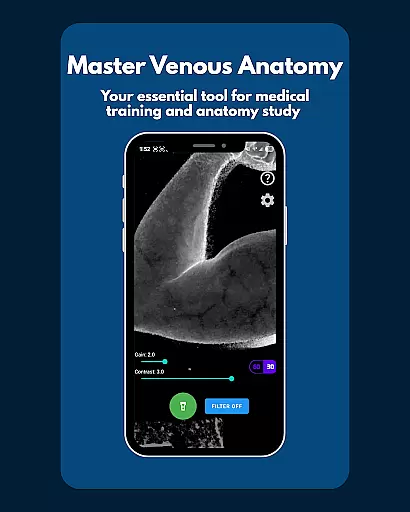
VeinFinder is an innovative educational tool designed to assist medical students and educators in mastering venous anatomy. Using advanced GPU-accelerated image processing, the app enhances vein visibility directly through your device's camera, eliminating the need for additional hardware. This makes it an ideal companion for both theoretical study and practical application.
The app offers precise control over gain and contrast settings, ensuring optimal vein visualization across various skin tones and lighting conditions. With its integrated flashlight feature, VeinFinder maintains consistent performance even in low-light environments. Whether preparing for exams or conducting classroom demonstrations, users can rely on VeinFinder to provide clear and accurate visualizations.
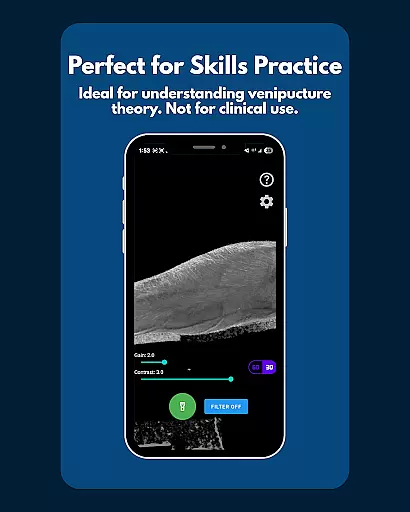
Perfect for students studying anatomy and physiology, VeinFinder also aids in understanding venipuncture techniques and IV access procedures. Its privacy-focused design ensures all processing occurs locally on the device, making it a secure choice for educational purposes.
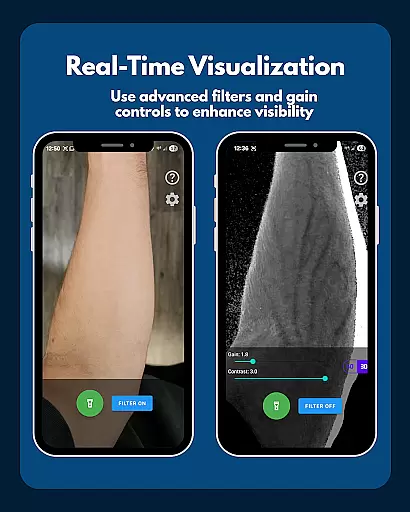
VeinFinder stands out with its array of specialized features tailored for medical education. The app's instant comparison function allows users to toggle between enhanced and raw camera views, facilitating a deeper understanding of venous structures. This real-time feedback is invaluable for students learning to identify veins accurately.
Precision control is another hallmark of VeinFinder, enabling users to fine-tune gain and contrast settings. This adaptability ensures that the app performs reliably across diverse skin tones and lighting scenarios, providing consistently clear vein visualizations. The integrated flashlight further enhances usability by maintaining visibility in dimly lit environments.
Privacy and security are paramount in VeinFinder's design. All image processing occurs locally on the device, ensuring that sensitive data never leaves the user's control. While optimized for Samsung devices, VeinFinder supports most Android models, with ongoing updates continually improving cross-device compatibility and performance.
VeinFinder stands out in the realm of educational tools by offering highly accurate and authoritative content for students and educators focused on anatomy and physiology. The app leverages advanced GPU-accelerated image processing to enhance the visibility of veins, providing a reliable resource for learning venous anatomy.
This technology ensures that users receive precise visual information directly through their device's camera without the need for additional hardware. Such accuracy is crucial for students preparing for exams or educators seeking effective teaching aids. By delivering clear and detailed vein visuals, VeinFinder bridges the gap between theoretical knowledge and practical understanding.
The app's precision control features allow users to fine-tune gain and contrast settings, optimizing visibility across various skin tones and lighting conditions. This adaptability enhances its reliability as an educational tool, accommodating diverse user needs and environments. Moreover, integrated flashlight control supports consistent performance even in low-light settings.
With all image processing conducted locally on the device, VeinFinder guarantees privacy and data security. Users can trust that their study sessions remain confidential, reinforcing the app's credibility as a dependable educational resource.
While VeinFinder does not offer traditional personalized learning paths like adaptive quizzes or tailored lesson plans, it provides unique customization options that cater to individual learning preferences. Users can adjust settings such as gain and contrast to create an optimal viewing experience based on their specific requirements.
This flexibility allows learners to personalize how they interact with complex venous anatomy, adapting the app's functionality to suit their study habits and pace. For instance, students can focus on particular areas of interest by selecting smooth, hair-free regions like the forearm or wrist for clearer vein visualization.
Moreover, VeinFinder's instant comparison feature enables users to toggle between enhanced and raw views, facilitating self-directed exploration of anatomical structures. This interactive approach empowers learners to identify areas needing further review and tailor their study sessions accordingly.
By supporting hands-on experimentation with different settings and techniques, VeinFinder fosters an engaging learning environment where users can develop practical skills at their own speed. This innovative method of personalization helps transform theoretical concepts into tangible understanding.
User-friendly interface
Real-time vein enhancement
Customizable settings
Local data processing
Educational focus
Limited clinical use
Device-dependent performance
Refund time constraints
Not for diagnosis
Varied accuracy

An animated storybook app to help ease your child through toilet training.
 3.70
3.70
Your guide to thousands of satellites and spacecraft in orbit around Earth!
3.90
Explore myths and gods across cultures with in-depth insights and stories.
5.00
Latest TLC Practice Questions! Multiple languages available!
4.50
Master the NRP with 700+ questions, rationales, and updated NREMT scenarios.
3.00
Explore the City of the Sun in Augmented Reality
3.70
Astronomy Guide To Night Sky
4.30
Discover Your Place in the Universe
4.70
Fun, personalized math learning games that adapt to your child’s needs.
4.40
Learn Words Daily in Just Minutes - Boost Your Language Skills Fast!
4.60
Astronomy Guide to the Night Sky
4.40
SkyView®, an augmented reality space app, brings stargazing to everyone!
4.40
Learn math, step-by-step
4.30
The "Go To" app for Airmen studying for promotion to SSgt and TSgt
4.30
Designed for Calculator 84 users
4.20
Listen, request and record pronunciations in more than 450 languages. Everywhere
3.90
An aviator’s preparation, study and test tool for FAA Knowledge Exams.
3.80
MONOPOLY JUNIOR brings Hasbro's classic the board game to life.
3.00
Study the questions most likely to be asked during the Oral & Practical Exams.
2.80


User Reviews