
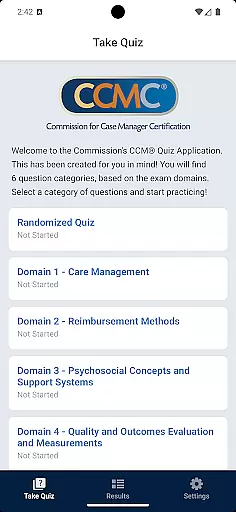
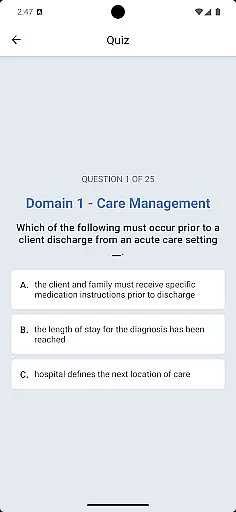
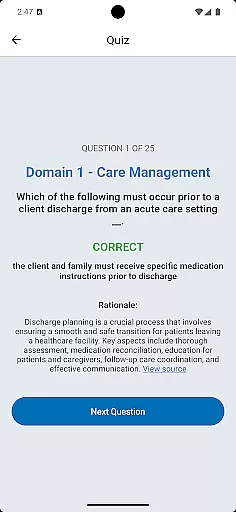
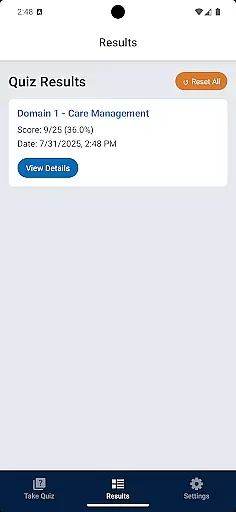
CCM Quiz App is a specialized educational tool designed to assist case managers in preparing for certification exams. Featuring nearly 200 CCMC-authorized questions, this app provides an authentic exam simulation experience. The quiz format mimics the actual certification test, offering immediate feedback on correct and incorrect responses. This helps users identify knowledge gaps across essential case management domains.
The app's unique features include automatic question shuffling to enhance learning retention, motivational messaging to encourage progress, and comprehensive tracking of user performance. With its mobile accessibility, professionals can conveniently study anytime, anywhere. Whether you're a new candidate or an experienced practitioner looking to refresh your knowledge, this app serves as an invaluable study companion.
By using CCM Quiz App, case managers can effectively gauge their readiness for the certification exam while systematically strengthening their understanding of key case management concepts. The app's ability to track average scores and monitor progress makes it an essential tool for continuous professional development.
CCM Quiz App offers a robust set of features that enhance the learning experience for case managers. The app includes nearly 200 carefully curated questions developed by CCMC subject matter experts, ensuring content accuracy and relevance. One of its standout features is the intelligent question shuffling system, which prevents answer memorization based on order and promotes genuine knowledge retention.
The app provides immediate feedback on each response, helping users understand their strengths and weaknesses in real-time. Questions are strategically divided into key case management knowledge domains, allowing focused study sessions. The built-in progress tracking system enables users to monitor their improvement over time, displaying both current and average scores.
Additional features include motivational messaging to maintain user engagement, convenient mobile access for studying on-the-go, and a comprehensive completion tracker that shows remaining questions in each session. These elements work together to create an optimal learning environment that adapts to each user's pace and needs.
When preparing for a professional certification exam, the accuracy and authority of study materials are paramount. The CCM Quiz App provides nearly 200 questions authorized by the CCMC, ensuring that the content is both relevant and reliable for case managers studying for certification.
The app's questions are developed by CCMC subject matter experts, which guarantees that users are learning from the most credible sources in the field. This level of expertise in content creation offers assurance to users that their study sessions are based on accurate information reflective of the actual exam.
Immediate feedback on answers helps reinforce learning and corrects misconceptions in real-time. By mimicking the question format of the actual exam, the app prepares users not only in terms of content but also in understanding how questions may be presented, thus sharpening their test-taking skills.
Moreover, the motivational messaging feature encourages continued success and persistence, acknowledging the hard work involved in mastering the essential case management knowledge domains. With this authoritative content at their fingertips, users can confidently track their progress and focus on areas that need improvement.
A personalized learning experience can significantly enhance the effectiveness of study sessions. The CCM Quiz App offers a tailored approach by dividing questions into key case management knowledge domains, allowing users to focus on specific areas where they need the most practice.
The app ensures no repeats until all questions have been seen, providing a broad exposure to the material without unnecessary repetition. This feature supports a personalized learning path as it adapts to the user's progress and mastery over the content, optimizing study time and effort.
Automatic shuffle functionality aids in learning the answers rather than memorizing the order, thus personalizing the retention strategy for each user. Tracking progress through the number of questions remaining in a session further customizes the pace of learning according to individual preferences and schedules.
Additionally, with the system tracking average and last scores, users gain insights into their performance trends, enabling them to adjust their learning strategies accordingly. These personalized metrics help maintain motivation and guide users toward their goal of certification with a clear understanding of their ongoing development.
Authentic Exam Simulation
Comprehensive Question Bank
Real-time Performance Tracking
Motivational Support System
Convenient Mobile Access
No Guarantee of Passing
Limited to Case Management
Premium Content Cost
Requires Device Compatibility
Internet Connection Needed

Turns you phone or tablet into TI graphing calculator (ROM required).
 4.20
4.20
An easy to use yet powerful and full-featured flashcard study app.
4.50
Pass your FAA written with flying colors - Study Buddy can help.
4.30
Stack the States makes learning about the 50 states fun!
4.70
Professional Award-Winning Astronomy Star Map App With Telescope Control
4.40
The best way to study for your amateur radio license exam.
4.90
Learn & Speak New Languages
4.70
Make your own game and world. Draw and animate characters
3.70
Learn to pass DMV permit tests. Driver license practice test 2025.
4.60
Age-Related Child Developmental Milestones
4.80
Learning the ancient Viking language made simple
4.70
Guitar chord finder, analyzer, smartly visualized theory, progressions, quizzes.
4.70
Engage in learning science and math with the award-winning PhET simulations!
4.70
Universe simulator: Find & explore planets system, outer space, astronomy events
4.60
Practice Casino Roulette Payouts for Table Game Dealers and Croupiers
4.40
Ignite curiosity, spark learning: All babybus videos &games
4.30
One of the most engaging and innovative ABC apps on the market.
4.30
Visit Daniel's house & make believe. Play doctor, make music, & feed fish.
3.20
Master the NRP with 700+ questions, rationales, and updated NREMT scenarios.
3.00


User Reviews