

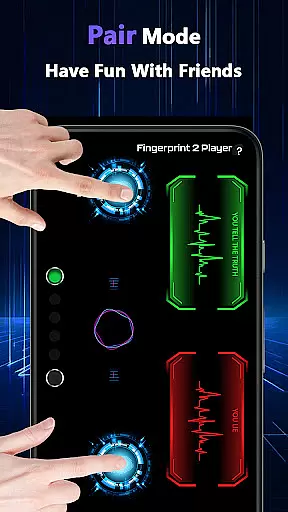
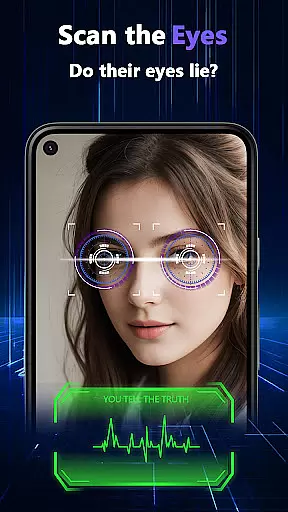
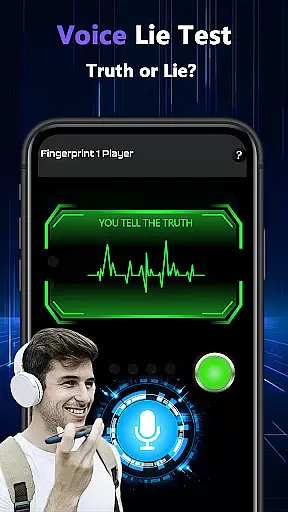

Lie Catcher Pro is a playful app designed to add fun and laughter to social gatherings through simulated lie-detection experiences. With features like fingerprint tests, eye scans, voice analysis, and pair mode for interactive friend challenges, it creates whimsical moments perfect for parties or casual get-togethers.
While the app doesn't offer real lie-detection accuracy, its purpose is to spark friendly banter and light-hearted entertainment. Whether you're hosting a game night or simply hanging out with friends, Lie Catcher Pro enhances the experience with engaging, albeit fictional, truth-finding interactions.
Lie Catcher Pro boasts an array of entertaining features that make it ideal for group settings. The app includes fingerprint tests, eye scans, and voice analysis tools, all designed to simulate the experience of detecting lies in a fun way. Additionally, its pair mode allows users to challenge friends, creating opportunities for shared amusement.
Each feature is crafted to enhance playful interactions without taking itself too seriously. For instance, the voice lie check adds a layer of humor during conversations, while the fingerprint test provides a visually engaging experience. These elements combine to create an app focused on entertainment rather than scientific precision.
Lie Catcher Pro provides a variety of playful features designed to spark fun interactions during social gatherings. The app includes fingerprint tests, eye scans, and voice lie checks, all created for entertainment purposes.
While the results are not scientifically accurate, each feature is crafted to enhance user engagement through whimsical activities. These tools allow users to test u201cwhou2019s lyingu201d in a light-hearted way, making it ideal for parties or casual meetups with friends.
The effectiveness of these features lies in their ability to generate laughter and friendly banter rather than serious truth-finding. By focusing on playful guessing, the app ensures every session is enjoyable and memorable.
The interface of Lie Catcher Pro is designed to be straightforward and easy to navigate, ensuring users can quickly access its entertaining features without confusion. From the moment you open the app, youu2019re greeted with clear options like fingerprint tests, pair mode, and voice lie checks.
Each feature is presented with simple instructions that guide users through the process seamlessly. Whether you're running an eye scan or initiating a voice check, the intuitive layout makes it easy to understand how everything works.
This simplicity enhances the overall user experience by allowing people of all tech skill levels to dive into the fun without any learning curve. Itu2019s all about keeping interactions smooth and enjoyable while sparking lively moments.
User-friendly interface
Fun party enhancement
Interactive pair mode
Visually engaging effects
Great conversation starter
No accurate lie detection
Limited practical use
Requires willing participants
Short on content variety
Not suitable for serious scenarios

 4.50
4.50
A powerful, easy-to-use flight computer on your phone or tablet!
3.80
Extremely fast, secure, and protects your privacy
4.80
An easy-to-use calculator designed to save time calculating and bending conduit
4.30
View detailed information about your Nissan Leaf the dealer never shows you.
4.10
Monitor car performance in real time and troubleshoot malfunctions.
4.80
Quickly check the frequency of the Earth
4.30
Creation, Learning, Entertainment & More — The All-in-One AI Search Engine
4.70
Enjoy a smooth mobile reading experience!
3.60
Navigate with Ease and Style
4.90
Unit and currency converter with easy and simple UI.
4.80
ADB support Android 4.X-Android 13(Support wireless pair mode).No root required!
4.70
Small and simple app to Verify Root Access and BusyBox Install!
4.70
Play your X-Box games remotely in 1080p with any controller and zero latency
4.60 4.50
4.50
Just one-tap to easy translate in any language after calls within seconds.
4.20
Quickly & easily calculate the spacing of handrail balusters
4.20
Amateur Radio app for APRS: Track friends, exchange messages, get tactical info.
3.90
Save any video in HD - paste the link, download fast and watch offline.
4.5


User Reviews