
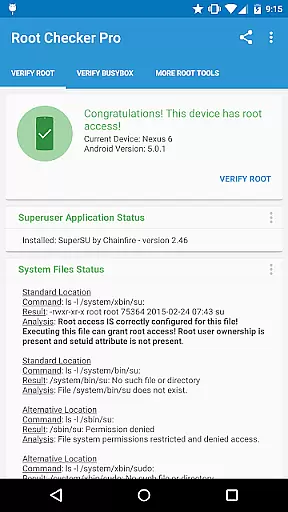
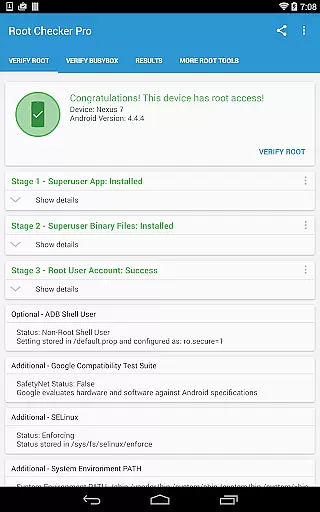
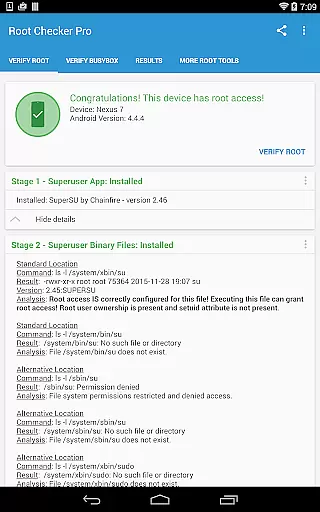
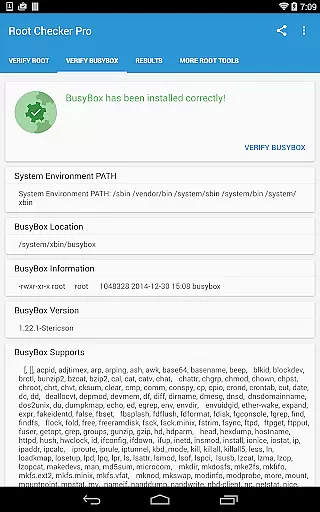
Root Checker Pro is a powerful Android tool designed to verify root access on your device. The app checks for proper root (superuser) permissions and BusyBox installation, providing detailed diagnostic information about su binary locations, file permissions, SELinux status, and more.
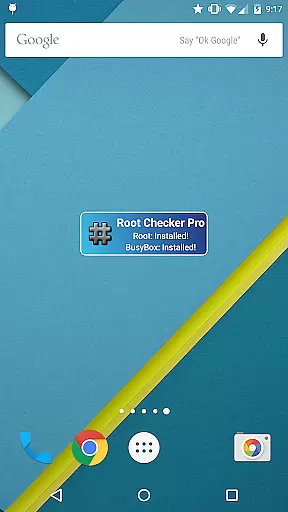
For advanced users, the application delivers comprehensive technical details while maintaining simplicity for beginners. Its intuitive interface allows even novice Android users to easily confirm root access and troubleshoot potential issues. The included widget enables continuous monitoring of root status with customizable timer intervals.
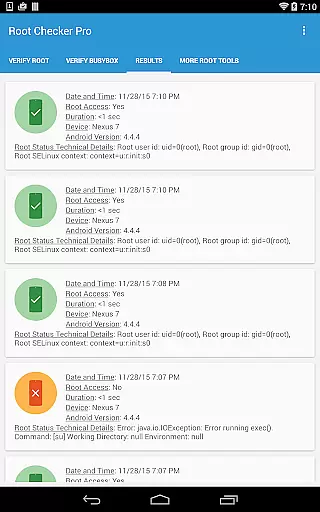
This tool stands out by offering easy exporting of root details through email or social media apps, making it simple to share diagnostic information with support teams or online communities. Whether you're verifying root access or debugging permission issues, Root Checker Pro provides quick and reliable results.
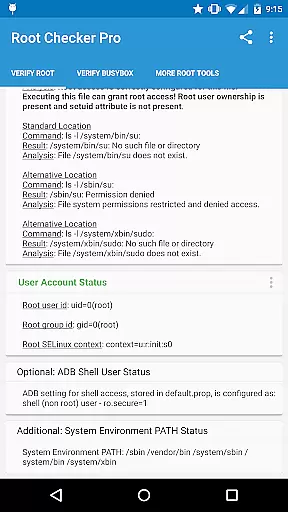
Root Checker Pro offers an impressive array of features for root verification and system diagnostics. The application scans multiple standard su binary locations while checking file permissions, user/group IDs, and SELinux contexts. It detects installed Superuser applications and their versions, providing complete visibility into your device's root configuration.
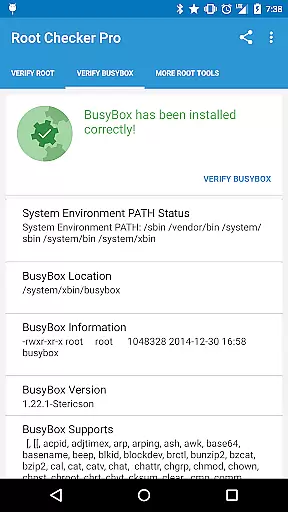
The app includes advanced BusyBox verification capabilities, analyzing installation paths and permissions. Its unique export functionality lets users share detailed root information via email or social media apps with a single tap. The built-in widget delivers real-time monitoring of root and BusyBox status, with customizable notification intervals.
Additional features include ADB shell mode detection, system PATH analysis, and SELinux status reporting. The application's quick test method provides reliable root verification within seconds, making it an essential tool for both casual users and technical experts who need to maintain and troubleshoot their device's root access.
Root Checker Pro delivers exceptional accuracy in verifying root access on Android devices. The application meticulously checks the presence and status of the su binary, which is critical for granting root permissions.
The app's effectiveness lies in its comprehensive analysis of various system parameters. It examines standard su binary locations, file permissions, root uid/gid settings, and SELinux contexts, providing users with a detailed overview of their device's root status.
For technically inclined users, the application offers advanced details about the root environment and BusyBox installation. This includes crucial information about Superuser application versions, adb shell default user modes, and SELinux enforcement status.
What sets this tool apart is its ability to quickly summarize complex technical data into an easily understandable format. Users can efficiently troubleshoot root-related issues or verify proper BusyBox installation through the app's systematic verification process.
The interface of Root Checker Pro demonstrates remarkable simplicity while maintaining powerful functionality. The developers have successfully created an intuitive user experience that caters to both novice and advanced Android users.
Despite handling complex system checks, the application presents its findings through a straightforward interface. Key information is organized in a clear, logical manner, making it easy for users to interpret their device's root status.
A single button enables users to export detailed root and BusyBox information, showcasing the app's thoughtful design. This feature facilitates collaboration and troubleshooting without complicating the user interface.
The inclusion of a monitoring widget further enhances the app's usability. This widget provides constant updates on root and BusyBox status, demonstrating how the application balances advanced functionality with user-friendly presentation.
Quick root verification
Detailed system reports
Easy result sharing
Real-time monitoring
User-friendly interface
No rooting capability
Paid version only
Technical jargon heavy
Limited visual appeal
Advanced features complex

 4.50
4.50
A convenient photo, video, and file recovery tool.
4.00
Just swipe the edge to do something!
4.40
Unit and currency converter with easy and simple UI.
4.80
Unlock your Essential Key. Create custom shortcuts to your favorite apps!
4.1
Enjoy smooth gameplay with Game Booster
4.90
App to pay for FUTO Keyboard
4.60
Effortlessly run ADB commands directly on your device without a PC.
4.20
The ideal app to be the digital eye of your family
3.40
Bedrock Together: Join any bedrock server on Xbox/PS
4.80
The Ultimate Flex Drivers Utility App - Convenient Tapping & Block Filters
4.70
HD Video player and downloader for all formats, fast & smooth 4K video playback.
4.60
Canon PRINT is a companion app for your Canon printer.
4.60
Mirror your screen to Chromecast and Android TV - Super fast and simple
4.60
Quickly switch to an encrypted DNS server on Android TV
4.50
Remote for Roku, Fire TV, Samsung TV, LG TV, Android TV, Chromecast and VIZIO TV
4.20
1-Click close all background apps on Android TV
3.90
Smart and comfortable browsing experience.
3.80
Transfer Files, APK from Phone to Watch & Install.
4.0


User Reviews