
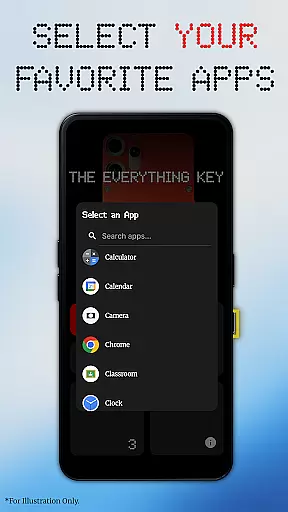
The Everything Key is a powerful utility app designed to unlock the hidden potential of your device's hardware button. With its intuitive remapping capabilities, you can transform that underutilized button into a productivity powerhouse. The app allows users to assign specific actions to both double and triple presses, enabling instant access to frequently used apps and functions.
What sets The Everything Key apart is its commitment to simplicity and privacy. The clean, minimalist interface makes it easy to manage your key mappings while ensuring complete control over which actions are active. Whether you need quick access to your camera, messaging apps, or essential utilities, this tool puts customization at your fingertips without compromising your personal data.
This application is particularly valuable for users of specific Nothing Technology devices, where it creates a seamless integration experience with personalized backgrounds and device-specific optimizations. By leveraging standard Android features, it delivers advanced functionality without requiring root access or complex setup procedures.
The Everything Key offers an impressive array of features that enhance device usability. Its primary capability lies in powerful remapping options, allowing users to assign different applications to both double-press and triple-press actions of their hardware button. This feature alone significantly boosts productivity by providing instant access to essential functions through customizable shortcuts.
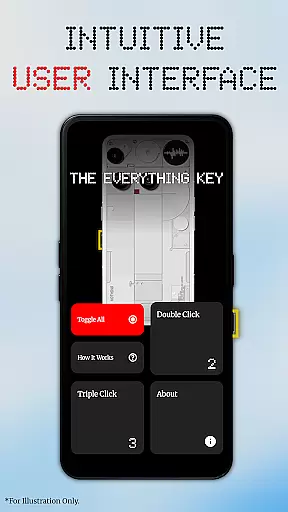
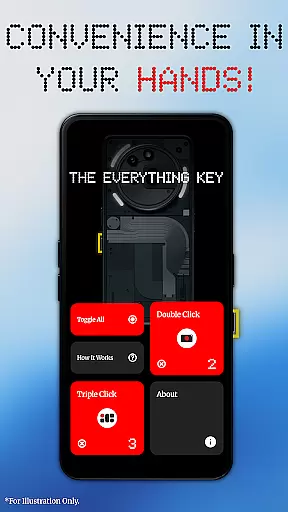
The app's intuitive UI stands out with its minimalist design approach, inspired by the Nothing aesthetic. Users can easily view and manage their mapped applications through clear visual indicators that show whether actions are active or disabled. Advanced control features include quick-toggle functionality for individual mappings and a global 'Toggle All' option that enables or disables all assigned actions with a single command.
Notably, The Everything Key operates without requiring root access, utilizing standard Android Accessibility Service features to detect hardware key presses. This approach ensures broad compatibility while maintaining strict privacy standards - the app only listens for specific hardware events without accessing any personal information or on-screen content. The initial setup process enhances user experience by guiding them through device-specific configuration and offering personalized background options based on their exact device model.
The Everything Key focuses on providing accurate and effective remapping of your device's hardware button. This app allows you to assign specific actions to both double-press and triple-press gestures, ensuring that each interaction with the button delivers the intended result without fail.
With its advanced control features, users can easily enable or disable actions through a simple tap on the mapped card within the app. The 'Toggle All' feature further enhances usability by allowing users to activate or deactivate all mappings at once, streamlining the management of their personalized settings.
This level of precision in executing commands transforms an underutilized hardware feature into a powerful productivity tool, giving users quick access to their most-used apps like the camera or messaging services. By focusing on functionality that is both reliable and responsive, The Everything Key ensures that every press counts.
By not requiring root access and working out-of-the-box with standard Android features, it provides a seamless experience for users looking to maximize their device's potential without any technical hassle. This commitment to core function accuracy makes The Everything Key an essential utility for compatible devices.
The Everything Key boasts an intuitive UI inspired by minimalist design principles, making it incredibly straightforward for users to navigate and customize their hardware button's functions. Upon launching the app, users are greeted with a clean interface where they can effortlessly see which apps are mapped to their hardware button and whether these mappings are active.
A personalized experience begins from the first launch; the app assists users in selecting their specific device model and color, displaying a stunning integrated background that aligns with their device aesthetics. This attention to visual detail ensures that the app feels like a natural extension of the user's device.
With easy-to-use controls such as tapping a mapped card to toggle its action or using the 'X' icon to un-map an app permanently, managing your custom shortcuts has never been easier. These simple yet powerful interactions ensure that even those unfamiliar with customization tools can quickly adapt and personalize their experience.
By prioritizing interface simplicity without sacrificing functionality, The Everything Key offers a streamlined way for users to enhance their device interaction while maintaining privacy and trust through transparent accessibility service usage.
Intuitive interface
Customizable shortcuts
No root required
Privacy-focused design
Device-specific optimization
Limited device support
Requires accessibility permission
No iOS version available
Third-party development
Specific use case

A convenient photo, video, and file recovery tool.
 4.00
4.00
Extremely fast, secure, and protects your privacy
4.80
Canon PRINT is a companion app for your Canon printer.
4.60
eXtended Permission Manager - a small app to manage permissions and AppOps
4.50
Amateur Radio app for APRS: Track friends, exchange messages, get tactical info.
3.90
A non-root local ADB shell client. READ BELOW!
3.40
Automate everything from settings to photos, SMS to speech. ADC2 prize winner.
4.10
Your personal health butler
3.60
The ideal app to be the digital eye of your family
3.40
Excellent scientific calculator with symbolic algebra, integrals, derivatives
4.80
ADB support Android 4.X-Android 13(Support wireless pair mode).No root required!
4.70
NFC Tools can read and write NFC tags.
4.70
Protect your device with antivirus, storage cleanup, and system monitoring
4.70
HD Camera captures every special moment.
4.60 4.50
4.50
Use your phone as a webcam on your computer over WiFi or USB.
4.40
Universal TV remote control all TVs, Roku, LG, Samsung, Fire, Vizio, Sony, TCL.
4.40
Carry a FTP server in your pocket and avoid USB cables for file transfer
4.20
Signal Strength, Mobile, Wifi, Speed Test, Bad Signals, Cellular, 5G, LTE, 4G
4.20


User Reviews