
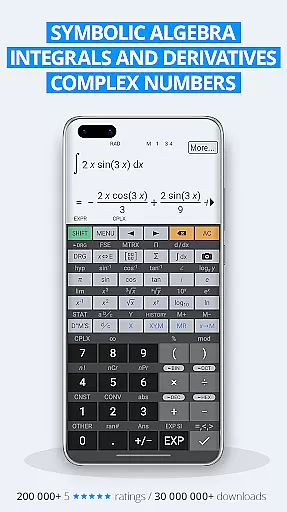
HiPER Calc Pro is an advanced scientific calculator that offers a comprehensive suite of mathematical tools. It supports symbolic algebra, graphing, equation solving, integrals, and derivatives, making it suitable for students, engineers, and professionals who require precise calculations.
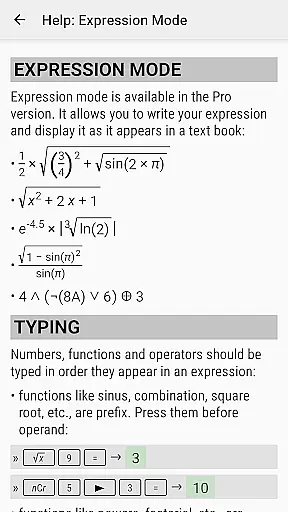
The app features multiple layouts optimized for different devices, including pocket view for small screens, compact mode for smartphones, and expanded view for tablets. Its intuitive interface allows users to input expressions naturally while delivering results in various formats such as simplified expressions or numerical values. With over 40 million downloads globally, this calculator has earned widespread acclaim for its functionality and reliability.
One standout feature is the multiline display available on tablets, which shows calculation history and previous results. Users can also choose from several high-quality themes to personalize their experience. Whether performing basic arithmetic or advanced calculus, HiPER Calc Pro provides the tools necessary for accurate and efficient problem-solving.
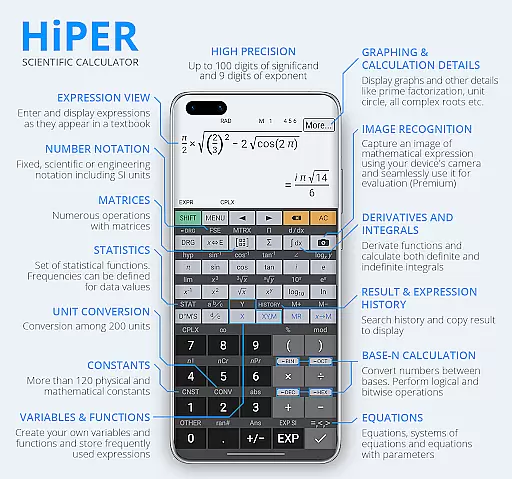
HiPER Calc Pro stands out with its extensive range of features designed to handle complex mathematical tasks. The calculator supports up to 100 digits of significand and 9 digits of exponent, ensuring precision in calculations. It includes functions like fractions, periodic numbers, equations, matrices, vectors, and statistical analysis, catering to both academic and professional needs.
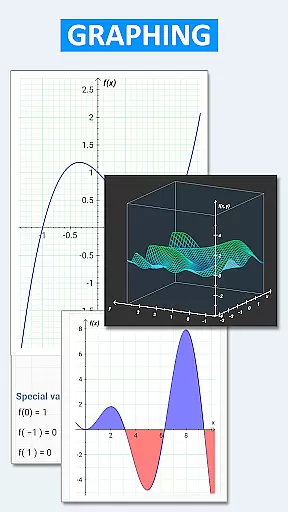
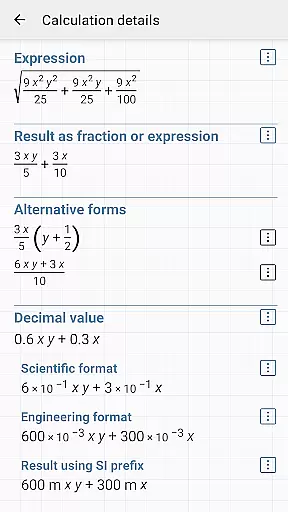
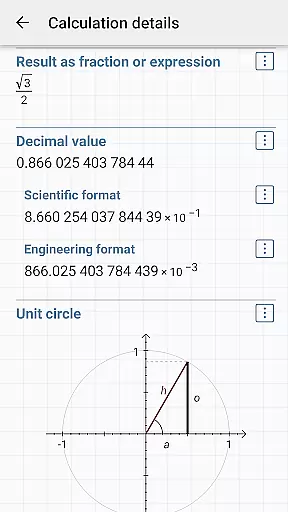
Graphing capabilities are another highlight, allowing users to plot functions, equations, and even 3D graphs. The app also provides detailed calculation insights, such as complex roots and unit circles, enhancing understanding of mathematical concepts. Additionally, it supports advanced operations like bitwise shifts, logical operations, and Reverse Polish Notation (RPN), appealing to programmers and engineers.
With over 90 physical constants and 250 unit conversions, the app serves as a versatile tool for science and engineering applications. Customizable settings, haptic feedback, and clipboard operations further enhance usability, making HiPER Calc Pro a top choice for anyone seeking a powerful mobile calculator.
HiPER Calc Pro stands out as a highly accurate and effective scientific calculator, offering users an extensive range of functions that cater to both basic and advanced mathematical needs. With capabilities extending up to 100 digits of significand and 9 digits of exponent, the calculator ensures precision in every calculation.
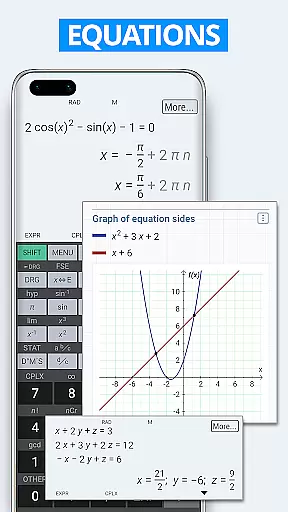
The application supports complex operations including equations, integrals, derivatives, and even symbolic algebra, making it indispensable for students, educators, and professionals alike. Its ability to handle matrices, vectors, and statistical computations adds another layer of utility, allowing users to tackle a wide array of mathematical challenges with confidence.
Graphing features further enhance its appeal, providing visual representations of functions, equations, and integral areas. This not only aids in understanding complex mathematical concepts but also makes the learning process more engaging. The inclusion of 3D graphing capabilities sets HiPER Calc Pro apart from conventional calculators, offering a dynamic way to explore mathematical relationships.
Ultimately, the app's comprehensive functionality, which includes over 90 physical constants and conversion among 250 units, empowers users to perform calculations across various scientific disciplines accurately. Whether for academic, professional, or personal use, HiPER Calc Pro delivers unmatched accuracy and effectiveness, ensuring reliable results every time.
Despite its vast array of functions, HiPER Calc Pro maintains an interface that is both simple and intuitive, ensuring users can navigate and utilize its features with ease. The calculator offers several layouts tailored to different device sizes, enhancing usability whether on a smartphone or tablet.
A notable feature is the multiline display option available for tablets, which allows users to view their entire calculation history and access previous results effortlessly. This contributes significantly to the app's intuitive nature, enabling users to track their work and make adjustments as needed without losing their place.
Furthermore, the availability of multiple high-quality themes lets users personalize their experience, adapting the interface to their preferences while maintaining clarity and accessibility. Such customization options not only enhance aesthetic appeal but also improve user engagement by creating a more personalized interaction with the calculator.
In summary, HiPER Calc Pro combines powerful computational abilities with an approachable and user-friendly design. By prioritizing interface simplicity and intuitiveness, the app ensures that even those new to advanced calculators can harness its full potential, making complex calculations accessible to everyone.
Highly accurate calculations
Extensive math functions
User-friendly interface
Versatile graphing tools
Customizable themes
Complex for beginners
Premium price tag
Occasional bugs
Limited offline help
Heavy on storage

Head tracking for PC sim games such as MSFS 2024 or Elite:Dangerous. No headset!
 4.50
4.50
App that Recover your pictures, videos or files after you delete them.
4.20
Best leveling tool for your Android device. Hang paintings like a pro.
4.90
Unleash gamepad precision for ultimate mobile gaming dominance.
3.90
PC precision for mobile gaming: dominate with keyboard and mouse!
4.30
Connect wirelessly to your computer to watch movies, browse the web, play games
5.00
Enjoy a smooth mobile reading experience!
3.60
Your personal health butler
3.60
The ideal app to be the digital eye of your family
3.40
The one-and-only remote control for PC, Mac, and Linux
4.70
Play your X-Box games remotely in 1080p with any controller and zero latency
4.60
Game Booster, GFX Tool is now compatible with newer game update
4.50
Universal TV remote control all TVs, Roku, LG, Samsung, Fire, Vizio, Sony, TCL.
4.40
MS-DOS in your pocket. Play old DOS games anywhere you are ;)
4.10
Automate everything from settings to photos, SMS to speech. ADC2 prize winner.
4.10
Introducing Smart Printer, your ultimate destination for printing solutions!
4.00
Fun lie-detection pranks for friends and parties.
3.80
A non-root local ADB shell client. READ BELOW!
3.40
PDF Reader - Document Viewer: Read, Manage & Organize Your Documents
3.10


User Reviews