
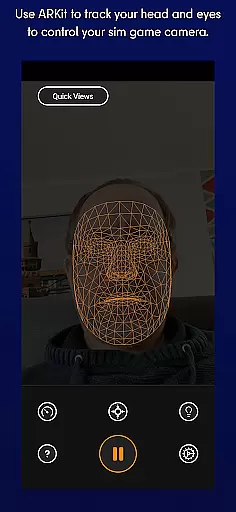
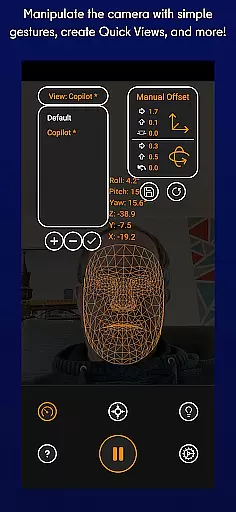
SmoothTrack is an innovative tool that leverages AR capabilities to provide 3D head tracking for sim game camera control. It supports any device compatible with Google AR Services and works seamlessly with games supporting TrackIR.
The app allows users to intuitively control their gaming perspective by simply moving their head, offering a near magical experience in games like Flight Simulator and Elite: Dangerous. No extra equipment is needed, just set up your device to see your face and use simple camera gestures to shift perspective in-game.
With features like dark mode for battery and OLED screen saving, and compatibility with FreeTrack or TrackIR protocol games, SmoothTrack enhances the simulation experience for gamers on various platforms.
SmoothTrack offers a range of features designed to enhance the gaming experience. Its core functionality includes 3D head tracking using AR technology, allowing users to control their sim game's camera intuitively.
The app supports a wide array of games including Microsoft Flight Simulator, Elite: Dangerous, and Euro Truck Simulator 2. With slight head movements magnified in-game, users can effortlessly change perspectives, such as leaning forward to inspect a cockpit or looking up to view overhead panels.
Additional features include dark mode for battery efficiency and OLED screen protection, bright mode for dark room play, and compatibility with FreeTrack or TrackIR protocol games, ensuring a versatile and immersive gaming experience without the need for extra equipment.
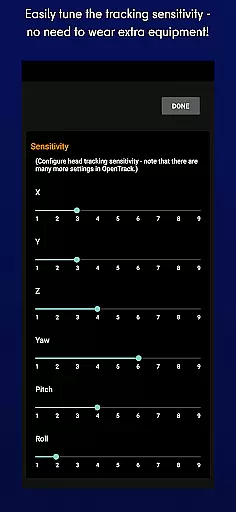
SmoothTrack delivers precise 3D head tracking functionality, utilizing the AR capabilities of your device to control sim game cameras with remarkable accuracy. This app ensures that even slight head movements are captured and translated into in-game perspective changes, providing an immersive experience.
The effectiveness of SmoothTrack is evident in its ability to magnify small head motions, allowing users to peek out of a cockpit window or view overhead panels with minimal effort. This seamless integration enhances gameplay by offering intuitive camera control without the need for additional equipment.
For users, this means an engaging and interactive gaming session where their physical movements directly influence the virtual environment. The app's precision in tracking ensures that every tilt or turn of the head results in immediate visual feedback within supported games.
By supporting protocols like FreeTrack and TrackIR, SmoothTrack guarantees compatibility with numerous simulation titles, making it a versatile tool for gamers seeking enhanced realism and control in their virtual experiences.
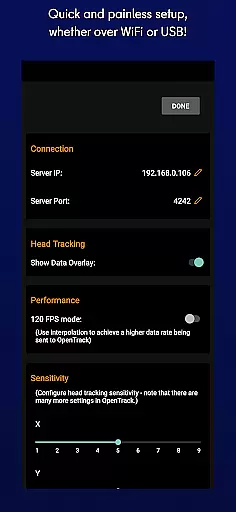
SmoothTrack boasts an interface designed for simplicity and ease of use, ensuring that users can quickly set up and start using the app without hassle. Its straightforward design allows gamers to focus on their simulations rather than navigating complex settings.
The intuitiveness of SmoothTrack is highlighted by its gesture-based controls which require no extra hardwareu2014just a device capable of installing Google AR services. Users can easily manipulate their in-game view through natural head movements, creating a near-magical interaction between player and game.
This streamlined approach not only reduces setup time but also enhances user engagement as players enjoy uninterrupted immersion in their favorite simulation titles. With features like dark mode to conserve battery life and bright mode for low-light conditions, SmoothTrack caters to various preferences while maintaining operational simplicity.
Overall, SmoothTrack offers an accessible solution for both novice and experienced gamers looking to enrich their simulation gameplay with responsive head-tracking technology, all within a user-friendly framework.
Intuitive camera control
No extra equipment required
Wide game compatibility
Battery-saving dark mode
Enhanced gaming immersion
Requires Google AR Services
Limited to supported games
Dependent on device camera quality
Potential learning curve
May drain battery faster

Connect instantly to a fast, encrypted VPN with one tap
 4.60
4.60
Small and simple app to Verify Root Access and BusyBox Install!
4.70
MS-DOS in your pocket. Play old DOS games anywhere you are ;)
4.10
Detect hidden spy camera with advanced scanning {{ Premium version }}
4.00
View detailed information about your Nissan Leaf the dealer never shows you.
4.10
Undelete and recover your lost or deleted files with DiskDigger!
3.40
With videos, electrical calculators, and built-in ebook, Ugly’s has your answer.
4.50
Clean up your phone, find files, play media, and share files offline
4.50
The ideal app to be the digital eye of your family
3.40
Connect wirelessly to your computer to watch movies, browse the web, play games
5.00
Easily install aab(Android App Bundle) files on your Android device with our app
4.80
Unit and currency converter with easy and simple UI.
4.80
Learn the vast amount of system information about device and monitor it's state
4.70
The Ultimate Flex Drivers Utility App - Convenient Tapping & Block Filters
4.70
NFC Tools can read and write NFC tags.
4.70
HD Camera captures every special moment.
4.60
HD Video player and downloader for all formats, fast & smooth 4K video playback.
4.60
Use your phone as a webcam on your computer over WiFi or USB.
4.40
VESC Tool can monitor and configure VESC-compatible devices over BLE and Wifi
4.20


User Reviews