
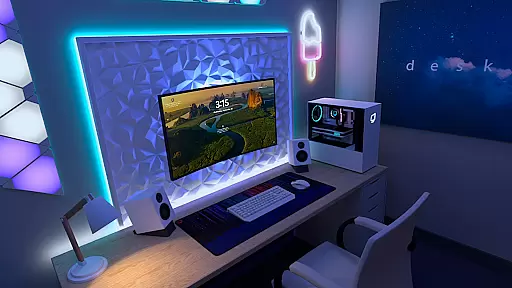


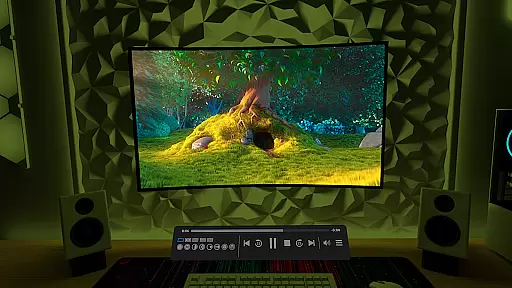
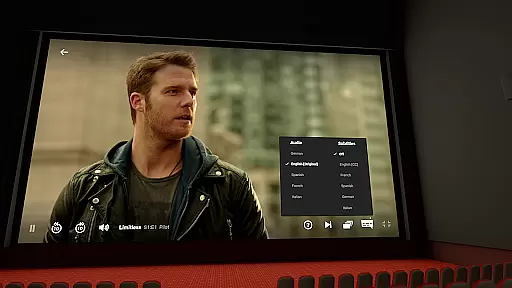

Virtual Desktop is a powerful tool that allows users to connect wirelessly to their computers for an immersive experience. With the ability to watch movies, browse the web, and even play games on a giant virtual screen, this app transforms how you interact with your computer remotely. Designed for low latency and high-quality streaming, it supports both Windows and macOS systems, making it versatile for various users.
The application's standout feature is its optimization for PCVR game streaming, offering a seamless experience for gamers. Whether you're looking to stream content from your computer or manage multiple monitors, Virtual Desktop provides a comprehensive solution. Its support for Bluetooth devices and 3D content enhances user interaction, while the microphone passthrough option ensures clear communication during use.
Perfect for remote work or entertainment, Virtual Desktop bridges the gap between your computer and mobile device, providing a flexible and efficient way to stay connected.
Virtual Desktop boasts a range of features designed to enhance user experience. One of its key capabilities is the support for most PCs and laptops running Windows 10 or 11, as well as macOS Catalina or later. This compatibility ensures that a wide array of users can take advantage of its functionalities. The app also supports PCVR game streaming, requiring a VR Ready PC for an optimal experience.
In addition to gaming, Virtual Desktop allows users to download or stream various video formats directly from their computers through the Videos tab. It supports Bluetooth mice, keyboards, and gamepads, enhancing control and interaction. The app's support for 3D Side-by-Side and Over-Under content on screen caters to users interested in immersive media experiences.
Furthermore, Virtual Desktop includes options for multi-monitor setups and remote connections over the internet, provided UPnP is enabled on the router. These features make it an invaluable tool for productivity and entertainment, allowing users to customize their virtual environments according to their needs.
Virtual Desktop is designed to provide users with an optimized and seamless experience when connecting wirelessly to their computers. This application ensures low latency and high-quality streaming, making it a reliable tool for various tasks.
The app supports a wide range of functionalities including watching movies, browsing the web, and playing games on a large virtual screen. It is also capable of streaming PCVR games, which requires a VR Ready PC running Windows 10 or 11. The emphasis on Gigabit Ethernet connectivity ensures that users can enjoy these activities without interruptions or lag.
For those who require more than just basic functions, Virtual Desktop offers advanced features such as support for Bluetooth devices like mice, keyboards, and gamepads. Additionally, it supports 3D content in Side-by-Side or Over-Under formats and includes options for multi-monitor setups. These capabilities make it an effective solution for both work and entertainment needs.
Overall, Virtual Desktop's core functions are meticulously crafted to deliver a high level of accuracy and effectiveness. Whether you're looking to enhance productivity or immerse yourself in gaming, this tool provides the necessary features to meet your expectations.
A key aspect of Virtual Desktop is its focus on providing an interface that is both simple and intuitive. This ensures that users can easily navigate through the application and access its features without any hassle.
The design prioritizes ease of use by offering straightforward controls and clear instructions. For instance, setting up a wireless connection to your computer is streamlined, allowing even those who may not be tech-savvy to get started quickly. The inclusion of tabs such as 'Videos' further simplifies the process of managing media files directly from your computer.
Moreover, Virtual Desktop supports remote connections over the internet, provided UPnP is enabled on your router. This feature adds another layer of convenience, enabling users to connect from anywhere while maintaining security protocols. Such thoughtful integration of complex functionalities into an accessible format underscores the appu2019s commitment to user-friendly design.
In summary, Virtual Desktop excels in delivering an interface that balances simplicity with powerful capabilities. By focusing on intuitive navigation and ease of setup, it ensures that all users can take full advantage of what the application has to offer.
High-quality streaming
Wide system compatibility
Supports PCVR gaming
Multi-monitor support
Bluetooth device integration
Requires wired Ethernet
Internet connection needed
Limited mobile OS support
Complex setup process
Premium pricing model

 4.50
4.50 4.50
4.50
Quickly switch to an encrypted DNS server on Android TV
4.50
Amateur Radio app for APRS: Track friends, exchange messages, get tactical info.
3.90
With videos, electrical calculators, and built-in ebook, Ugly’s has your answer.
4.50
The ultimate tool for network analysis, wifi scanning and problem detection.
4.90
Create your own custom widget with endless possibilities
3.90
Creation, Learning, Entertainment & More — The All-in-One AI Search Engine
4.70
Mobile Security with Scam Protection | Malware & Virus Cleaner | Safe Browser
4.70
Support Fossify apps with a warm thank you!
5.00
Easily install aab(Android App Bundle) files on your Android device with our app
4.80
Learn the vast amount of system information about device and monitor it's state
4.70
ADB support Android 4.X-Android 13(Support wireless pair mode).No root required!
4.70
Protect your device with antivirus, storage cleanup, and system monitoring
4.70
App that Recover your pictures, videos or files after you delete them.
4.20
Automate everything from settings to photos, SMS to speech. ADC2 prize winner.
4.10
Family Locator, Share location, StayConnect with your family in real time
3.90
A powerful, easy-to-use flight computer on your phone or tablet!
3.80
A recovery soft,it features photo recovery, video recovery, file recovery.
3.40


User Reviews