
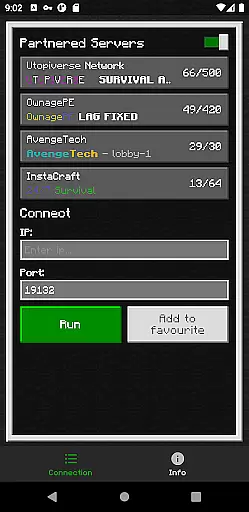
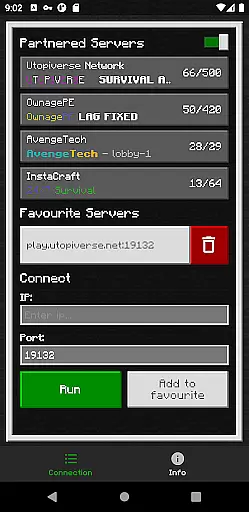
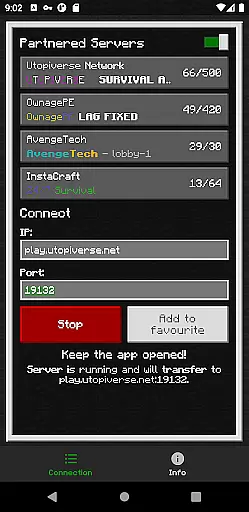
BedrockTogether (Pro) is an innovative tool designed to simplify the process of connecting to Bedrock Edition servers for Minecraft players. This ad-free version offers a seamless experience by enabling any Bedrock server to appear as a LAN server on Xbox or PlayStation clients, allowing users to connect easily without DNS rerouting. It's particularly useful for players seeking quick and hassle-free access to multiplayer sessions directly through their gaming consoles.
The app ensures compatibility with most setups, although Realms and Nintendo Switch support are currently unavailable. By following a few simple steps, users can input their desired server details, launch the connection, and access the server via the LAN tab in Minecraft. Once connected, the app can be closed, freeing up system resources while maintaining the connection.
BedrockTogether (Pro) stands out with its specialized features tailored for Minecraft enthusiasts. The primary feature allows users to input server IP and port details, making the server visible as a LAN option on supported gaming consoles. This eliminates the need for complex network configurations or DNS rerouting, thus simplifying the connection process significantly.
Another notable aspect is the app's focus on user convenience. It operates efficiently within the same LAN network, ensuring stable and reliable connections. Additionally, the app provides troubleshooting guidance and access to a community Discord and Telegram channel for bug reporting and support. Although it doesn't support Realms or Nintendo Switch, its straightforward functionality makes it a valuable tool for enhancing multiplayer experiences on supported platforms.
BedrockTogether (Pro) delivers a streamlined solution for connecting to Bedrock Edition servers without the need for DNS rerouting. This app ensures that any Bedrock Edition server can be displayed as a LAN server on Xbox or PlayStation clients running Minecraft Bedrock Edition, providing a seamless connection process.
The core functionality is designed to simplify the user experience by allowing players to enter their desired server IP and port, click the 'Run' button, and connect through the 'Friends' tab in the game. The app's effectiveness is evident in its straightforward approach, eliminating complex configurations while maintaining stability and reliability during gameplay sessions.
By focusing on accuracy and ease of use, BedrockTogether (Pro) offers users an ad-free environment, ensuring that there are no distractions or interruptions while setting up their gaming sessions. This attention to detail enhances the overall user experience, making it an essential tool for Minecraft enthusiasts looking to connect with friends effortlessly.
The interface of BedrockTogether (Pro) is crafted to ensure a user-friendly experience. With a clean layout and minimalistic design, the app allows users to input server details quickly and initiate connections with just a few taps. This simplicity reduces the potential for user error and makes the app accessible even to those who may not be tech-savvy.
Intuitive controls guide users through each step of the connection process, from entering server information to launching the game and navigating to the 'Friends' tab. Clear instructions within the app help users understand how to connect using the LAN tab, ensuring that they can enjoy their gaming sessions without unnecessary complications.
Moreover, BedrockTogether (Pro) provides troubleshooting tips directly within the app description, addressing common connectivity issues and guiding users toward solutions. By offering direct links to support channels like Discord and Telegram, the app fosters a community-driven approach to problem-solving, enhancing its overall intuitiveness and support network.
User-friendly interface
Eliminates DNS rerouting
Seamless LAN integration
Ad-free experience
Active community support
No Nintendo Switch support
Limited to LAN networks
Realms not supported
Third-party application
Manual server entry required

App that Recover your pictures, videos or files after you delete them.
 4.20
4.20
Carry a FTP server in your pocket and avoid USB cables for file transfer
4.20
An open-source APK explorer for Android!
4.10
App to pay for FUTO Keyboard
4.60
Smart and comfortable browsing experience.
3.80
PC precision for mobile gaming: dominate with keyboard and mouse!
4.30
Making emulation easy for everyone!
4.30
WiFi Signal Strength Meter help you detect WiFi Signal Strength in real time.
4.80
A clean app.
4.50
Enjoy smooth gameplay with Game Booster
4.90
Best leveling tool for your Android device. Hang paintings like a pro.
4.90
Protect your device with antivirus, storage cleanup, and system monitoring
4.70 4.50
4.50 4.50
4.50
Quickly check the frequency of the Earth
4.30
Effortlessly run ADB commands directly on your device without a PC.
4.20
Introducing Smart Printer, your ultimate destination for printing solutions!
4.00
This app unlocks the Pro features of the Central for DayZ app
3.60
A non-root local ADB shell client. READ BELOW!
3.40


User Reviews