
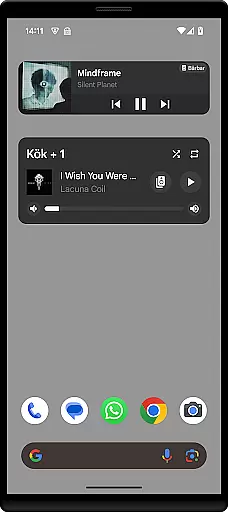
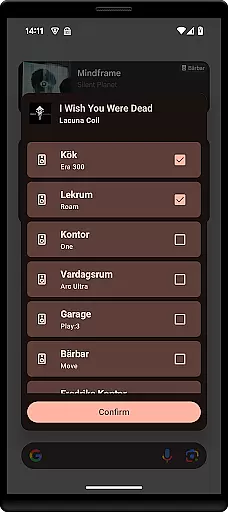
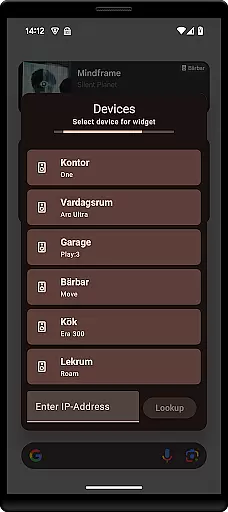
Sonos Widget is a powerful tool for managing your Sonos system directly from your home screen. This app provides two different widget options, Compact and Enhanced, allowing users to choose the layout that best suits their needs. With features like volume control, grouping, playback controls, and modes support, it offers comprehensive control over your Sonos devices.
The app displays relevant metadata for your music, enhancing your listening experience. Whether you want to adjust the volume, change tracks, or manage grouped speakers, Sonos Widget makes it easy to do so without opening the full Sonos app. Its intuitive design ensures quick access to essential functions, making it an ideal solution for Sonos users who prefer convenience and efficiency.
Sonos Widget stands out with its two distinct widget styles, Compact and Enhanced, catering to different user preferences. The Compact widget offers a minimalistic approach, while the Enhanced widget provides more detailed information and controls. Both options display relevant metadata, ensuring you always know what's playing.
Volume control is seamless with Sonos Widget, allowing you to adjust levels directly from your home screen. Grouping functionality lets you manage multiple speakers effortlessly, creating synchronized audio experiences across rooms. Playback controls include play, pause, next, and previous options, giving you full command over your music. Additionally, the app supports shuffle and repeat modes, adding versatility to your listening sessions.
When it comes to managing your music library, Sonos Widget offers a seamless experience. The app allows you to control your Sonos system directly from your home screen, ensuring that your entire music collection is at your fingertips.
The widget supports two different display modes - Compact and Enhanced - both of which provide relevant metadata about the tracks you are playing. This ensures that users can easily access detailed information about their music, enhancing the overall listening experience.
While Sonos Widget itself does not host a music library, its integration capabilities with your existing Sonos system ensure that all your music, whether purchased or streamed, is managed efficiently. This includes support for various music services, ensuring broad compatibility.
Copyright compliance is crucial in today's digital age, and Sonos Widget respects this by working only with content that users have legitimately added to their Sonos libraries. This means that any music you manage through the widget is guaranteed to be authentic and legally accessible, providing peace of mind while enjoying your favorite tunes.
Audio quality is paramount when enjoying music, and Sonos Widget excels in delivering top-notch sound. By integrating directly with your Sonos system, the widget ensures that all playback benefits from the high-quality audio standards that Sonos is known for.
The widget provides volume control and supports various playback modes such as Shuffle and Repeat. These features allow users to customize their listening experience according to their preferences, ensuring optimal audio output tailored to individual tastes.
Moreover, Sonos systems are renowned for their superior sound engineering, and Sonos Widget leverages this by offering precise control over playback functions like Play, Pause, Next, and Previous. This level of detail ensures that every track sounds as good as it was intended to by the artists.
For audiophiles who demand the best, Sonos Widget delivers an unmatched audio experience. Whether you're streaming high-resolution tracks or playing locally stored files, the widget guarantees that the audio quality remains uncompromised, providing a rich and immersive listening session every time.
User-friendly interface
Comprehensive control options
Quick access to essential features
Enhanced metadata display
Two widget styles available
Limited to Sonos systems
No official Sonos endorsement
Setup can be complex
Requires existing Sonos setup
Occasional connectivity issues

SqueezePlayer turns your Android phone or tablet into a SqueezeBox on its own!
 4.60
4.60
Save hundreds of dollars for a physical strobe tuner and instead use this app.
4.50
Guzheng Master supports many playing techniques as an acoustic Guzheng
4.50
Help you quickly get started with Shokz headphones
4.40
The original SP-1200 experience on your iPad
4.20
Turn your Android phone into a professional audio analyser with up to 120 bands.
4.00
Sheet music reader, piano & music note player. Play music score & learn to read.
3.90
Be a true music maker: create beats, mix and make music like a real DJ!
4.30
Play your music offline without limits
4.80
Music, News & Sports Radio Tuner App. Tune in Live FM & AM Radio Stations.
4.80
Gorgeous UI, Powerful music Search and Equalizer, the great choice for you!
4.70
Listen to live FM radio stations, sports, music and news on global radios online
4.70
Advanced 10-Band Audio Graphic Equalizer Sound Booster Pro
4.30
Time Trainer: accurate metronome w tools to help you develop your internal time!
4.20
Next generation modular control surface
4.10
Permanently backup Now Playing. Maps, filters & listening stats.
4.00
Offline Tunes, Unlimited Vibes
3.90
Simply convert wav to mp3. Clear. Reliable. Safe.
4.1
Make music anywhere. Turn your device into an instrument.
4.2


User Reviews