
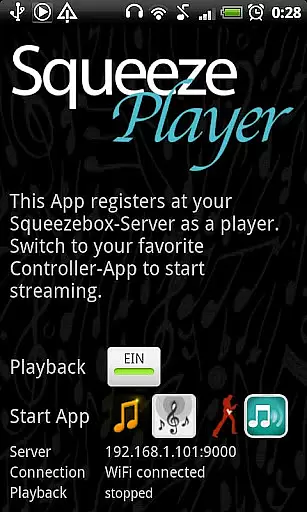
SqueezePlayer is a powerful music streaming application that transforms your Android device into a Logitech Squeezebox, enabling you to stream all your music content directly to your phone or tablet. It supports various music formats including FLAC, MP3, WAV, and PCM, ensuring high-quality playback. Whether you're at home, in the car, or on the go, SqueezePlayer allows you to enjoy your favorite tunes via WiFi or mobile connection.
One of the standout features of SqueezePlayer is its ability to integrate seamlessly with the Logitech Media Server (formerly known as Squeezebox Server). This integration enables users to access not only their local music library but also internet radio stations and services like Last.FM, Deezer, and WiMP. With proper network configuration, such as port forwarding and DynDNS setup, users can even stream music over 3G connections, making it an ideal solution for those who want their music library always within reach.
SqueezePlayer offers a comprehensive set of features designed to enhance your music streaming experience. The app supports native decoding of popular audio formats such as FLAC, MP3, WAV, and PCM directly on your Android device. Additionally, when paired with a Logitech Media Server, SqueezePlayer can handle other file types like Ogg and mp4 by converting them to FLAC or MP3 on the fly, thus expanding its compatibility with various music libraries.
Another notable feature is its seamless integration with third-party control apps like OrangeSqueeze, SqueezeCommander, and Squeezer. These companion apps allow you to manage playback and control multiple players from a single interface. For instance, OrangeSqueeze can automatically launch SqueezePlayer from its player list, providing a highly integrated user experience. Moreover, SqueezePlayer's support for remote streaming via 3G ensures that your music is accessible wherever you are, provided you have configured your network settings correctly.
When it comes to streaming music, the size and authenticity of the library are crucial factors. SqueezePlayer offers an extensive music library that includes local music files, internet radio stations, and songs from various apps like Last.FM, Deezer, or WiMP. This vast selection ensures users have access to a wide range of music genres and artists.
The app supports popular music formats such as FLAC, MP3, WAV, and PCM natively, meaning these files are decoded directly on your Android device. Additionally, the Logitech Media Server can convert other file types like Ogg and mp4 to FLAC or MP3 on the fly, expanding the range of playable content. This flexibility allows users to enjoy their entire music collection without worrying about format compatibility.
Copyright authenticity is another key aspect of SqueezePlayer. By integrating with the Logitech Media Server, which manages and streams content legally, users can be confident that they are accessing music that respects copyright laws. This setup not only enhances the user experience but also ensures compliance with legal standards.
Overall, SqueezePlayer's robust music library and commitment to copyright authenticity make it a reliable choice for music enthusiasts who want to stream their favorite tunes seamlessly and legally.
Audio quality is paramount for any music streaming application, and SqueezePlayer excels in providing high-quality audio options. The app supports native decoding of high-fidelity formats such as FLAC, MP3, WAV, and PCM on Android devices. This ensures that users can enjoy their music in the best possible quality, preserving the nuances and details of the original recordings.
In addition to native support, SqueezePlayer leverages the capabilities of the Logitech Media Server to transcode unsupported formats into high-quality FLAC or MP3. This process maintains the integrity of the audio, even when converting from formats like Ogg or mp4. As a result, users can experience consistent audio quality across different types of music files.
For audiophiles and casual listeners alike, the ability to stream via WiFi or mobile connection adds another layer of convenience without compromising on sound quality. Whether you're at home, in the car, or on the go, SqueezePlayer delivers a superior listening experience that adapts to your environment.
By focusing on both native decoding and transcoding capabilities, SqueezePlayer ensures that users have access to a variety of audio quality options. This dedication to audio excellence makes it a standout choice for anyone looking to enhance their music streaming experience.
User-friendly interface
Wide format compatibility
Remote streaming capability
Seamless server integration
Active developer support
Requires separate server app
No standalone control function
Limited transcoding on Touch
Some services not supported
Complex network setup

Control your MIDI USB or Bluetooth devices in app and avoid some trampling
 3.30
3.30
Most Advanced AI Song Generator and Music Creator. Rap, Pop, Rock, Gospel & more
4.70
Listen to live FM radio stations, sports, music and news on global radios online
4.70
The only true audiophile music player with Hi-Fi audio rendering and DSP engine
3.90
Offline Music Player&MP3 Player with themes, equalizer, lyrics, music play mode
4.60
The iconic iOS metronome app is now on Android.
3.70
Offline Tunes, Unlimited Vibes
3.90
One-tap booster for max volume - enjoy powerful sound with this audio booster
4.50
Be a true music maker: create beats, mix and make music like a real DJ!
4.30
Simple & Intuitive Metronome
4.70
Pay Once, no monthly payment
4.60
Enhance the sound quality of your devices, listen to what you want
4.50
Guzheng Master supports many playing techniques as an acoustic Guzheng
4.50
DJ Music Mixer Pro is a real DJ controllers and DJ Music Studio to remix DJ.
4.40
Time Guru will strengthen your internal sense of musical time via random muting.
4.30
Learn and play 2M+ music tabs & chords on guitar, ukulele, bass, and more
4.30
A sleek, no-frills player designed for true music lovers.
4.20
The original SP-1200 experience on your iPad
4.20
Powerful beat maker & DJ mixer to remix tracks, make music, & perform DJ mix
3.70


User Reviews