
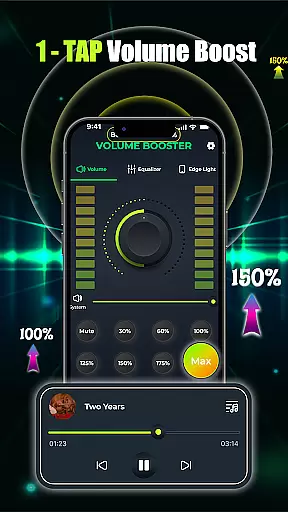
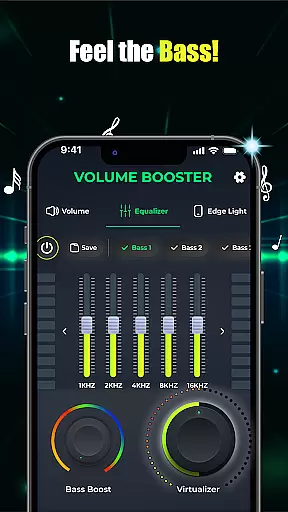
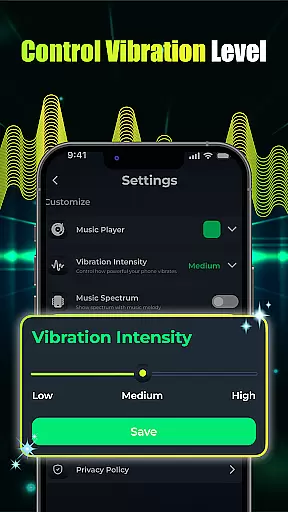
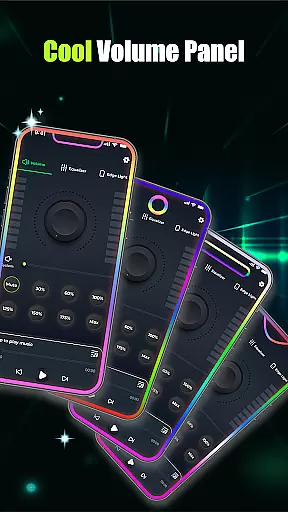
Volume Booster - Music & Sound is a powerful audio enhancement application designed to maximize your listening experience. This app allows users to amplify device volume beyond standard limits while maintaining clear, distortion-free sound quality. Whether you're using Bluetooth headphones, external speakers, or your phone's built-in speaker, the app ensures every audio element is heard with enhanced clarity and depth.
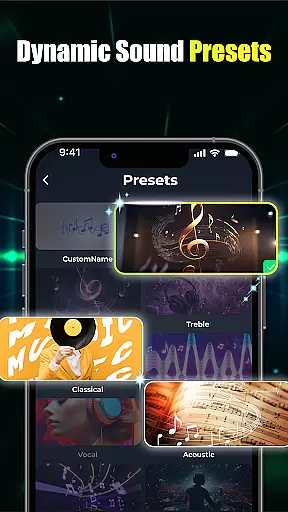
The application features an intuitive one-tap boost function combined with advanced equalizer controls. Users can customize their audio experience through various presets including bass boost, 3D virtualization, and flat equalizer settings. The built-in music player integration enables seamless management of multiple audio sources, making it perfect for both casual listeners and audio enthusiasts who demand precise control over their sound output.
Perfect for movie watching, music streaming, or enhancing conference calls, this app transforms any Android device into a high-performance audio system. Its user-friendly interface and customizable options make it suitable for all types of users looking to elevate their audio experience.
This audio booster application stands out with its comprehensive feature set that caters to diverse user needs. The core functionality includes a sophisticated volume boosting system that can increase output levels up to 50% higher than standard device limits without compromising sound quality. The smart processing algorithm prevents audio distortion even at maximum volume levels.
Advanced equalization capabilities allow users to fine-tune their audio experience through multiple customization options. The app provides a complete suite of sound enhancement tools including a multi-band equalizer with preset configurations, bass boost with adjustable intensity, and 3D sound virtualization for immersive audio experiences. The innovative edge light visual effects add a unique touch, synchronizing with audio playback for enhanced entertainment value.
Additional features include a unified music player interface that consolidates audio playback from different applications, automatic device optimization based on connected audio equipment, and intuitive user interface design that simplifies complex audio adjustments. These features work together to create a seamless and enjoyable audio enhancement solution for Android users.
When it comes to music and audio applications, the size and authenticity of the music library are crucial factors. Volume Booster - Music & Sound offers an extensive collection of songs and soundtracks, ensuring users have access to a wide variety of audio content. This vast library is not just about quantity; it's also about quality and legality.
The app guarantees that all tracks are properly licensed, giving users peace of mind that they are enjoying music that respects copyright laws. This commitment to copyright authenticity means artists and producers are rightfully credited and compensated for their work, fostering a healthy creative ecosystem.
For users, this translates into a reliable and diverse listening experience. Whether you're in the mood for the latest hits or niche genres, the app's comprehensive library has something for everyone. The assurance of legal compliance adds an extra layer of trust and satisfaction.
Moreover, the integration with various devices ensures seamless playback across platforms. Users can enjoy high-quality audio without worrying about compatibility issues, making Volume Booster - Music & Sound a versatile choice for enhancing your audio experience.
Audio quality is at the heart of any music and audio application, and Volume Booster - Music & Sound excels in providing top-notch audio quality options. With advanced features like customizable equalizer settings and bass boost options, users can tailor their sound experience to their exact preferences.
The app includes a flat equalizer and band equalizer presets, allowing precise adjustments to achieve studio-quality sound. These tools enable users to fine-tune every aspect of their audio, from treble to bass, ensuring an immersive listening experience. The crystal-clear custom sound presets further enhance this by offering 3D virtualization for a richer audio environment.
Volume Booster - Music & Sound doesn't stop there. It provides options for boosting volume instantly with just one tap, delivering louder and more powerful sound without distortion. This feature is particularly beneficial for devices that struggle with low sound levels, making it perfect for movies, music, and even conversations.
Additionally, the built-in music player supports multiple audio playback applications, integrating seamlessly with your deviceu2019s operating system. This ensures smooth interaction and clean design, allowing users to manage their audio effortlessly. With these robust audio quality options, Volume Booster - Music & Sound stands out as a premier choice for audiophiles seeking the best in sound enhancement.
Superior volume amplification
Distortion-free audio output
Comprehensive equalizer controls
User-friendly interface design
Multi-device compatibility
Battery consumption concerns
Occasional audio glitches
Limited iOS availability
Premium feature costs
Device compatibility issues

The Skullcandy App Experience
 3.20
3.20
A High-Precision Audio Spectrum Analysis App
4.20
The alternative folder based music player.
4.20
Learn to play the piano using falling notes!
3.80
A sleek, no-frills player designed for true music lovers.
4.20
Voice recorder - Audio recorder. Best recorder for recording
4.90
Play your hearts out on TouchTunes jukeboxes & connect with fellow music lovers.
4.80
Music, News & Sports Radio Tuner App. Tune in Live FM & AM Radio Stations.
4.80
Learn and play 2M+ music tabs & chords on guitar, ukulele, bass, and more
4.30
Over 100 million tracks available for high quality streaming and download
4.60
The best music and audio player, with beautiful UI, music search and equalizer.
4.60
A synth that really lets you shape your sounds!
4.50
Guzheng Master supports many playing techniques as an acoustic Guzheng
4.50
Let your Android device with the sound effects you want
4.50
Full featured mp3 and audio player with Chromecast and Android Auto support.
4.40
Network/Cloud Streaming, Visualization, Graphic Equalizer and Sound Effects.
4.20
Simply convert wav to mp3. Clear. Reliable. Safe.
4.5
Make music anywhere. Turn your device into an instrument.
4.3
Remove ads permanently from Music Visualizer
4.2


User Reviews