
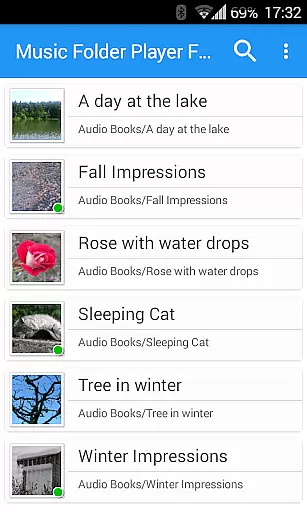
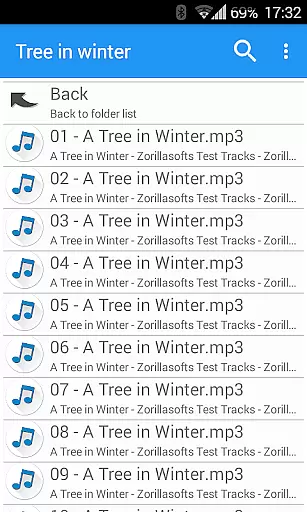
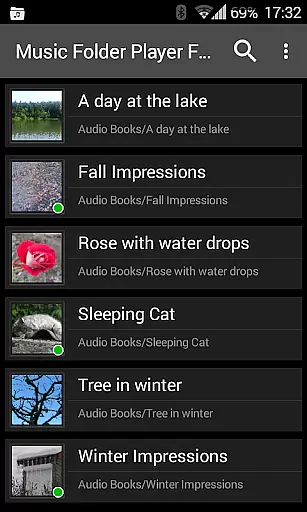
Music Folder Player Full is a specialized audio player designed for users who prefer organizing their music files in folders rather than traditional categories like artist or album. The app offers a unique folder-based playback experience, making it ideal for those with custom file organization systems.
In addition to its core functionality, the app provides advanced features such as homescreen widgets, resume playback where you left off, and multiple display options for different collection sizes. With support for playlists, equalizer settings, and speed control with pitch correction, it caters to both casual listeners and audiophiles alike.
The application's standout features include virtual room effects, 432 Hz playback mode, and car/sports mode with enlarged buttons. These capabilities, combined with practical functions like sleep timer and Last.fm scrobbling, make it a versatile tool for various listening scenarios and preferences.
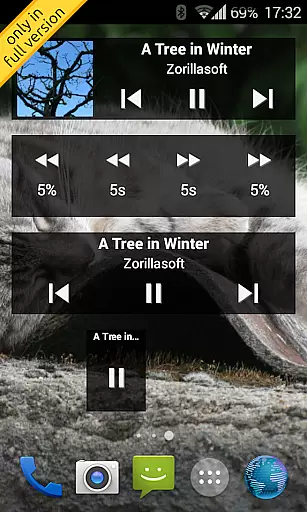
Music Folder Player Full stands out with its comprehensive feature set tailored for folder-based music management. The app implements Material Design principles, providing an intuitive and modern user interface through three distinct homescreen widget options available exclusively in the full version.
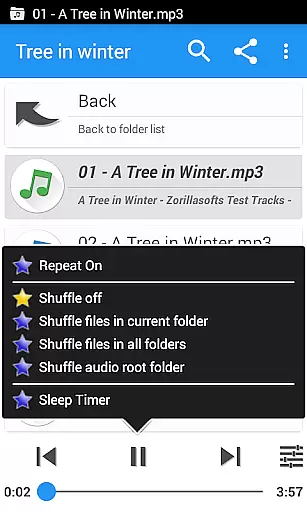
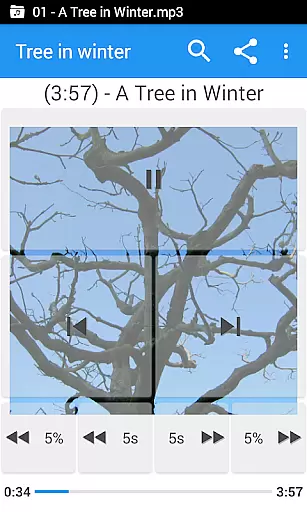
One of the key innovations is its ability to remember playback positions for each folder, allowing seamless continuation of listening sessions. Users can choose between flat list views for smaller collections or hierarchical displays for larger libraries. The four configurable seek buttons offer precise navigation, especially useful for podcasts and audiobooks.
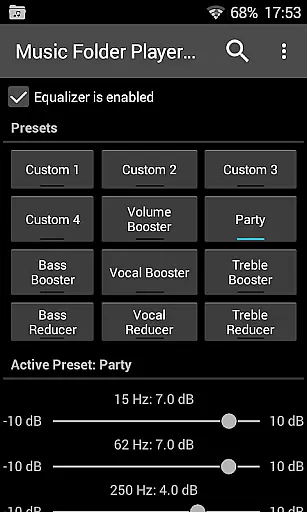
Advanced audio processing capabilities include a four-band equalizer with customizable presets, virtual room effects, and playback speed adjustment with pitch correction. The implementation of two-finger gesture controls for volume and balance adjustment demonstrates the app's attention to user convenience and accessibility.
Music Folder Player Full offers a unique approach to music organization by allowing users to manage their audio tracks through folders rather than traditional artist or album categories. This method provides an extensive personal music library that is only limited by the device's storage capacity.
The app supports various audio formats, ensuring that users can include all their legally acquired music files without compatibility concerns. By organizing music in folders, users maintain control over their library's structure and expansion, making it easy to add new tracks or remove unwanted ones.
Regarding copyright authenticity, this app respects users' ownership rights of legally purchased music. It does not provide or distribute music but instead focuses on giving users tools to enjoy their collections. The emphasis is on personal organization and playback rather than content acquisition.
This player ensures that your music library remains authentic and personalized. With features like virtual folders for favorite songs and playlist creation, users can curate their collections while respecting copyright laws, making it an ideal choice for those who value both functionality and legal integrity.
One of Music Folder Player Full's standout features is its advanced audio quality options, which cater to audiophiles and casual listeners alike. The app includes a robust equalizer with four customizable settings and eight predefined options, such as Bass Booster and Vocal Booster, allowing users to fine-tune their listening experience.
For those seeking more sophisticated sound adjustments, the app offers virtual room and reverb effects, creating immersive audio environments. These features are particularly beneficial when listening through high-quality headphones or speakers, enhancing the overall music appreciation.
The player also includes speed control with pitch correction, enabling users to adjust playback speed without affecting audio quality. This feature is especially useful for podcasts and audiobooks but is not recommended for music. Additionally, the pre-amplifier function boosts low-level recordings, ensuring consistent volume across different tracks.
Unique audio modes, like the 432 Hz playback setting, provide alternative listening experiences for users interested in exploring different sound frequencies. These comprehensive audio quality options demonstrate the app's commitment to delivering premium sound experiences while maintaining user control over their music playback settings.
User-friendly folder organization
Advanced equalizer settings
Speed control with pitch correction
Multiple homescreen widgets
Comprehensive playback options
Lacks cloud integration
No built-in music store
Premium price point
Complex for beginners
Android-specific features

Turn your phone into a musical instrument from the future!
 3.90
3.90
Remove ads permanently from Music Visualizer
4.3
JBL PartyBox APP works with 110/310/710/120/320/520/Encore/Encore 2/Encore Ess 2
4.80
The only true audiophile music player with Hi-Fi audio rendering and DSP engine
3.90
Super Sound Editor, Song Maker & Mixer, Vocal Remover, Voice Recorder & Changer!
4.60
Help you quickly get started with Shokz headphones
4.40
The iconic iOS metronome app is now on Android.
3.70
Sing, record, and create music together — enhanced by smart voice tools.
4.00
Play your music offline without limits
4.80
Tune in to the greatest hits on UK Radio | The home of Capital, Smooth & Heart.
4.90
Full-featured, High-Quality Groovebox Workstation, perfect for Live Performance!
4.80
Play your hearts out on TouchTunes jukeboxes & connect with fellow music lovers.
4.80
Music, News & Sports Radio Tuner App. Tune in Live FM & AM Radio Stations.
4.80
Gorgeous UI, Powerful music Search and Equalizer, the great choice for you!
4.70
Save hundreds of dollars for a physical strobe tuner and instead use this app.
4.50
10-Band Audio Equalizer, Sound / Bass Booster for Spotify Users & Music Players
4.40
Time Guru will strengthen your internal sense of musical time via random muting.
4.30
A sleek, no-frills player designed for true music lovers.
4.20
Make music anywhere. Turn your device into an instrument.
4.3


User Reviews