
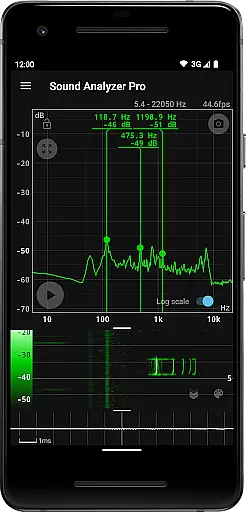
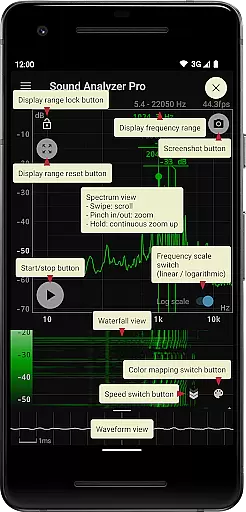
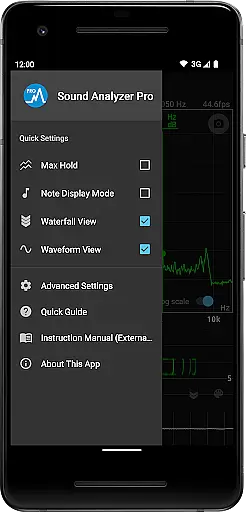
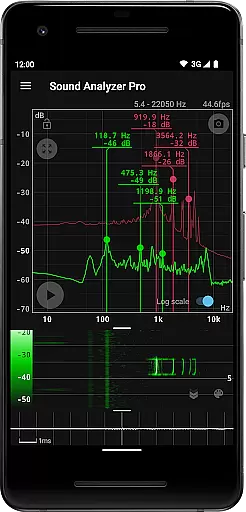
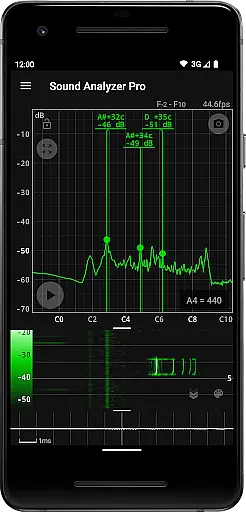
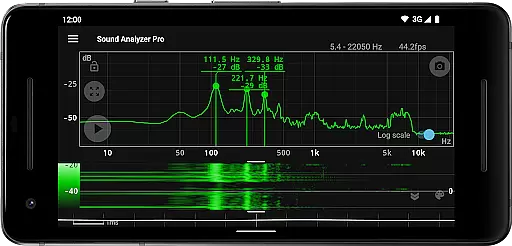
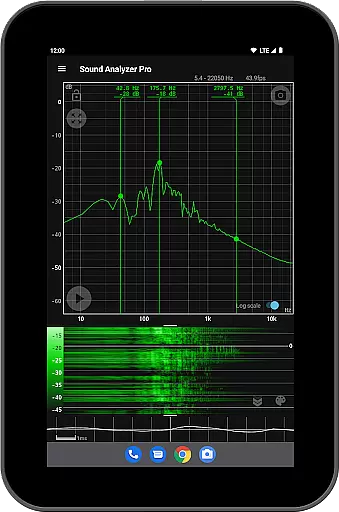
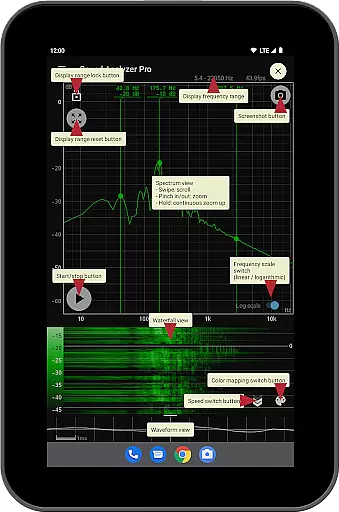
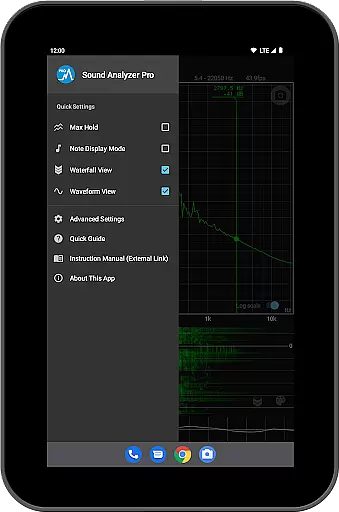
Sound Analyzer is a powerful audio analysis tool designed for both audio professionals and enthusiasts. The app's core functionality lies in its ability to display real-time frequency (Hz) and amplitude (dB) spectra directly on your mobile device. This makes it an invaluable tool for sound engineers, musicians, and anyone needing precise audio measurements.
In addition to the spectrum view, Sound Analyzer offers advanced features like waterfall visualization that shows spectral changes over time, and waveform view for analyzing sound patterns. The app stands out with its exceptional measurement accuracy - within 0.1 Hz error in quiet environments - making it suitable for professional-grade analysis.
A key application of Sound Analyzer is in music production and live sound engineering, where users can benefit from features like peak frequency display, note detection showing musical pitches (A to G♯), and switchable frequency scales. The absence of advertisements enhances the user experience, while additional functions such as max hold and screenshot capabilities make this a comprehensive audio analysis solution.
Sound Analyzer distinguishes itself through its comprehensive set of professional-grade features. The app's most notable capability is its real-time spectrum analysis, which accurately measures frequencies up to 96 kHz with exceptional precision. The touch-based interface allows users to easily adjust display ranges and switch between logarithmic and linear frequency scales.
The application provides multiple visualization modes including waterfall view for temporal spectral changes, waveform view for sound pattern analysis, and a unique musical note display mode that translates frequencies into standard musical notes with cent accuracy. Advanced features include a max hold function for capturing peak values, and a professional-grade screenshot function with timer for documentation purposes.
What sets Sound Analyzer apart from other audio tools is its combination of high-precision measurement capabilities with user-friendly features. The app maintains a clean interface free from advertisements while offering specialized functions like peak frequency tracking and simultaneous multi-view displays. These features make it particularly valuable for both field measurements and studio work across various audio applications.
Sound Analyzer does not focus on providing a vast music library but rather emphasizes real-time audio signal analysis. The app allows users to analyze audio signals with high precision, offering detailed frequency and amplitude readings that are crucial for audio professionals.
While it doesn't provide a traditional music library, its ability to display note names and errors in cents makes it an invaluable tool for musicians and sound engineers who need accurate pitch information. This functionality ensures that the content generated and analyzed maintains a high level of authenticity and reliability.
The application's measurement accuracy is exceptional, with errors typically within 0.1 Hz in low-noise environments. This precision supports the creation and analysis of audio content that adheres to strict professional standards, indirectly contributing to copyright authenticity through precise audio reproduction and analysis.
Sound Analyzer excels in providing various audio quality options, allowing users to adjust settings to achieve optimal results based on their specific needs. The app supports frequency settings up to 96 kHz, catering primarily to high-performance devices that demand superior audio quality.
Users can switch between logarithmic and linear scales on the frequency axis, offering flexibility in how audio data is visualized and interpreted. This feature is particularly beneficial for professionals who require detailed control over their audio analysis parameters.
In addition to its advanced spectral analysis capabilities, Sound Analyzer includes a waveform view and waterfall view, enabling comprehensive examination of sound waveforms and spectral changes over time. These features collectively enhance the overall audio quality assessment process, making it an essential tool for anyone serious about audio production and analysis.
High-precision measurements
Real-time spectrum analysis
No advertisements
Multiple visualization modes
Professional-grade features
Complex for beginners
Requires technical knowledge
Limited high-frequency support
Device compatibility issues
Advanced features overwhelming

Make music anywhere. Turn your device into an instrument.
 4.2
4.2
Formerly known as Spotistats! View your top tracks, artists, albums and more!
4.40
Performance-Synthesizer & Multi-Track-Sequencer, polyphonic + multi timbral!
4.70
JBL PartyBox APP works with 110/310/710/120/320/520/Encore/Encore 2/Encore Ess 2
4.80
Walkout Song DJ is the most intuitive app to manage your sports music.
4.70
The ultimate media player for Android devices
3.90
USB audio recording and playback finally possible on Android 3.1 or higher!
3.90
The official Sonos app
4.10
The iconic iOS metronome app is now on Android.
3.70 4.70
4.70
Over 100 million tracks available for high quality streaming and download
4.60
The best music and audio player, with beautiful UI, music search and equalizer.
4.60
Reverse your voice & songs instantly! Fun singing challenge with cool effects.
4.60
Help you quickly get started with Shokz headphones
4.40
Master Salsa Rhythm quickly and with a lot of fun!
4.30
PowerAudio is a powerful offline music player.
4.20
The Skullcandy App Experience
3.20
Simply convert wav to mp3. Clear. Reliable. Safe.
4.5
Remove ads permanently from Music Visualizer
4.2


User Reviews