
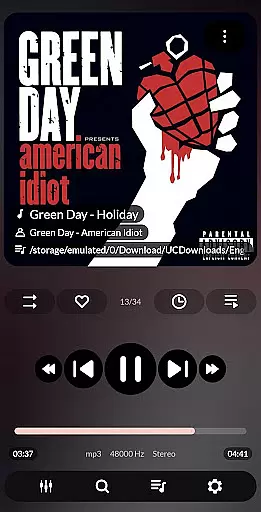
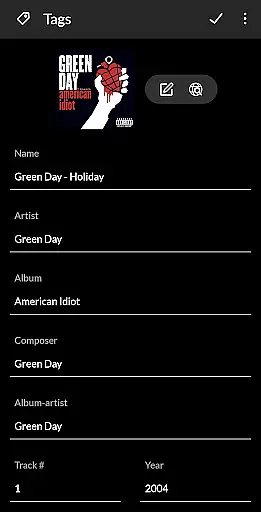


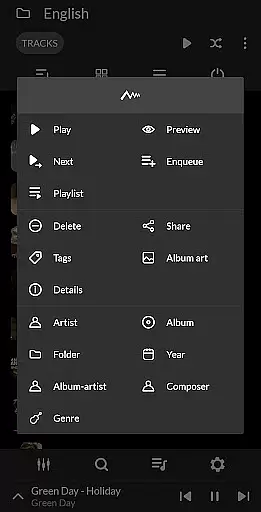
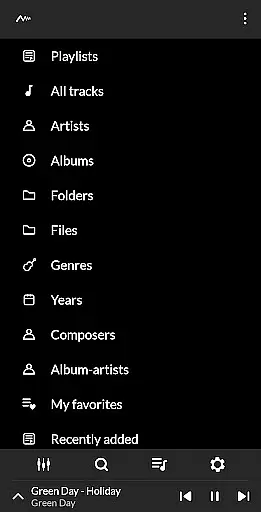
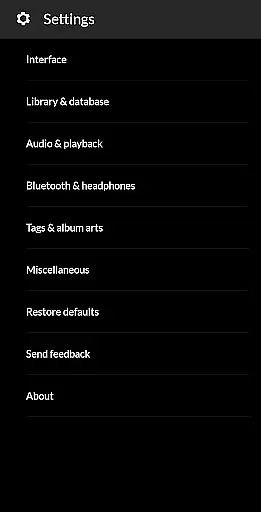
PowerAudio Plus Music Player is a feature-rich audio player designed to deliver an exceptional music experience. With its intuitive interface and support for all major audio formats, it allows users to browse songs by albums, artists, playlists, or favorites. The app includes advanced playback options such as repeat, shuffle, and sleep timer functionalities.
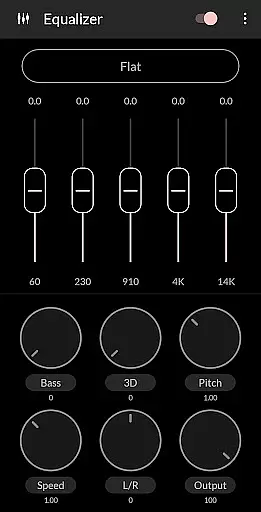
A standout feature of PowerAudio Plus is its powerful equalizer with BassBoost and Virtualizer, offering various presets and custom settings. Users can create personalized playlists, set phone ringtones, share media files, and even view detailed codec information. The app also supports background playback and automatically pauses when headphones are disconnected.
This versatile music player is ideal for audiophiles who demand high-quality sound and extensive customization options. Whether you're organizing your music library or fine-tuning audio settings, PowerAudio Plus provides the tools needed for an enhanced listening experience across Android devices.
PowerAudio Plus Music Player distinguishes itself through its comprehensive feature set tailored for music enthusiasts. The app's equalizer offers multiple presets including BassBoost and Virtualizer, allowing users to customize their listening experience. Advanced sorting options enable organizing tracks by name, date, or date added, while the multi-select function facilitates efficient playlist management.
The application supports creating custom queues and playlists, with options to add songs to favorites from any tab. Its intelligent detection system automatically pauses playback when headphones are disconnected. Additional features include setting ringtones, sharing media files, viewing codec details, and deleting unwanted songs or playlists.
PowerAudio Plus stands out among music players by combining essential playback functions with advanced audio controls. The app's ability to play music in the background while maintaining optimal performance demonstrates its technical sophistication. These features collectively provide users with complete control over their music library and listening preferences.
PowerAudio Plus Music Player offers an extensive music library that supports all major audio formats including mp3, m4a, wav, aac, amr, and ogg. This ensures that users can enjoy a wide variety of music without worrying about compatibility issues.
The application emphasizes copyright authenticity by providing features such as codec details which include information like bitrate, sample frequency, and channels. Users can be confident that the music they are enjoying is of high quality and legally obtained.
With the ability to browse songs by albums, artists, or playlists, PowerAudio Plus makes it easy for users to organize and access their music collection. The app also allows users to create their own playlists, adding a personal touch to how they experience their favorite tracks.
One of the standout features of PowerAudio Plus Music Player is its powerful equalizer, complete with BassBoost and Virtualizer. These tools allow users to customize their listening experience according to their preferences, ensuring optimal audio quality for different genres and types of audio content.
Users can choose from a variety of music presets or even create their custom preset, giving them full control over how their music sounds. This level of customization enhances the overall audio experience, making each listening session unique and tailored to individual tastes.
In addition to its advanced equalizer, PowerAudio Plus supports high-quality audio formats, delivering crisp and clear sound. Whether you're using headphones or speakers, this music player guarantees an immersive auditory experience that highlights the best aspects of your music library.
User-friendly interface
Extensive format support
Advanced equalizer settings
Customizable playlists
Background playback capability
Requires multiple permissions
No built-in lyrics support
Interface may feel dated
Limited visual themes
Occasional stability issues

Tune in to the greatest hits on UK Radio | The home of Capital, Smooth & Heart.
 4.90
4.90
Pay Once, no monthly payment
4.60
DJ Music Mixer - DJ Remix: remix songs, make beat music & record mix of DJ.
4.40
Brian Eno and Peter Chilvers’ acclaimed music app Bloom, radically reinvented.
4.80
Listen radio AM / FM Stations. Live AM / FM Radio App Station. Radio Com.
4.70
Enjoy singing any song, no matter how high or low it is
4.30
Play your hearts out on TouchTunes jukeboxes & connect with fellow music lovers.
4.80
The iconic iOS metronome app is now on Android.
3.70
Responsive piano with great sounds, graphics, and songs
4.80
More downloads than any other metronome. Includes drum machine & tempo trainer.
4.80
Music, News & Sports Radio Tuner App. Tune in Live FM & AM Radio Stations.
4.80
Gorgeous UI, Powerful music Search and Equalizer, the great choice for you!
4.70
Walkout Song DJ is the most intuitive app to manage your sports music.
4.70
Ultimate Sonos Controller
4.70
The best music and audio player, with beautiful UI, music search and equalizer.
4.60
Fun & Easy Voice Changer – Record, Edit & Add Hilarious Effects!
4.50
The alternative folder based music player.
4.20
The original SP-1200 experience on your iPad
4.20
The Minimalistic Premium Music Player. Handmade with passion for music
2.20


User Reviews