
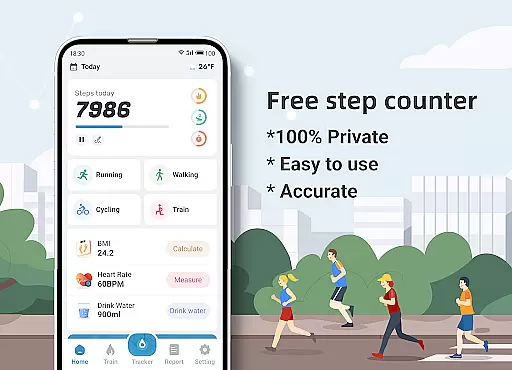
Step Counter - Pedometer & BMI is a comprehensive health and fitness application designed to track your daily steps, monitor your BMI, and provide detailed activity reports. The app offers accurate step counting through your mobile device, eliminating the need for additional pedometer hardware.
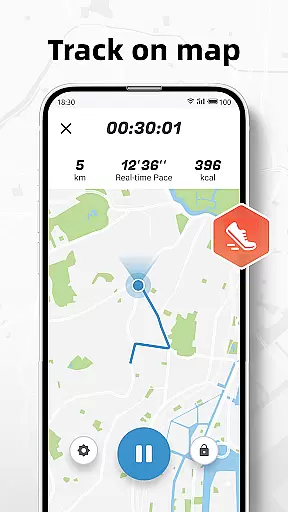
Beyond basic step tracking, the app provides advanced features like GPS-based activity mapping, customizable training plans, and health metrics such as calorie burn and distance tracking. Its user-friendly interface makes it suitable for fitness enthusiasts of all levels who want to monitor their progress and improve their health.
The application's privacy-focused design ensures that all your health data remains completely private and secure on your device. Whether you're walking, running, or following structured training programs, Step Counter helps you achieve your fitness goals while maintaining complete control over your personal information.
Step Counter stands out with its robust feature set tailored for health-conscious users. The app's core functionality includes precise step tracking using your phone's built-in sensors, with adjustable sensitivity settings to ensure maximum accuracy regardless of your carrying position.
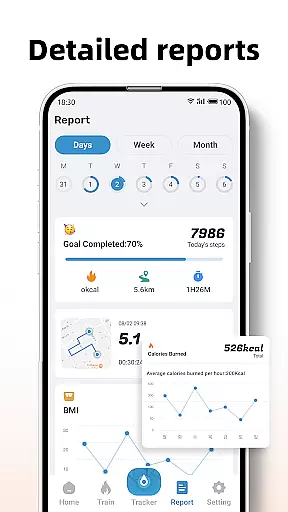
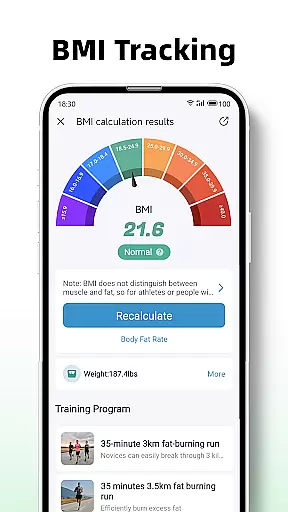
One of the app's key innovations is its integrated BMI calculator and tracking system, which allows users to monitor their body mass index alongside their physical activity data. The detailed reporting system provides visual graphs and analytics for daily, weekly, and monthly activity patterns, helping users identify trends and maintain consistent progress toward their fitness objectives.
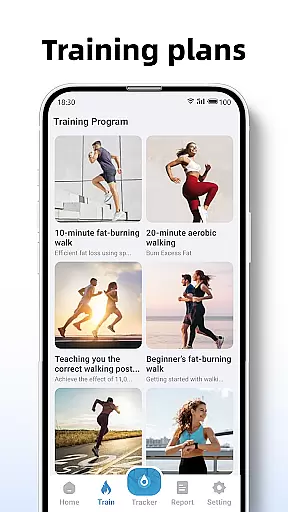
For beginners, the app offers structured training plans ranging from short 10-minute workouts to more extended exercise routines. These plans include real-time tracking of active time, distance covered, and calories burned. Additionally, the app's mapping feature visually tracks your outdoor activities, providing geographical context to your fitness journey.
Personalized planning in Step Counter - Pedometer & BMI offers tailored training plans to suit individual fitness goals. The app provides structured programs such as 10-minute jogging sessions, which are designed to help users begin their fitness journey with guided workouts.
By recording active time, distance, and calories burned during these sessions, the app ensures that users can track their progress effectively. This personalized approach not only helps in setting realistic fitness targets but also keeps users motivated by showing tangible results of their efforts.
The app's ability to adapt to different user needs makes it a versatile tool for anyone looking to improve their health. Whether you're a beginner or an experienced walker, the personalized plans offer a roadmap to achieving your fitness milestones.
Step Counter - Pedometer & BMI excels in progress visualization by offering detailed reports and graphs that cover daily, weekly, and monthly data. These visual aids allow users to easily understand their walking trends and improvements over time.
With clear graphical representations, users can quickly identify patterns in their activity levels, helping them make informed decisions about their fitness routines. The app's design focuses on user engagement through visually appealing and easy-to-read charts.
This feature is crucial for maintaining motivation, as seeing progress in a visual format can be incredibly rewarding. Users can celebrate milestones and adjust their efforts based on concrete data, ensuring continuous improvement in their health journey.
User-friendly interface
Accurate step tracking
Private data handling
Detailed activity reports
Integrated BMI calculator
No wearable integration
Limited social features
Basic UI design
Occasional accuracy issues
No premium support

Your Health Has Met Its App (℠)
 3.90
3.90
See what's really going on inside your head! Real time EEG graphs from your Muse
4.40
A brain game that moves you
4.70
The OFFICIAL Couch to 5K® running training app! A 9 week walk-run workout plan.
4.50
Pupillary distance PD with camera quick and easy, checking glasses frames on you
3.70
Pilates, Calisthenics, Yoga
4.50
FODMAP, Gluten, Allergy, Vegan
4.50
Your personal BP tracking companion, focus on helping you achieve wellness goal.
4.10
Mood journal, habits, self-care tracker, self-love
4.90
sobriety counter app to help and motivate people to stop drinking alcohol.
4.90
Protect your healthy sleep
4.80
Step Counter, track steps when you walk or run
4.70
Effortlessly and naturally release anxiety by harnessing the power of your brain
4.60
Memory, mind & logic exercises. Puzzle games, IQ & brain test for kids & adults
4.50
Track heart rate & HRV in 30s! Get live health insights and anomaly alerts
4.40
Interval timer for High Intensity Interval Training, Tabata and Circuit Training
4.20
“Overcoming pain based on EMDR” helps you to alleviate chronic pain and stress.
4.10
Histamine intolerance, low FODMAP diet and irritable bowel syndrome (IBS)
4.00
Turn your steps into cash, gift cards & rewards with our step counting pedometer
3.80


User Reviews