
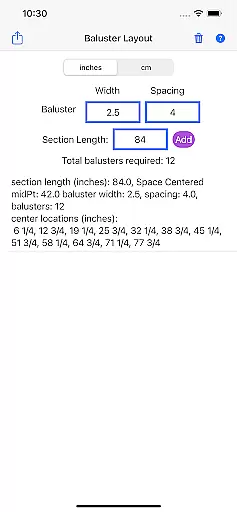
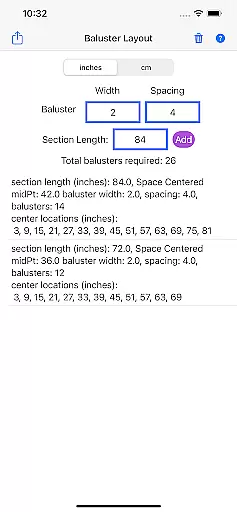
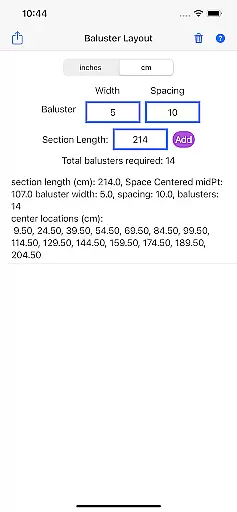
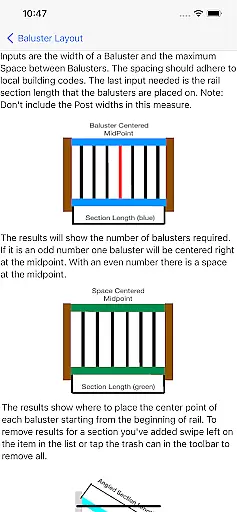
Baluster Layout is a specialized application designed for deck and stair builders who need precise calculations for baluster spacing. The app ensures compliance with building codes by calculating the optimal number of balusters and their exact placement based on user inputs such as railing length, baluster width, and desired spacing.
One of the standout features of Baluster Layout is its ability to handle complex projects involving multiple railing sections, each with unique dimensions. This makes it an invaluable tool for both professional builders and DIY enthusiasts. By providing detailed results and unit flexibility between inches and centimeters, the app caters to a wide range of project specifications.
The ultimate goal of Baluster Layout is to save users time and effort while ensuring safety and code compliance. Its intuitive interface and accurate calculations help avoid costly mistakes, making it easier to create visually appealing and structurally sound railings.
Baluster Layout offers a variety of robust features that cater specifically to the needs of deck and stair builders. One of the primary functionalities is precision spacing, which allows users to calculate the optimal distance between balusters to meet stringent building code requirements. This feature alone can significantly reduce the risk of non-compliance and ensure the structural integrity of railings.
In addition to precision spacing, the app supports projects with multiple rail sections, each having different dimensions. Users can input specific measurements for each section, and the app will generate a comprehensive plan detailing the number of balusters needed and their exact placement. This level of detail is crucial for complex installations and helps streamline the building process.
Unit flexibility is another key feature, allowing users to switch between inches and centimeters. This ensures that the app can be used globally and adapts to various project specifications. Detailed results provided by the app include a breakdown of baluster distribution and placement, offering users a clear roadmap for their projects.
In the realm of home improvement and construction, having accurate project specifications is crucial. Baluster Layout provides precise calculations tailored to your project's unique requirements.
By entering specific parameters such as railing length and baluster width, the app ensures that all data reflects the true needs of your construction task. This accuracy in calculation guarantees that every baluster placement complies with building codes.
The authenticity of each project listing within the app is maintained through detailed input options, allowing users to configure multiple rail sections with individual dimensions. This feature ensures that no detail is overlooked.
Ultimately, this leads to error-free project planning, saving both time and resources while ensuring safety and compliance in your deck or stair building endeavors.
Beyond simple calculations, Baluster Layout offers comprehensive home management features designed to streamline the building process. The app allows for handling complex projects involving multiple railing sections, each with distinct measurements.
Users can choose their preferred units of measurement, either inches or centimeters, providing flexibility that matches the specifications of any project. Detailed results further enhance usability by breaking down the number of balusters needed for each section.
This meticulous approach not only aids in efficient material management but also ensures a visually appealing outcome. By avoiding manual guesswork, builders can focus on creating stable and attractive structures.
These features collectively contribute to a hassle-free experience, making Baluster Layout an indispensable tool for professionals and DIY enthusiasts alike.
Accurate calculations
User-friendly interface
Supports multiple units
Detailed project breakdown
Compliance assurance
Limited to baluster projects
No 3D visualization
Basic design layout
Few customization options
Requires manual input

Tailored Care Guides For Houseplants, Indoor Plants, Garden Plants & Flowers.
 4.60
4.60
B-hyve Pro App for landscape irrigation professionals
4.70
An awesome mobile app for Home Security Surveillance - uses ZoneMinder
3.20
Convert your Phone to HiSense Smart TV Remote Control
4.70
Control Fire TV & mirror your phone screen instantly over Wi-Fi.
3.30
SmartRent - Opening Doors To A Smarter World
4.40
Design your dream home with 3D planning app, Visualize your dream home in 3D.
4.20
3D House Design and AI Room Planner - from floor plans to full interior design.
4.40
Houses for Sale & Homes for Rent: Buy Homes, Rent Apartments & Sell Real Estate
4.80
Connect with reliable pros for maintenance services, plumbing, and home design!
4.80
Rent on-the-go with TurboTenant’s app made just for renters
4.50
Resident Center, powered by Buildium, is designed with simplicity in mind.
4.50
Control the scent and ambiance of your home and car, right from your phone.
4.50
The Merkury Smart app makes it easy to control your smart devices.
4.50
Control your thermostat, comfort, and home monitoring from your phone
4.30
Book your local plumber 24/7, track your service order & get exclusive coupons
4.00
Technology powering many in-home services for residents across the United States
3.80
Draw your floor plan smartly. Make house design blueprint with home planner app
3.60
An easier way to make payments and maintenance requests from anywhere.
3.50


User Reviews