
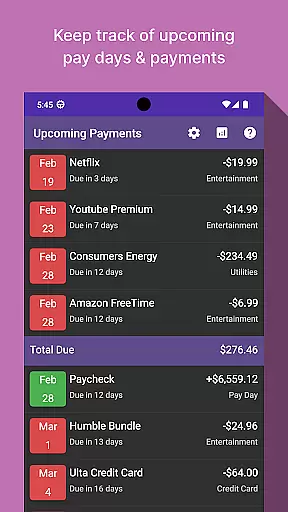
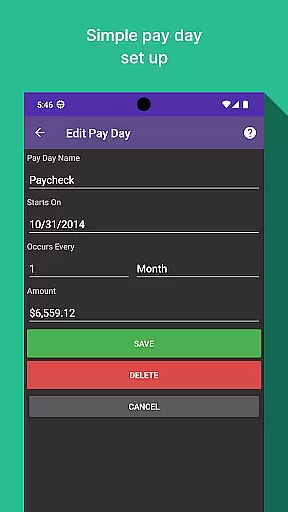
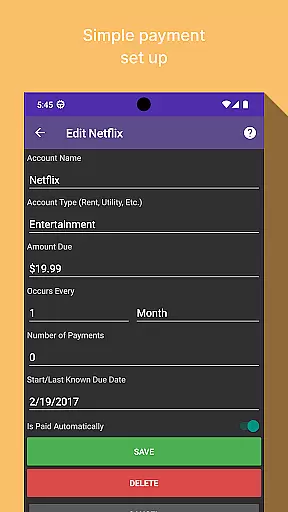
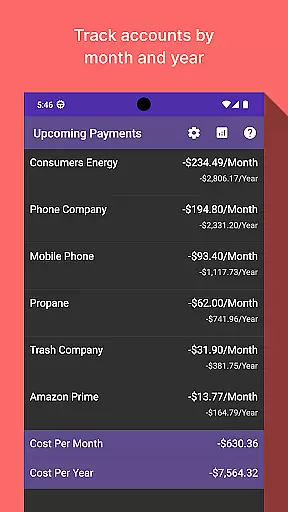
Bill Manager is a comprehensive financial management application designed to help users stay on top of their upcoming bills and payments. The app provides detailed information about pending bills, including payment amounts and due dates relative to the user's next payday. This ensures that users can effectively manage their cash flow and avoid late payments.
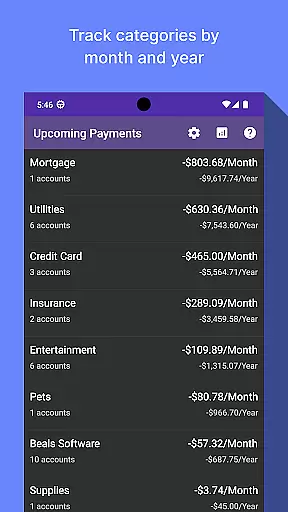
In addition to bill tracking, Bill Manager offers robust analytics features. Users can view categorized expenses by month and year, gaining valuable insights into their spending patterns. This functionality makes it an essential tool for anyone looking to maintain better control over their financial obligations and plan for future expenses.
One of the standout features of Bill Manager is its ability to display which bills are still due from the current date up to the next payday. This feature helps users prioritize their payments based on their available funds. The app also provides detailed breakdowns of payment amounts and due dates, ensuring users have all the necessary information at their fingertips.
The analytics view is another key aspect of Bill Manager. It allows users to analyze their expenses across different categories and accounts on a monthly and yearly basis. This helps in identifying spending trends and making informed financial decisions. With its intuitive interface and powerful tools, Bill Manager stands out as a top choice for managing personal finances effectively.
Account and fund security is a critical aspect of any financial application, ensuring that users' sensitive information remains protected. Bill Manager employs advanced encryption protocols to safeguard your data against unauthorized access.
The app implements multi-factor authentication, adding an extra layer of security by requiring not just a password but also a second form of verification before granting access. This ensures that only authorized users can view or manage their bills.
Furthermore, Bill Manager provides real-time alerts for any unusual activities detected within the account, allowing users to respond promptly to potential threats. These proactive measures help maintain trust and peace of mind.
By prioritizing security features such as encryption, multi-factor authentication, and activity monitoring, Bill Manager guarantees that your financial information is kept confidential and secure at all times.
A seamless transaction experience is essential for managing bills efficiently, and Bill Manager excels in providing users with timely and accurate information regarding their financial obligations. The app offers a clear overview of upcoming bills, detailing amounts due and payment deadlines.
Users benefit from personalized notifications about pending payments relative to their next payday, enabling better financial planning. This feature helps prevent late fees and ensures that users can manage their cash flow effectively.
In addition to tracking bill payments, Bill Manager includes an analytics view that categorizes expenses by month and year. This allows users to understand spending patterns and make informed decisions about future financial commitments.
With its intuitive interface and comprehensive insights into both current and projected expenses, Bill Manager enhances the overall transaction experience by simplifying bill management and promoting fiscal responsibility.
User-friendly interface
Comprehensive bill tracking
Detailed analytics view
Customizable notifications
Secure data management
Limited free version
No multi-currency support
Occasional syncing issues
Ads in free version
Requires constant updates

Currency Converter, Exchange Rates, Widgets
 4.90
4.90
Companies owe you money.
4.80
Earn cash & save money daily. Access instant cash advances* - no credit check!
4.50
Money transfer made easy. Send money to friends and family with great rates.
4.70
Your Big Financial Friend
4.70
Put crypto to work & earn rewards. Stake crypto like Ethereum, Solana & Cardano
4.40
Manage your credit card account with the Credit One Bank mobile app.
4.70
Read and extract public data on NFC Contactless banking card (VISA, MasterCard
4.30
Make Real Cash by Playing Games! Fetch Playful Rewards, Win & Triumph
4.50
Military retirement pay estimation calculator
4.70
Money App - Earn Cash back, Fast Cash Advance, Personal Loan Offers, Banking
4.70
Manage your prepaid cards and add to Google or Samsung Wallet.
4.60
Easily invest, save, and plan—all in one app.
4.60
Early payday & cash advances with no-fee mobile banking!
4.60 4.50
4.50
Manage your account, make a payment, and redeem your rewards on the go.
4.50
Registration of your debts and Mdionatk and assembled, as well as a significant reports
4.30
Venmo is the fun and easy way to pay and get paid.
4.10
Bitcoin gpu app helps you remote mine using your cell phone easily .
3.60


User Reviews