
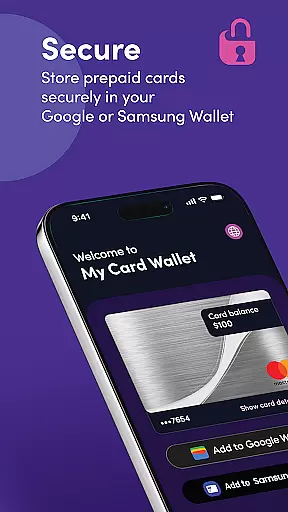
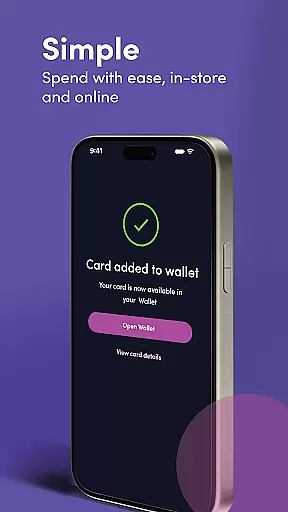
My Card Wallet is a financial management application designed to simplify the way users manage their prepaid cards. The app allows users to securely store card information, check balances, and add cards to digital wallets such as Google or Samsung Wallet for seamless in-store and online payments. With its intuitive interface, My Card Wallet makes it easy to access card details and set primary payment methods, ensuring a convenient shopping experience.
The app also provides essential features like balance tracking and secure storage of card details, making it an indispensable tool for anyone using prepaid cards. Whether you're paying at retail locations or shopping online, My Card Wallet streamlines the process by eliminating the need to manually enter card information. This functionality not only saves time but also enhances security during transactions.
For users who frequently shop with prepaid cards, My Card Wallet offers peace of mind by providing instant access to card balances and transaction history. This feature helps users maintain better control over their finances while enjoying the convenience of digital payments. Additionally, the app's support resources ensure that help is readily available whenever needed.
My Card Wallet stands out with its comprehensive set of features tailored for prepaid card users. One of its key functionalities is the ability to add cards to popular digital wallets like Google and Samsung Wallet. This integration enables contactless payments at any retailer that accepts these payment methods, offering a faster and more secure checkout experience.
Beyond digital wallet integration, the app provides real-time balance updates and easy access to full card details. Users can view their current balance directly within the app, eliminating the guesswork when making purchases. For online shopping, the app allows users to retrieve complete card information, which is particularly useful for sites that don't support digital wallet payments.
The app also includes robust security measures to protect sensitive card information. All data is stored securely, and users can quickly access their card details when needed. Furthermore, My Card Wallet offers dedicated customer support through its website, ensuring that users can resolve any issues promptly. These features collectively make the app an essential tool for managing prepaid cards effectively.
In the realm of digital finance, securing your account and funds is paramount. My Card Wallet ensures top-tier security by employing advanced encryption protocols to protect user data and transactions. Every card added to the wallet is verified and securely stored, preventing unauthorized access.
The app provides users with peace of mind through features like two-factor authentication and real-time fraud monitoring. These measures are crucial for maintaining the integrity of financial information in an era where digital threats are increasingly sophisticated.
By integrating with trusted payment platforms such as Google and Samsung Wallet, My Card Wallet guarantees that all transactions are safeguarded against potential vulnerabilities. This seamless blend of convenience and security allows users to focus on their spending without worrying about the safety of their funds.
Ultimately, the robust security framework of My Card Wallet empowers users to manage their prepaid cards confidently. With secure storage and easy access to card details, users can enjoy a worry-free digital payment experience.
A seamless transaction experience is at the heart of My Card Wallet's functionality. By enabling users to add their prepaid cards to Google or Samsung Wallet, the app facilitates effortless contactless payments in any retailer that accepts these payment methods. This ease of use transforms the traditional payment process into a swift tap-to-pay action.
For online purchases, My Card Wallet streamlines the checkout process by eliminating the need to manually enter card details. Users can select their preferred payment method directly at checkout, making online transactions faster and more efficient. Additionally, the app offers quick access to full card details for retailers not supporting Google or Samsung Pay.
Real-time balance updates further enhance the transaction experience by providing users with immediate insights into their spending capacity. This feature ensures that users always have accurate information about their available funds, allowing for better financial planning and decision-making.
Overall, My Card Wallet delivers a superior transaction experience by combining speed, convenience, and up-to-date financial information, setting a new standard for digital wallets in the Finance category.
User-friendly interface
Secure card storage
Real-time balance updates
Wide merchant acceptance
Dedicated customer support
Limited to prepaid cards
No budgeting tools
Requires digital wallet
Occasional sync issues
Region restrictions

Currency Converter, Exchange Rates, Widgets
 4.90
4.90
Secure, simple money transfer app. Send money to Mexico and worldwide fast.
4.80
Bill Manager is a simple app to help you keep track of your upcoming bills.
4.0
Need help before payday? Get cash advances with no interest or credit checks.
4.60
PayMe helps you claim money from settlements on companies that harmed you.
4.80
Get, Earn, and Save Money
4.30
Save, spend & get paid faster²
4.50
Easy budgeting planning on a calendar!
4.80
Wells Fargo Mobile allows you to access your investment and bank accounts.
4.80
Check EBT, SNAP, WIC balances, manage food stamps, and save money with benefits
4.80
Early payday cash advance up to $150 a day with a max of $1,000 per pay period
4.70
Managing your money just got easier. Get the new Mobile app.
4.70
Get 250$ Cash Advance to solve emergencies instantly in loan app called LendMe
4.70
Your Big Financial Friend
4.70
“Money Manager” is an optimized application for personal asset management.
4.70
Get a cash advance instantly. File taxes & cover unexpected bills in minutes.
4.60
The US Debt Clock .org App gives you a Real-Time glimpse of US Financial Stats
4.60
Put crypto to work & earn rewards. Stake crypto like Ethereum, Solana & Cardano
4.40
View BSC Transactions for multiple accounts
3.90


User Reviews