
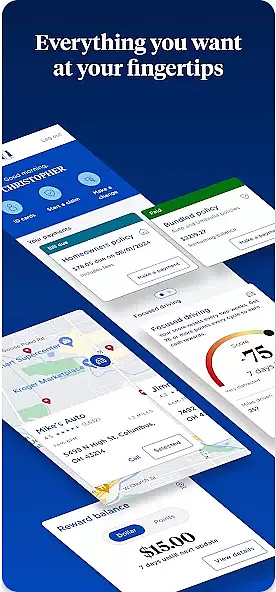

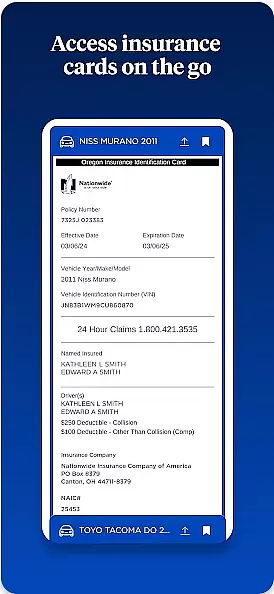
Nationwide Mobile is a finance-focused application designed to provide users with convenient access to their financial information. This app allows customers of Nationwide, a well-known financial institution, to manage their accounts on the go. Users can check balances, transfer funds, pay bills, and locate branches or ATMs through an intuitive interface.
One standout feature is its robust security measures that protect user data while allowing quick access through biometric authentication. The app also supports various customization options for notifications and alerts, ensuring users stay informed about their financial activities. Whether you're at home or traveling, Nationwide Mobile offers reliable tools for everyday banking needs.
The Nationwide Mobile app boasts several key features that enhance the user experience. First, it provides comprehensive account management capabilities including balance checks, fund transfers, and bill payments. These functions are accessible via a streamlined dashboard that prioritizes ease of use without compromising functionality.
Security is another major focus, with advanced encryption protocols and biometric login options such as fingerprint and facial recognition. Additionally, the app offers customizable notification settings so users can tailor updates according to their preferences. Integration with other financial tools and services further extends its utility, making Nationwide Mobile a versatile choice for managing personal finances efficiently.
In the realm of mobile banking, security stands as a paramount concern for users. Nationwide Mobile addresses this by implementing robust data encryption protocols to safeguard user information. Every transaction and personal detail entered into the app is encoded, ensuring that sensitive data remains protected from unauthorized access.
Beyond encryption, the app incorporates multi-factor authentication processes. Users are required to verify their identity through multiple steps before accessing their accounts or performing transactions. This not only includes traditional passwords but also biometric verification methods such as fingerprint scanning, adding an extra layer of security tailored to individual device capabilities.
Privacy protection within Nationwide Mobile extends to providing users with control over their data sharing preferences. The application allows individuals to manage what information is shared with third parties, empowering them with transparency and choice regarding their financial privacy. Such measures ensure compliance with global standards while fostering trust among its user base.
Nationwide Mobile redefines the transaction experience by offering seamless and intuitive navigation throughout the payment process. From bill payments to fund transfers, each action can be completed within a few taps, streamlining what could otherwise be time-consuming tasks into efficient operations that fit effortlessly into daily routines.
Real-time notifications serve as another pillar enhancing the transaction journey on this platform. Users receive instant alerts for every activity conducted through their accounts, keeping them informed about their financial status at all times. These notifications not only provide peace of mind but also enable swift action in case of any discrepancies or suspicious activities detected.
Moreover, Nationwide Mobile maintains a comprehensive transaction history readily accessible within the app's interface. This feature allows users to review past transactions easily, categorize expenses, and even export statements for personal or tax-related record-keeping purposes. By integrating these functionalities, Nationwide Mobile ensures that managing finances becomes not just secure but also remarkably convenient and insightful for its clientele.
User-friendly interface
Strong security features
Comprehensive account management
Customizable notifications
Biometric authentication
Limited to Nationwide members
No investment tracking
Occasional bugs reported
Requires internet connection
Some features need enrollment

Currency Converter, Exchange Rates, Widgets
 4.90
4.90
Play for fun, earn for real. Collect rent by owning virtual land & get cashback
4.60
Bill Manager is a simple app to help you keep track of your upcoming bills.
4.4
No credit checked needed.
4.80
Easy budgeting planning on a calendar!
4.80
Keep track of your subscriptions with no limitations
4.80
Access State Farm accounts, policies, ID cards and more
4.60
Make your paycheck work harder for you with Perpay.
4.10
The PayPal app is the secure way to send and receive money, shop and pay in 4.
4.20
BA Financial Calculator PRO – Perfect for CFA/FRM/CPA and finance professionals
4.90
Simple & secure international money transfers - for personal & business needs.
4.80
Managing your money just got easier. Get the new Mobile app.
4.70
Your Big Financial Friend
4.70
“Money Manager” is an optimized application for personal asset management.
4.70
Military retirement pay estimation calculator
4.70
Cash Advance, Credit Cards, Credit Lines, Score Monitoring, Saving, Budgeting
4.70
Manage your account, make a payment, and redeem your rewards on the go.
4.50
The simplest way to budget, bank, save and invest.
4.50
Get, Earn, and Save Money
4.30


User Reviews