
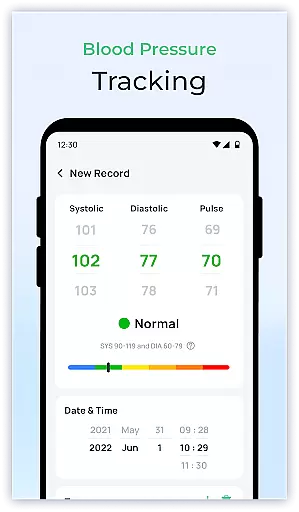
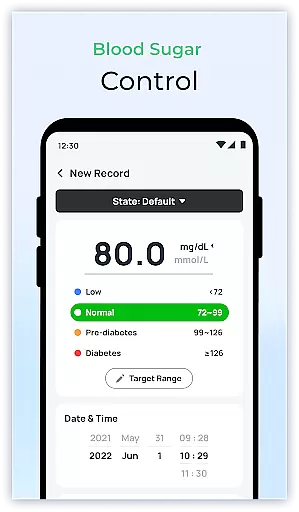
Blood Sugar & Diabetes Tracker is a comprehensive health management tool designed specifically for individuals managing diabetes. This app allows users to log and monitor their blood sugar levels with ease, providing personalized insights and trends based on the data entered. With its user-friendly interface, it ensures a seamless experience while offering customizable reminders to help users stay consistent with their tracking.
One of the standout features of this app is its ability to generate detailed reports that can be shared directly with healthcare providers. These reports assist in better diabetes management by offering a clear picture of blood sugar patterns over time. Additionally, the app provides educational resources and tips on maintaining a healthy lifestyle, ensuring users are well-informed about their condition.
Whether you're newly diagnosed or have been managing diabetes for years, Blood Sugar & Diabetes Tracker serves as a reliable companion in your health journey. By analyzing patterns and offering personalized recommendations, it empowers users to maintain stable blood sugar levels and make informed decisions about their health.
Blood Sugar & Diabetes Tracker offers a robust set of features tailored to diabetes management. The app's comprehensive blood sugar tracking functionality allows users to easily log their readings and view trends over time. This feature not only simplifies daily tracking but also helps identify triggers that may affect blood sugar levels, enabling users to take proactive steps in managing their health.
In addition to tracking, the app provides detailed reports that offer valuable insights into blood sugar patterns. These reports can be shared with healthcare providers to facilitate more informed discussions during medical appointments. The app also includes an intuitive user interface with customizable reminders, ensuring users never miss an important reading or medication dose.
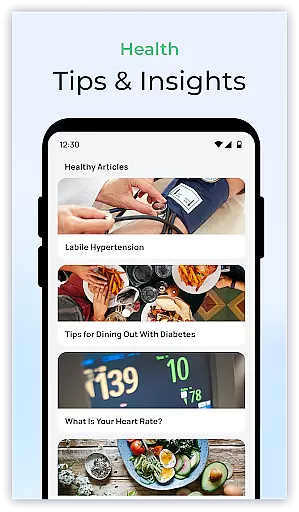
Another key aspect is the inclusion of educational resources. Users can access a wealth of information on diabetes care, from lifestyle tips to the latest research. This feature ensures that users are equipped with the knowledge needed to manage their condition effectively. Overall, Blood Sugar & Diabetes Tracker combines essential tools with user-centric design to support long-term health and wellness.
Personalized planning in health applications refers to the ability to create tailored strategies based on individual health data. For Blood Sugar & Diabetes Tracker, this means analyzing your blood sugar levels to offer customized insights and recommendations.
The app achieves personalized planning by allowing users to log their blood sugar readings effortlessly. It then processes this data to identify trends and patterns unique to the user's lifestyle and health condition. This functionality empowers users with actionable insights that are specifically relevant to their situation.
Users benefit from personalized planning as it helps them understand how different factors affect their blood sugar levels. The app provides suggestions that guide users in making informed decisions about their diet, exercise, and overall diabetes management strategy.
This feature adds significant value by enhancing the user's ability to maintain stable blood sugar levels, ultimately contributing to better long-term health outcomes. Personalized planning transforms generic advice into specific actions tailored to each user's needs.
Progress visualization is a crucial aspect of any health and fitness application, providing users with a clear picture of their health journey. In Blood Sugar & Diabetes Tracker, progress visualization translates complex health data into easy-to-understand charts and graphs.
The app offers various visualization tools such as trend lines, bar charts, and detailed reports that display the user's blood sugar levels over time. These visual aids make it easier for users to grasp how their daily activities and habits influence their health metrics.
By seeing their progress visually, users can celebrate milestones, recognize patterns, and adjust their behavior accordingly. Visual feedback fosters motivation and accountability, encouraging users to stick to their diabetes management plans.
Ultimately, progress visualization enhances user engagement and retention by offering tangible evidence of improvement. This feature not only tracks but also celebrates the small victories along the way, reinforcing positive health behaviors.
User-friendly interface
Comprehensive tracking
Detailed health reports
Customizable reminders
Educational resources
Premium features locked
Limited offline functionality
Occasional bugs reported
Subscription cost
Not a medical device

“Overcoming pain based on EMDR” helps you to alleviate chronic pain and stress.
 4.10
4.10
The Wear OS BeechBand app is designed to alleviate anxiety and other conditions
4.2
Get alert about getting out of desired heart rate zone.
4.10
A brain game that moves you
4.70
3D Body Measurement System
3.60
Medbridge GO gets you moving - get back to doing what you love, faster!
4.90
The most accurate heart rate app to monitor and track your heart rate & pulse.
4.40
GloryFit is a companion app for the smart bracelet.
3.60
Mood journal, habits, self-care tracker, self-love
4.90
Point, scan, and unlock truth in every bite.
4.50
The OFFICIAL Couch to 5K® running training app! A 9 week walk-run workout plan.
4.50
Grow with self-tests and personal routine.
4.30
Turn your steps into cash, gift cards & rewards with our step counting pedometer
3.80
Track sleep cycle, relax with white noise, sleep sounds & smart alarm clock
3.80
Focus on BP & Health
3.80
Live Heart Rate Pro - Real Time Heart & Workout Data For Wear OS & Bluetooth BLE
3.20
Measure real-time wrist & ambient temperature with your Galaxy Watch (Wear OS)
3.20
Sync your activities of the most popular sports tracking services
2.70
Using Recognise™ has been shown to reduce pain and improve performance.
4.2


User Reviews