





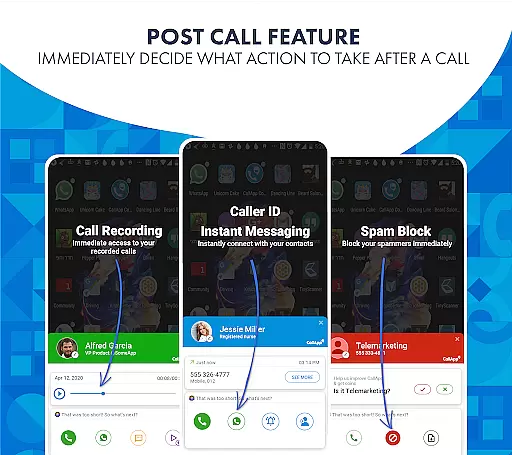

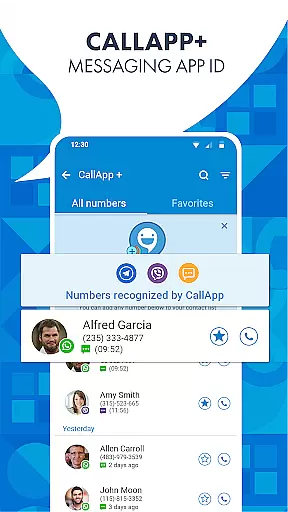
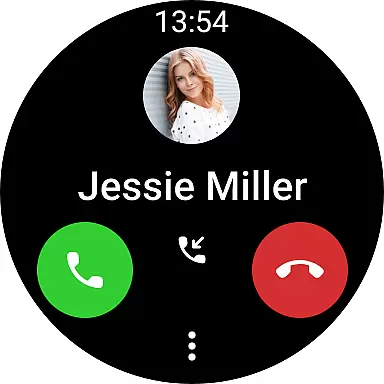
CallApp is a comprehensive communication app designed specifically for Android Wear users, offering advanced caller ID, call blocking, and SMS management features. The app's robust phone number lookup system contains over 7 billion numbers, ensuring you'll always know who is calling.
In addition to its powerful caller identification, CallApp provides effective spam call and message blocking capabilities. Users can blacklist specific numbers, block telemarketing calls, and employ advanced filters to automatically detect and prevent unwanted communications. The app also serves as a default SMS application, organizing messages into categories such as personal, favorites, and spam.
The automatic call recording feature (ACR) adds another layer of functionality, allowing users to record important calls and store them on the cloud. With compatibility across WEAR OS devices and smartwatches, CallApp streamlines communication while maintaining user privacy and data security.
CallApp distinguishes itself through its comprehensive suite of communication tools tailored for Android Wear devices. The app's advanced caller ID technology not only identifies unknown numbers but also provides detailed information about incoming calls, helping users avoid unwanted telemarketing and spam communications.
One of the standout features is the sophisticated spam detection and blocking system. This includes customizable blacklisting options, robocall filters, and automatic protection against scam calls and messages. The app's intelligent algorithms learn user preferences to provide increasingly accurate spam filtering over time.
As a default SMS application, CallApp offers automated message organization and spam protection. The automatic call recording feature provides flexible storage options, including cloud saving, while maintaining compatibility with various Android devices. Additionally, the app's integration with WEAR OS enables seamless communication across multiple devices without compromising user privacy or sharing data with third parties.
Companion app integration is essential for users who want seamless connectivity between their mobile devices and wearable technology. CallApp excels in this area by offering a robust solution that ensures all your important caller information, spam blocking features, and messaging capabilities are accessible right from your wrist.
The integration with WEAR OS allows users to receive notifications about incoming calls, messages, and even spam alerts directly on their smartwatches. This means you can quickly identify who is trying to reach you without having to take out your phone. The ability to manage contacts, view call history, and control which numbers get through while wearing your device adds an extra layer of convenience.
By leveraging the power of CallApp's advanced caller ID technology, users benefit from real-time updates and synchronization across both platforms. Whether it's recognizing unknown callers or blocking unwanted telemarketing attempts, the companion app experience ensures that these functionalities remain consistent whether accessed via smartphone or smartwatch.
This level of integration not only enhances user productivity but also provides peace of mind knowing that critical communication tools are always within reach, no matter where they go.
Ensuring broad compatibility with various devices running Wear OS is crucial for any application targeting wearable technology users. CallApp stands out by providing extensive support for different models of smartwatches powered by Wear OS, making sure everyone can enjoy its comprehensive suite of features regardless of their hardware choice.
With full optimization for performance on Wear OS, CallApp delivers smooth operation when managing contacts, reviewing recent communications, or adjusting settings like blacklists and spam filters directly from the watch interface. Users will appreciate how intuitive controls translate into effortless navigation through menus and options tailored specifically for smaller screens.
Moreover, regular updates keep pace with advancements in Wear OS itself, ensuring ongoing stability and access to new functionalities as they become available. By prioritizing cross-device functionality, CallApp guarantees that whether at work, home, or play, maintaining control over personal communications remains straightforward and reliable.
Ultimately, this commitment to wide-ranging device compatibility empowers individuals to stay connected securely and efficiently, enhancing daily interactions without being tied down to just one type of gadget.
User-friendly interface
Comprehensive spam protection
Automatic call recording
WEAR OS compatibility
Cloud storage option
Premium features require subscription
Occasional false positives
Limited iOS functionality
Storage space needed
Learning curve for setup

A customizable Christmas watch face for Wear OS with a countdown.
 4.20
4.20
A Wintery Snow Globe on Your Wrist; now celebrating Christmas!
4.5
Deck out your Wear OS Watch face with a beautifully decorated pine wreath!
4.50
A modern premium sporty hybrid watch face for Wear OS by Ballozi
4.70
3 Complications. All shadow on/off. 30 Themes color palette...
4.4
Digital watch face with big numbers and many customization for Wear OS devices
4.40
Ideal for surviving in the wasteland left after nuclear fallout
4.50
Find EV charging stations
4.30
Hybrid watch face for Wear OS with customizable complications by Matteo Dini MD
4.70
The most customizable minimal watch face. For Wear OS 5.0, API 34+ and later
4.70
Real-time results, stats, schedules and player profiles for all leagues
4.60
Animated video-game inspired “secret agent” simulation, right on your wrist!
4.20
Your music, your playlists, and more—offline and unlimited.
4.20
sleep, alarm, snoring, stress, healing, focus, sound therapy, circadian rhythm
4.10
Daily Weather forecast with 15 weather images for Day & Night plus Big Bold time
4.10
A digital watch face that celebrates Christmas.
4.00
Animated Watch Face and Customizable with 24 Backgrounds. Perfect for Christmas!
3.90
Analog watch face with 8 complications and expedition styling
4.0
Stunning modern digital watch face with 7 complications and strong contrast
4.0


User Reviews