
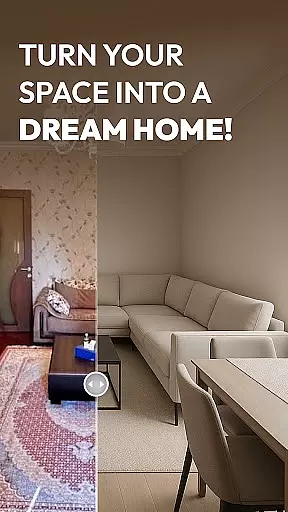

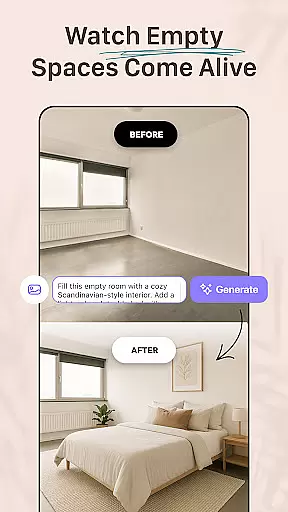



AI Remodel is a cutting-edge AI home design tool that empowers users to plan, design, and visualize their dream spaces with professional precision. The app offers intuitive tools for creating accurate floor plans and rich 3D renderings, making it accessible even to those without prior design experience. Whether you're remodeling a single room or redesigning an entire home, AI Remodel provides full creative control over every detail.
One standout feature is its advanced interior design AI, which suggests layouts, color palettes, furniture arrangements, and material combinations based on user input. With seamless integration of Planner 5D, the app ensures high-resolution outputs and real-time measurements, enabling users to experiment freely while maintaining precision. This makes AI Remodel perfect not only for homeowners and renters but also for professional designers seeking to present polished concepts to clients.
AI Remodel stands out with its powerful yet user-friendly features tailored for modern interior creators. At its core is the Room AI Interior Design tool, which allows users to drag, drop, and rotate furniture and decor in a fully responsive 3D environment. This interactive planner lets you explore different styles, from minimalism to rustic themes, ensuring your ideas come to life effortlessly.
The app's smart layout tools enable users to draw custom floor plans, move walls, add lighting, and test various materials within a single platform. Its AI-driven suggestions help users make confident decisions by previewing changes before implementation. Additionally, Planner 5D integration enhances accuracy, allowing users to scale designs, measure spaces in real time, and export professional-grade plans. These capabilities ensure a smooth workflow for both DIY enthusiasts and professional designers alike.
When it comes to designing or remodeling your home, having accurate and reliable information is crucial. AI Remodel ensures property listing authenticity by providing users with verified design templates and layouts that reflect real-world possibilities. This means every design element you interact with has been carefully curated and validated.
The app uses advanced algorithms to cross-check design suggestions against actual architectural standards and material specifications. This verification process guarantees that the floor plans, furniture arrangements, and color palettes suggested are not only aesthetically pleasing but also practical and feasible for implementation.
Users benefit from this feature as they can confidently experiment with different design ideas knowing that each suggestion is rooted in reality. Whether planning a single room update or an entire home renovation, the assurance of working with authentic listings provides peace of mind and saves valuable time during the decision-making process.
This commitment to accuracy extends to integrations with tools like Planner 5D, ensuring all exported designs maintain their integrity and precision. By prioritizing property listing authenticity, AI Remodel empowers homeowners, renters, and professional designers to create spaces that are both imaginative and achievable.
Managing a home renovation project involves juggling multiple tasks, from conceptualizing layouts to tracking progress and making adjustments along the way. AI Remodel excels in home management features, offering a comprehensive suite of tools designed to streamline every step of the process.
The app's smart layout tools allow users to draw custom floor plans, move walls, add lighting, and test different materials within a unified platform. These capabilities ensure that all aspects of the renovation are accounted for in a single, easy-to-navigate interface. Additionally, the integration with Planner 5D enhances these features by enabling real-time measurements and high-resolution exports.
For users, this translates into enhanced productivity and organization. The ability to visualize changes in 3D and simulate final results with precise measurements reduces uncertainty and helps prevent costly mistakes. Moreover, the intuitive drag-and-drop functionality makes it simple to experiment with various design elements without requiring any prior experience.
By combining powerful room AI interior design functionality with practical project management tools, AI Remodel ensures that users can focus on bringing their creative visions to life while maintaining full control over the logistical aspects of their home renovation projects.
User-friendly interface
Advanced AI suggestions
Seamless Planner 5D integration
Versatile style options
Accurate 3D visualization
Limited offline functionality
Premium features locked behind paywall
Steep learning curve for beginners
Occasional rendering glitches
Subscription costs may add up

For all of your Airthings devices
 4.30
4.30
PRO Version of GLB AR Viewer
4.2
Tailored Care Guides For Houseplants, Indoor Plants, Garden Plants & Flowers.
4.60
Control your Daikin, Amana & Goodman heating & cooling systems from anywhere
4.40
Find paints using a Color Muse & ColorSnap® Match
3.60
Download today to join the community to help bring lost pets home faster.
4.70
Floor Plan Creator Home Design with 2D interior design and 3d view.
3.90
Search for Homes, Rentals, Agents & Schools
4.70
Apartment finder for apartments for rent. Compare prices, amenities & rentals.
4.50
A Smarter Home in Seconds
4.70
Your guide to apartments & rental homes. Find your next place to rent with AG.
4.60
AI-powered home design, interior design, home decor, and room design solutions
4.50
The Merkury Smart app makes it easy to control your smart devices.
4.50
AI Home Designer & Room Planner: Decorate your interior space with AI
4.40
The official app for Home Assistant. Control your home anywhere in the world.
4.30
Smart AI plant care schedules, Real plant experts, support & Thriving community!
4.20
Our app allows Sunrun customers to monitor systems, pay bills, and get support.
3.80
An easier way to make payments and maintenance requests from anywhere.
3.50
Calculate baluster spacing with ease and precision.
4.3


User Reviews